
Introduction
The Tamron Auto Focus 70-300mm f/4.0-5.6 Di LD Macro Zoom Lens (Model A17E) is designed for use with Canon Digital SLR cameras. This versatile lens offers a broad telephoto zoom range, making it suitable for various photography styles, including nature, sports, and portraiture. Its lightweight and compact design enhances portability and ease of handling for handheld shooting. A key feature is its macro mode, allowing for close-up photography with a magnification ratio of 1:2.
The lens incorporates Low Dispersion (LD) glass elements to minimize chromatic aberration, ensuring sharper images with improved color accuracy across the zoom range. This manual provides essential information for the proper setup, operation, and maintenance of your lens.
Setup
Attaching the Lens to Your Camera
- Ensure both the camera and lens are powered off.
- Remove the rear lens cap from the Tamron lens and the body cap from your Canon Digital SLR camera.
- Align the mounting index (usually a white dot or line) on the lens barrel with the corresponding index on your camera's lens mount.
- Insert the lens into the camera's mount and rotate it clockwise until it clicks securely into place. Do not force the lens.
- Remove the front lens cap. Your lens is now ready for use.
Removing the Lens from Your Camera
- Ensure the camera is powered off.
- Press and hold the lens release button on your camera body.
- While holding the button, rotate the lens counter-clockwise until it detaches from the camera body.
- Immediately attach the front and rear lens caps to protect the lens elements and camera sensor from dust and damage.

Figure 1: Tamron 70-300mm lens with front and rear caps. The lens is shown in its compact state, ready for storage or attachment.
Operating the Lens
Focus Mode Selection (AF/MF)
The lens features a switch to select between Autofocus (AF) and Manual Focus (MF) modes. This switch is typically located on the side of the lens barrel.
- AF (Autofocus): For automatic focusing. The camera will control the lens focus.
- MF (Manual Focus): For manual focusing. Rotate the focus ring on the lens barrel to adjust focus.
Zooming
To adjust the focal length, rotate the zoom ring on the lens barrel. The lens offers a focal range from 70mm (wide telephoto) to 300mm (super telephoto).
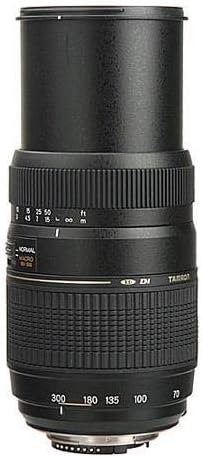
Figure 2: Tamron 70-300mm lens extended to its maximum 300mm focal length. This demonstrates the lens's telephoto capability.
Macro Mode
The lens features a dedicated macro mode for close-up photography. To engage macro mode:
- Rotate the zoom ring to a focal length between 180mm and 300mm.
- Locate the 'NORMAL - MACRO 180-300' switch on the lens barrel.
- Slide the switch to the 'MACRO' position. This will allow for closer focusing distances, down to 0.95m (3.1 feet) for a 1:2 magnification ratio.
- To return to normal mode, slide the switch back to 'NORMAL'. Ensure the zoom is within the 180-300mm range to activate/deactivate macro mode.
Macro mode is best utilized for stationary subjects due to the precise focusing required at close distances.

Figure 3: Example of a detailed close-up image, demonstrating the macro capability of the lens for capturing fine details of subjects like wildlife.
Maintenance
General Care
- Always attach the front and rear lens caps when the lens is not in use to protect the optical elements.
- Store the lens in a dry, cool place, away from direct sunlight and extreme temperatures.
- Avoid exposing the lens to dust, dirt, and moisture. If exposed, clean immediately.
- Handle the lens with care to prevent drops or impacts, which can damage internal components.
Cleaning the Lens
- Use a blower brush to remove loose dust and debris from the lens surface.
- For smudges or fingerprints, use a clean, soft microfiber cloth specifically designed for optical lenses, along with a small amount of lens cleaning fluid. Apply the fluid to the cloth, not directly to the lens.
- Wipe gently in a circular motion from the center outwards.
- Never use abrasive materials, household cleaners, or solvents on the lens.
Troubleshooting
- Loud Autofocus Noise: This lens may produce audible noise during autofocus operation. This is normal for some lens designs and does not indicate a malfunction.
- Slow Autofocus: In low light conditions or with subjects lacking contrast, the autofocus may be slower or 'hunt' for focus. Switching to manual focus (MF) may be necessary in such situations.
- Front-Heavy Balance: When mounted on lighter camera bodies, the lens may make the setup feel front-heavy, especially at longer focal lengths. Using a tripod or supporting the lens with your hand can improve stability.
- Chromatic Aberration: While the lens uses LD glass to reduce it, some chromatic aberration (color fringing) may still be visible in high-contrast areas, particularly at the telephoto end. This can often be corrected in post-processing software.
- Macro Mode Engagement: Ensure the zoom ring is set between 180mm and 300mm before attempting to switch to macro mode. The macro switch will only engage within this specific focal length range.
Specifications
| Feature | Description |
|---|---|
| Model Number | A17E |
| Focal Length | 70-300mm |
| Maximum Aperture | f/4.0-5.6 |
| Minimum Aperture | f/32 |
| Lens Construction | 9 Groups, 13 Elements |
| Diaphragm Blade Number | 9 |
| Minimum Focus Distance (Normal) | 1.5m (59 inches) |
| Minimum Focus Distance (Macro) | 0.95m (37.4 inches) at 180mm-300mm range |
| Macro Magnification Ratio | 1:2 |
| Zooming Type | Rotation |
| Compatible Mountings | Canon EF |
| Product Dimensions | 4.57 x 3.03 x 3.03 inches |
| Item Weight | 1.01 pounds (458g) |
Warranty & Support
Warranty Information
The Tamron Auto Focus 70-300mm f/4.0-5.6 Di LD Macro Zoom Lens (Model A17E) typically comes with a 6-year warranty from Tamron. Please refer to the warranty card included with your product for specific terms, conditions, and registration details. Keep your proof of purchase for warranty claims.
Customer Support
For technical assistance, service, or further inquiries regarding your Tamron lens, please contact Tamron customer support directly. Visit the official Tamron website for contact information, FAQs, and additional resources.