1. Introduction
The Werner PS48 Portable Scaffold is a versatile tool designed to assist with various tasks requiring elevated access. It features a robust powder-coated steel construction, a 500-pound capacity, and multiple working levels. Its design allows for easy setup, portability, and compact storage, making it suitable for home improvement projects.
2. Setup Instructions
Follow these steps to correctly assemble and set up your Werner PS48 Portable Scaffold:
- Unfold the Frame: Carefully unfold the main scaffold frame until it is fully extended and stable. Ensure all hinged joints are securely in place.
- Attach Caster Wheels: Insert the four locking caster wheels into the designated openings at the bottom of each leg of the scaffold frame. Ensure they are firmly seated.
- Place Platforms: Position the two platform planks onto the desired support rails of the scaffold. The rails are spaced 12 inches apart, offering multiple working heights (12", 24", 36" from the ground). Ensure the platforms are securely seated on the rails.
- Lock Wheels: Before use, engage the locking mechanism on all four caster wheels to prevent unintended movement. Each wheel has an individual brake.
To disassemble, reverse these steps. The frame folds compactly for storage, and the platforms can be removed.
3. Operating the Scaffold
The Werner PS48 Portable Scaffold is designed for ease of use and mobility. Observe the following guidelines for safe operation:
- Adjusting Working Height: The scaffold offers multiple platform height options. To change the height, remove the platforms, adjust them to a different set of rails, and ensure they are securely re-seated.
- Moving the Scaffold: To move the scaffold, disengage the locks on all four caster wheels. Carefully push or pull the scaffold to the desired location. Once in position, immediately engage the locks on all wheels to secure the scaffold.
- Weight Capacity: Do not exceed the maximum load capacity of 500 pounds (including user and materials) on the platforms.
- Stability: Always ensure the scaffold is on a level, stable surface. Never use the scaffold on uneven ground without proper stabilization.
- Safety: Always lock the wheels when the scaffold is stationary and in use. Do not work from the very top level of the scaffold if it compromises your balance or safety.
4. Maintenance
Regular maintenance ensures the longevity and safe operation of your scaffold:
- Inspection: Before each use, inspect the scaffold for any signs of damage, wear, or loose components. Check the frame, platforms, and especially the caster wheels and their locking mechanisms.
- Cleaning: Clean the scaffold regularly with a damp cloth to remove dirt, paint, or debris. Avoid using harsh chemicals that could damage the finish.
- Storage: When not in use, store the scaffold in a dry, protected area. Its foldable design allows for compact storage.
5. Troubleshooting
If you encounter issues with your Werner PS48 Portable Scaffold, consider the following:
- Scaffold Instability: Ensure the scaffold is on a flat, level surface. Verify that all frame connections are secure and the caster wheels are fully locked.
- Wheels Not Locking/Rolling: Check for debris obstructing the wheel mechanisms. Ensure the locking levers are fully engaged or disengaged as intended. If a wheel is damaged, it may need replacement.
- Difficulty Folding/Unfolding: Ensure no components are bent or obstructed. Apply light lubricant to hinges if movement is stiff.
For persistent issues, refer to the support section for contact information.
6. Specifications
| Feature | Detail |
|---|---|
| Brand | Werner |
| Model | PS48 |
| Material | Metal (Powder-coated steel) |
| Load Capacity | 500 Pounds |
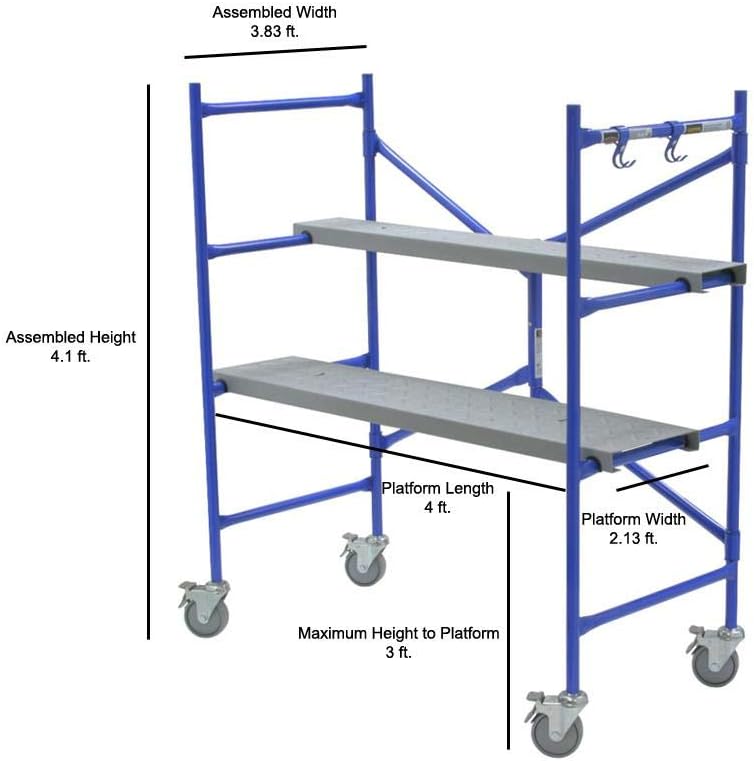
| Assembled Width | 3.83 ft |
| Assembled Height | 4.1 ft |
| Platform Length | 4 ft |
| Platform Width | 2.13 ft |
| Maximum Height to Platform | 3 ft |
| Adjustable Working Heights | 12", 24", 36" |
| Color | Blue |
| Special Features | Lightweight, Locking Wheels, Multi-use S-hooks |
| UPC | 051751068245 |
7. Product Images



8. Product Videos
No official product videos from a 'Seller' creator type were available for embedding based on the provided data.
9. Warranty and Support
For warranty information, technical support, or to inquire about replacement parts, please contact Werner customer service. Refer to the product packaging or the official Werner website for the most current contact details and warranty terms.


