
1. Introduction
This manual provides detailed instructions for the safe installation, operation, and maintenance of the ABB TF30RCP Weather-Resistant Fused AC Disconnect Switch. This device is designed to provide a safe means of disconnecting power to outdoor air conditioning units and other outdoor electrical equipment. Please read this manual thoroughly before installation or use to ensure proper function and safety.
2. Safety Information
WARNING: Installation and servicing of this equipment should only be performed by qualified, licensed electricians. Failure to follow these instructions can result in serious injury, death, or property damage.
- Always disconnect power at the main service panel before working on this unit or any connected equipment.
- Verify that all power is off using a voltage tester before proceeding with any work.
- Ensure all local and national electrical codes are followed during installation.
- Do not operate the disconnect switch with the cover open unless performing authorized maintenance.
- Use only fuses of the correct type and rating as specified for this unit.
3. Product Overview
The ABB TF30RCP is a robust, weather-resistant fused AC disconnect switch designed for outdoor applications. It provides a reliable method for safely disconnecting power to air conditioning units and other outdoor electrical loads.
Key Features:
- Quick Installation: Designed for efficient setup, reducing installation time and labor costs.
- Durable Construction: NEMA 3R weather-resistant enclosure made from G90 galvanized steel ensures superior corrosion resistance and suitability for harsh outdoor environments.
- Enhanced Safety: Features padlock provisions to prevent unauthorized access and ensure safety during maintenance. Straight-through wiring and knockouts simplify connections.
- Fused Protection: Provides 1-phase fusing with a 10 kAIC rating for circuit protection.
- Versatile Application: Ideal for single-family residences requiring a reliable AC disconnect solution.

Figure 1: Front view of the ABB TF30RCP AC Disconnect Switch with the cover open, revealing the internal fuse holder and wiring instructions label.

Figure 2: Overview of key benefits including quick installation, safe operation, overload protection, and user safety.
4. Specifications
| Attribute | Value |
|---|---|
| Model Number | TF30RCP |
| Brand | ABB |
| Amperage Capacity | 30 Amps |
| Voltage | 240 Volts |
| Phase | 1 Phase |
| Horsepower Rating | 3 HP |
| Interrupting Rating | 10 kAIC |
| Enclosure Type | NEMA 3R Weather-Resistant |
| Material | G90 Galvanized Steel |
| Fuse Classes Accepted | H, K1, K5, K9, RK1, RK5 |
| Product Dimensions (L x W x H) | 21.08 x 13.97 x 8.89 cm |
| Item Weight | 1.12 kg |
5. Setup and Installation
IMPORTANT: All installation procedures must be performed by a qualified electrician in accordance with all applicable national and local electrical codes.
5.1 Pre-Installation Checklist
- Ensure the main power supply to the circuit is OFF at the service panel.
- Confirm the voltage and amperage requirements of the AC unit match the specifications of the TF30RCP (30A, 240V, 1 Phase).
- Gather necessary tools: screwdriver set, wire strippers, pliers, voltage tester, conduit, wire connectors, appropriate fuses.
5.2 Mounting the Disconnect Switch
- Select a suitable outdoor location near the AC unit, ensuring it is easily accessible for maintenance and meets local code requirements for clearance.
- Mount the disconnect switch securely to a rigid surface using appropriate fasteners through the mounting holes provided.
5.3 Wiring Instructions
- Open the disconnect switch cover. The three-piece construction allows for easy access to the wiring area.
- Remove the appropriate knockouts for conduit entry.
- Connect the incoming power supply wires (Line) from the main service panel to the designated "LINE" terminals. The terminals accept solid copper 14-8 AWG, aluminum 12-8 AWG, or stranded copper 14-3 AWG, aluminum 12-3 AWG.
- Connect the outgoing wires (Load) to the AC unit to the designated "LOAD" terminals.
- Ensure all connections are tight and secure.
- Install the correct fuses (e.g., 20A for a 20A AC unit, up to 30A max) into the fuse holder. Refer to your AC unit's specifications for the correct fuse rating.
- Close the cover securely.
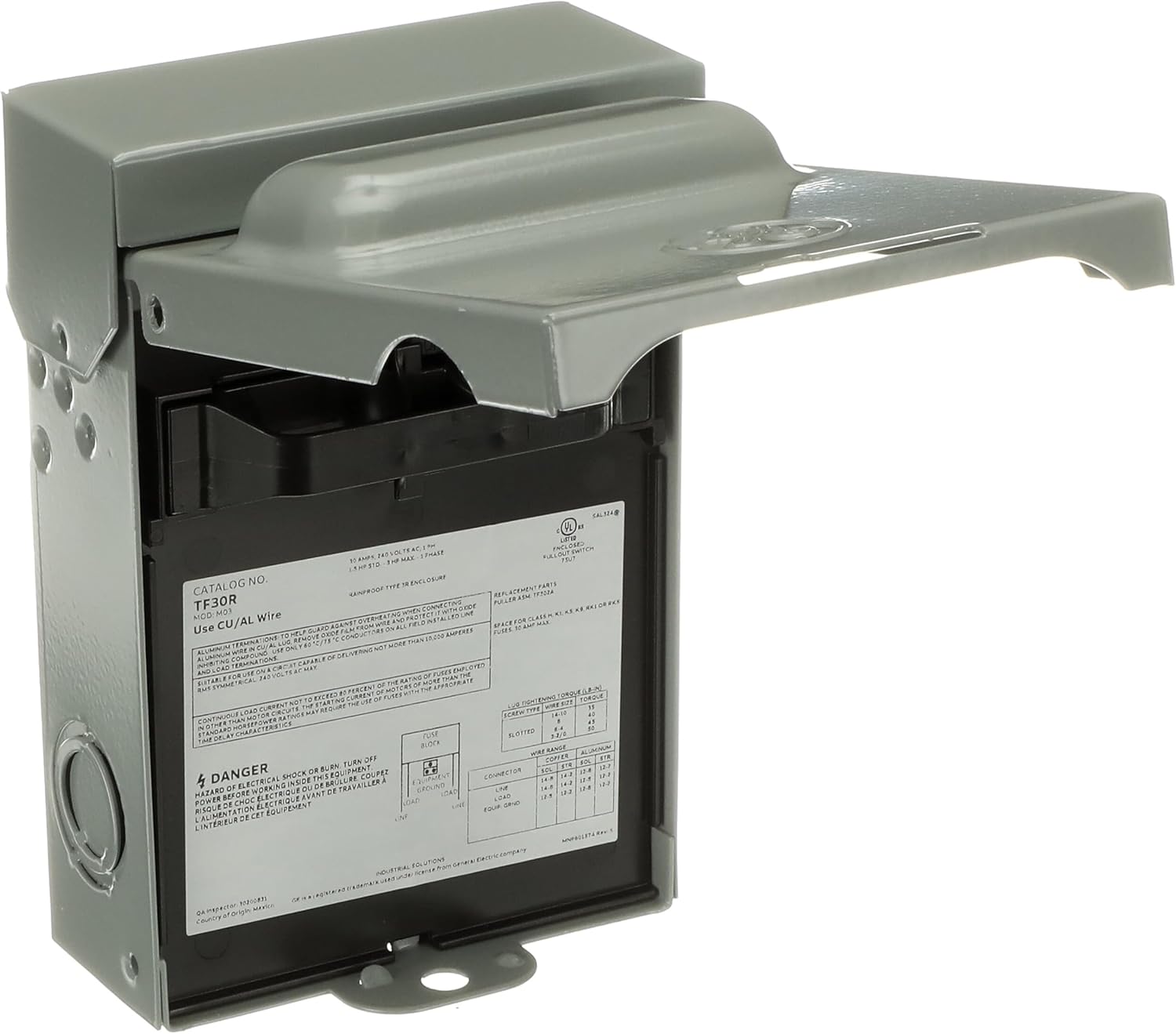
Figure 3: Internal label showing wiring diagram and technical specifications. Always refer to this label for precise wiring instructions.

Figure 4: Illustration of the fused T-handle and the disconnect switch installed outdoors next to an AC unit.
6. Operating Instructions
The ABB TF30RCP disconnect switch is designed for simple operation to connect or disconnect power to your outdoor equipment.
6.1 Connecting Power
- Ensure the T-handle is fully inserted into the disconnect switch, engaging the fuses and completing the circuit.
- Close and secure the outer cover.
- Restore power at the main service panel.
6.2 Disconnecting Power for Service
- Turn off power to the AC unit at the main service panel.
- Open the outer cover of the disconnect switch.
- Pull the T-handle completely out of the disconnect switch. This action physically removes the fuses, ensuring a complete power disconnection to the AC unit.
- For added safety during maintenance, a padlock can be applied to the padlock provision on the cover to prevent the T-handle from being reinserted.
7. Maintenance
Regular maintenance ensures the longevity and safe operation of your ABB TF30RCP disconnect switch. Always disconnect power before performing any maintenance.
7.1 Routine Inspection (Annually)
- With power disconnected, open the cover and inspect for any signs of corrosion, loose wiring, or damage to the enclosure.
- Check the fuse connections for tightness and ensure fuses are seated correctly.
- Inspect the T-handle for any damage or wear.
- Ensure the padlock provision is functional.
7.2 Fuse Replacement
If a fuse blows, it indicates an overload or short circuit. Identify and resolve the cause before replacing the fuse.
- Disconnect Power: Ensure power is OFF at the main service panel and the T-handle is removed from the disconnect switch.
- Remove Old Fuses: Carefully remove the blown fuses from the T-handle.
- Install New Fuses: Insert new fuses of the correct type and amperage rating into the T-handle. Using incorrect fuses can lead to equipment damage or fire.
- Restore Operation: Reinsert the T-handle, close the cover, and restore power at the main service panel.
8. Troubleshooting
This section addresses common issues you might encounter with your AC disconnect switch. For problems not listed here, or if you are unsure, contact a qualified electrician.
| Problem | Possible Cause | Solution |
|---|---|---|
| No power to AC unit |
|
|
| Fuses blow repeatedly |
|
|
| Difficulty inserting/removing T-handle |
|
|
9. Warranty and Support
For warranty information and technical support, please refer to the documentation included with your purchase or visit the official ABB website. Keep your proof of purchase for warranty claims.
ABB Customer Service: Please visit new.abb.com/contact-us for contact details and support resources in your region.
10. Disposal Information
This product should not be disposed of with household waste. Please recycle electrical and electronic equipment at designated collection points. Contact your local authorities for information on proper disposal and recycling options.

