Introduction
This manual provides detailed instructions for the safe and efficient operation of your Hitachi CP-X605 LCD Multimedia Projector. Please read this manual thoroughly before using the projector and retain it for future reference. The CP-X605 offers 4000 lumens brightness, a 1000:1 contrast ratio, and XGA (1024x768) native resolution, suitable for various presentation environments.
1. Setup
1.1 Unpacking and Placement
Carefully remove the projector from its packaging. Place the projector on a stable, level surface or mount it securely. Ensure adequate ventilation around the unit to prevent overheating. The projector supports projection on screens up to 300 inches diagonally.
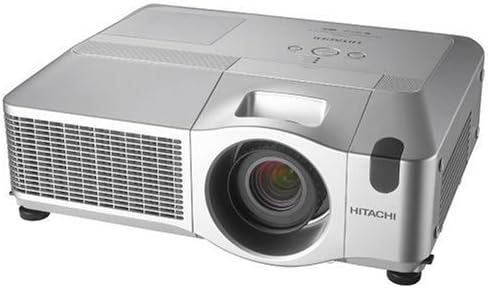
Figure 1: Front-side view of the Hitachi CP-X605 Projector, showing the lens and ventilation grilles.
1.2 Connecting Power
Connect the power cord to the projector's power input and then to a grounded electrical outlet. Ensure the power switch is in the OFF position before connecting.
1.3 Connecting Input Sources
The CP-X605 offers multiple input options:
- Video Inputs: 1 x M1-D, 2 x HD DB-15 (VGA), 1 x S-Video, 1 x RCA Composite, 3 x RCA Component.
- Audio Inputs: 4 x RCA (Left/Right), 2 x Mini Jack.
- Network/Control: 1 x RJ-45 (Network), 1 x D-Sub (DB-9) Serial.
- Video Output: 1 x HD DB-15.
- Audio Output: 1 x Mini Jack.
Connect your desired video and audio sources to the corresponding ports on the projector. For network control, connect an Ethernet cable to the RJ-45 port.

Figure 2: Rear view of the Hitachi CP-X605 Projector, illustrating the various input and output ports for connectivity.
2. Operating Instructions
2.1 Powering On/Off
To power on, press the power button on the control panel or remote control. The projector will undergo a rapid warm-up sequence. To power off, press the power button again. Allow the projector to cool down before unplugging or moving.
2.2 Input Source Selection
Use the 'Input' button on the control panel or remote to cycle through available input sources (e.g., Computer 1, Computer 2, Video, S-Video, Component). Select the input corresponding to your connected device.
2.3 Image Adjustment
- Focus: Rotate the focus ring on the lens until the image is sharp and clear.
- Zoom: Adjust the 1.2x manual zoom lens to achieve the desired image size.
- Lens Shift: The CP-X605 features horizontal and vertical lens shift. Use the dedicated controls (typically dials or levers near the lens) to fine-tune the image position without moving the projector.
- Keystone Correction: If the image appears trapezoidal, use the keystone correction function in the projector's menu to square the image.
2.4 Network Control
The projector can be remotely controlled and maintained through a LAN network connection via its RJ-45 port. Refer to the advanced user guide for detailed instructions on network setup and management.
3. Maintenance
3.1 Lamp Replacement
The projector uses a 285W UHB lamp. Lamp life is approximately 2000 hours in normal mode and 3000 hours in whisper mode. When the lamp indicator lights up or the image becomes dim, replace the lamp. Refer to the detailed lamp replacement procedure in the full service manual. Always use genuine Hitachi replacement lamps.
3.2 Cleaning
- Exterior: Wipe the projector casing with a soft, dry cloth. For stubborn dirt, use a slightly damp cloth and mild detergent, then wipe dry.
- Lens: Gently clean the lens with a lens cleaning cloth or lens paper. Avoid abrasive materials.
- Air Filter: Regularly clean the air filter to ensure proper cooling and prevent dust buildup. The frequency depends on the operating environment. Refer to the full manual for filter removal and cleaning instructions.
4. Troubleshooting
If you encounter issues with your projector, consult the following common troubleshooting steps:
- No Image:
- Ensure the projector is powered on and the lamp is functioning.
- Verify that the correct input source is selected.
- Check all video cable connections between the source device and the projector.
- Confirm the source device is outputting a signal.
- Dim Image:
- Check lamp life; a dim image may indicate the lamp needs replacement.
- Ensure the projector is not in an eco or whisper mode that reduces brightness.
- Clean the lens and air filter.
- Image Out of Focus:
- Adjust the focus ring on the lens.
- Ensure the projection surface is flat and the projector is stable.
- Overheating Warning:
- Clean the air filter.
- Ensure ventilation vents are not blocked.
- Operate the projector in an environment with adequate airflow.
For more complex issues or error codes, refer to the comprehensive troubleshooting section in the full user manual or contact Hitachi support.
5. Specifications
| Manufacturer | Hitachi, Ltd. |
| Product Type | LCD Multimedia Projector |
| Model Number | CP-X605 |
| Brightness | 4000 Lumens |
| Contrast Ratio | 1000:1 |
| Native Resolution | 1024 x 768 (XGA) |
| Supported Resolutions | VGA (640x480) to UXGA (1600x1200) |
| Lamp Type | 285W UHB |
| Lamp Life | Approx. 2000 hours (Normal), 3000 hours (Whisper) |
| Zoom | 1.2x Manual Zoom |
| Image Size | Up to 300 inches diagonal |
| Projection Distance | 35" to 436" |
| Interfaces | M1-D, HD DB-15 (VGA), S-Video, RCA Composite, RCA Component, RCA Audio, Mini Jack Audio, D-Sub (DB-9) Serial, RJ-45 (Network) |
| Weight | 15.6 lb (7.08 kg) |
| Dimensions (W x D x H) | 22 x 9.5 x 19 inches (approximate) |
6. Warranty and Support
6.1 Warranty Information
The Hitachi CP-X605 Projector comes with a 3-Year Limited Standard Warranty. This warranty covers manufacturing defects under normal use. Please note that the warranty does not cover misuse of the product. For specific terms and conditions, refer to the warranty card included with your product or visit the official Hitachi website.
6.2 Customer Support
For technical assistance, service, or further inquiries, please contact Hitachi customer support. You can find contact information on the official Hitachi website (www.hitachi.com) or in the documentation provided with your projector.


