
Introduction
The SentrySafe CB-12 Portable Cash Box is designed to provide a secure and organized solution for managing cash, important documents, and small valuables. Its durable construction, key lock mechanism, and removable cash tray make it ideal for various uses, from personal organization to small business operations.

Figure 1: SentrySafe CB-12 Portable Cash Box in its closed state.
Setup
- Unpacking: Carefully remove the cash box and all accessories from its packaging. Ensure both keys are present.
- Key Identification: The cash box comes with two unique keys. Keep one key in a safe, separate location as a spare.
- Familiarize with Components: Open the cash box using a key to access the interior. Note the removable cash tray and the main storage compartment beneath it.
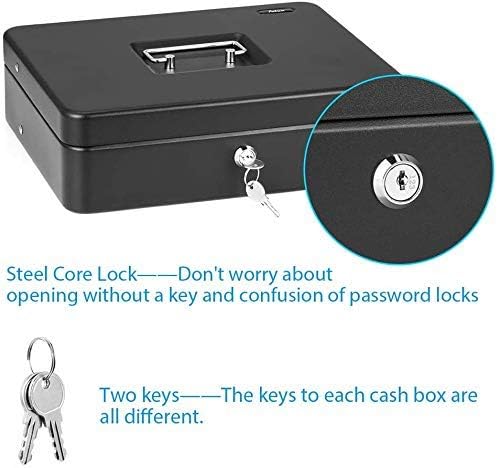
Figure 2: The key lock mechanism and included keys for the SentrySafe CB-12.
Operating Instructions
- Unlocking the Cash Box:
- Insert one of the provided keys into the keyhole on the front of the cash box.
- Turn the key clockwise to unlock the mechanism.
- Lift the lid using the carrying handle.
- Organizing with the Cash Tray:
- The removable plastic tray features multiple compartments for organizing bills, coins, and receipts.
- Place bills in the designated slots and coins in the smaller compartments.

Figure 3: Interior view of the cash box with the removable tray organizing currency.
- Using the Main Storage Compartment:
- To access the main storage area, simply lift the removable cash tray.
- This compartment provides ample space for larger items such as important documents, passports, or additional currency bundles.
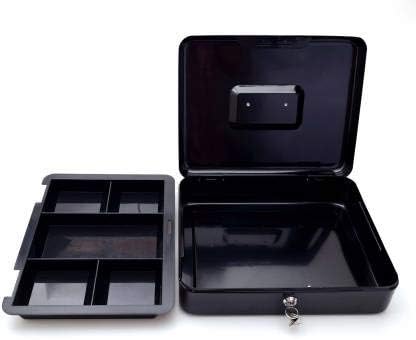
Figure 4: The cash box with the tray removed, revealing the spacious lower compartment.
- Locking the Cash Box:
- Close the lid firmly.
- Insert the key into the keyhole and turn it counter-clockwise until it clicks into the locked position.
- Remove the key and store it in a secure location.

Figure 5: Visual guide for locking and unlocking the cash box.
- Portability: The integrated carrying handle allows for easy and secure transportation of the cash box.
Maintenance
- Cleaning: Wipe the exterior and interior surfaces with a soft, damp cloth. Avoid abrasive cleaners that could damage the finish.
- Key Care: Keep keys clean and dry. Do not force a key if it feels stiff; a small amount of graphite lubricant can be applied to the keyhole if necessary.
- Storage: Store the cash box in a dry environment to prevent rust or damage.
Troubleshooting
- Lid will not close or lock:
- Check for any items obstructing the lid or the locking mechanism.
- Ensure the removable cash tray is properly seated within the box.
- Key is difficult to turn:
- Ensure the key is fully inserted into the keyhole.
- Apply a small amount of graphite lubricant to the key and keyhole, then try turning gently.
Specifications

Figure 6: Key dimensions of the SentrySafe CB-12 cash box.
| Feature | Detail |
|---|---|
| Brand | SentrySafe |
| Model Number | CB12 |
| Product Dimensions (Exterior) | 9.5"D x 12"W x 3.75"H (11.75"W x 9.875"D x 4"H) |
| Interior Dimensions | 11.625"W x 9.75"D x 2.625"H |
| Capacity | 0.21 Cubic Feet (0.17 cubic foot beneath tray) |
| Item Weight | 4 Pounds (approx. 0.01 Pounds listed in specs, but 4 pounds in features) |
| Lock Type | Key Lock |
| Color | Black |
| Material | Alloy Steel |
| Special Feature | Portable, Removable Money Tray |
| Included Components | One Cash Box, Two Keys |
| Water Resistance Level | Not Water Resistant |
Warranty
The SentrySafe CB-12 Portable Cash Box is covered by the manufacturer's limited warranty. For specific details regarding coverage, duration, and claims process, please refer to the warranty documentation included with your product or visit the official SentrySafe website.
Support
For further assistance, product inquiries, or to purchase replacement parts, please visit the official SentrySafe website at www.sentrysafe.com or contact their customer service department. Contact information can typically be found on the SentrySafe website or within your product packaging.

Figure 7: SentrySafe's commitment to safeguarding valuables.