
1. Introduction
This manual provides essential instructions for the proper installation, operation, and maintenance of the Hitachi 321583 Chip Cover. This accessory is designed to enhance dust and chip collection when used with compatible Hitachi power tools, specifically models CJ120V and C325209. Please read this manual thoroughly before installation and use to ensure safe and efficient operation.
2. Safety Information
Always observe general power tool safety guidelines when installing or using this accessory. Failure to do so may result in personal injury or damage to the tool or workpiece.
- Disconnect Power: Always disconnect the power tool from its power source before installing, removing, or performing any maintenance on the chip cover.
- Inspect for Damage: Before each use, inspect the chip cover for any cracks, breaks, or other damage. Do not use a damaged chip cover; replace it immediately.
- Secure Installation: Ensure the chip cover is securely attached to the power tool according to the installation instructions. A loose cover can become a projectile.
- Eye Protection: Always wear appropriate eye protection when operating power tools, even with a chip cover installed.
- Maintain Clear Visibility: Keep the chip cover clean to maintain clear visibility of the workpiece and cutting line.
3. Package Contents
Verify that all items are present upon opening the package:
- 1 x Hitachi 321583 Chip Cover
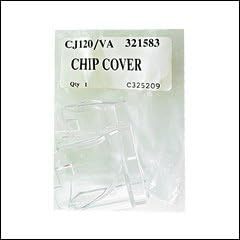
Figure 1: The Hitachi 321583 Chip Cover as supplied in its packaging. The label indicates "CJ120/VA 321583 CHIP COVER" and "Qty 1 C325209".
4. Setup and Installation
Follow these steps to properly install the 321583 Chip Cover onto your compatible Hitachi power tool (CJ120V or C325209).
- Power Disconnection: Ensure the power tool is unplugged from the electrical outlet before beginning installation.
- Identify Mounting Point: Locate the designated mounting area for the chip cover on your specific Hitachi CJ120V or C325209 model. Refer to your power tool's instruction manual for precise location if unsure.
- Position the Cover: Carefully align the Hitachi 321583 Chip Cover with the mounting points on the power tool. The cover is designed to fit snugly.
- Secure Attachment: Gently press or slide the chip cover into place until it clicks or locks securely. Ensure there is no play or looseness. Do not force the cover, as this may cause damage.
- Verify Installation: Once installed, gently tug on the chip cover to confirm it is firmly attached and will not dislodge during operation.
Note: Specific installation methods may vary slightly depending on the exact model of your Hitachi power tool. Always consult your tool's primary manual for detailed instructions regarding accessory attachment.
5. Operating Instructions
Once the Hitachi 321583 Chip Cover is securely installed, operate your power tool as usual. The chip cover is designed to:
- Contain Debris: Help direct wood chips, sawdust, and other debris away from the operator and the immediate work area.
- Improve Visibility: While containing debris, the transparent design allows for continued visibility of the cutting line.
- Connect to Dust Extraction (if applicable): If your power tool and chip cover system allow, connect a dust extraction system for optimal debris removal.
Regularly check the chip cover during operation to ensure it remains clear of excessive debris buildup, which could obstruct visibility or interfere with tool function.
6. Maintenance
Proper maintenance ensures the longevity and effectiveness of your chip cover.
- Cleaning: After each use, or as needed, clean the chip cover with a soft cloth to remove sawdust and debris. For stubborn residue, use a mild soap and water solution. Avoid abrasive cleaners or solvents, as these can scratch or damage the plastic.
- Inspection: Periodically inspect the chip cover for any signs of wear, cracks, or damage. Pay close attention to the attachment points.
- Storage: Store the chip cover in a clean, dry place when not in use, preferably attached to the tool or in a protective container to prevent scratches.
7. Troubleshooting
| Problem | Possible Cause | Solution |
|---|---|---|
| Chip cover does not fit or is loose. | Incorrect model compatibility; improper installation; damaged attachment points. | Verify the chip cover (321583) is compatible with your tool (CJ120V or C325209). Re-read installation instructions. Inspect tool and cover for damage. |
| Reduced visibility through the cover. | Excessive dust/debris buildup; scratches on the cover. | Clean the cover thoroughly. If heavily scratched, consider replacement for optimal safety. |
| Chip cover breaks or cracks easily. | Impact damage; material fatigue; improper handling. | Handle with care. Replace damaged cover immediately to maintain safety. |
8. Specifications
- Part Number: 321583
- Item Weight: 1.6 ounces
- Manufacturer: Hitachi
- Compatibility: Hitachi CJ120V, Hitachi C325209
9. Warranty and Support
For information regarding warranty coverage, technical support, or replacement parts for your Hitachi 321583 Chip Cover, please refer to the warranty documentation included with your original power tool or visit the official Hitachi website. Keep your purchase receipt as proof of purchase.
Manufacturer: Hitachi
For further assistance, please contact Hitachi customer service through their official channels.