
Introduction
Thank you for purchasing the Jamo I300 2.1 Channel Speaker System. This manual provides essential information for the safe and efficient use of your new audio system. Please read these instructions carefully before installation and operation, and retain them for future reference.
The Jamo I300 is a high-performance 2.1 channel speaker system designed to deliver rich, dynamic audio. It features a powerful subwoofer for deep bass and two satellite speakers for clear mid-range and treble. With Bluetooth connectivity, you can easily stream audio wirelessly from compatible devices. A remote control is included for convenient system management.
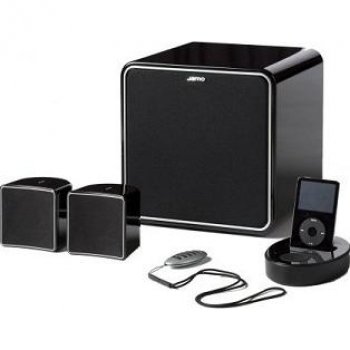
Image: The Jamo I300 2.1 Channel Speaker System, showcasing the subwoofer and two satellite speakers.
Package Contents
Please check that all items are present in the package:
- 1 x Jamo I300 Subwoofer
- 2 x Jamo I300 Satellite Speakers
- 1 x Remote Control
- 1 x Power Cable
- Audio Connection Cables (e.g., RCA to 3.5mm, speaker wires)
- This Instruction Manual
Setup
1. Unpacking
Carefully remove all components from the packaging. Retain the packaging materials for future transport or storage.
2. Placement
Optimal placement is crucial for sound quality. The Jamo I300 system can be placed on the floor or on a table, depending on your room layout and preference.
- Subwoofer: Place the subwoofer on the floor, ideally in a corner or near a wall for enhanced bass response. Experiment with placement to find the best sound for your room.
- Satellite Speakers: Position the satellite speakers equidistant from your primary listening position. For stereo imaging, place them at ear level or slightly above, angled towards the listener.
3. Connections
- Connect Satellite Speakers: Connect the satellite speakers to the corresponding outputs on the subwoofer using the provided speaker wires. Ensure correct polarity (positive to positive, negative to negative).
- Connect Audio Source: Connect your audio source (e.g., TV, computer, smartphone) to the subwoofer's input using the appropriate audio cable (e.g., RCA or 3.5mm jack).
- Connect Power: Plug the power cable into the subwoofer's power input, then connect the other end to a suitable wall outlet.
Operating Instructions
1. Powering On/Off
- To power on the system, press the power button on the subwoofer or the remote control. The power indicator will illuminate.
- To power off, press the power button again.
2. Volume Control
- Adjust the master volume using the volume controls on the subwoofer or the remote control.
- Some models may feature separate bass/treble controls for fine-tuning the sound.
3. Source Selection
Use the 'Source' or 'Input' button on the subwoofer or remote control to switch between connected audio sources (e.g., Line In, Bluetooth).
4. Bluetooth Pairing
- Ensure the speaker system is powered on and set to Bluetooth input mode. The Bluetooth indicator will typically flash, indicating it's in pairing mode.
- On your Bluetooth-enabled device (e.g., smartphone, tablet), go to the Bluetooth settings and search for available devices.
- Select "Jamo I300" from the list of devices.
- Once paired, the Bluetooth indicator on the speaker system will become solid, and you can now stream audio wirelessly.
Maintenance
1. Cleaning
- Always disconnect the power cable before cleaning.
- Use a soft, dry cloth to wipe the surfaces of the speakers and subwoofer.
- Do not use liquid cleaners, aerosols, or abrasive materials, as these can damage the finish or internal components.
2. Storage
If storing the system for an extended period, ensure it is powered off and disconnected from the mains. Store it in a cool, dry place, away from direct sunlight and extreme temperatures.
Troubleshooting
Refer to the table below for common issues and their solutions.
| Problem | Possible Cause | Solution |
|---|---|---|
| No power | Power cable not connected; Power outlet faulty | Check power cable connection; Try a different power outlet |
| No sound | Incorrect input source; Volume too low; Audio cables loose/faulty | Select correct input source; Increase volume; Check all audio cable connections |
| Bluetooth not pairing | Speaker not in pairing mode; Device too far; Interference | Ensure speaker is in pairing mode; Move device closer; Restart both devices |
| Distorted sound | Volume too high; Poor audio source quality; Speaker placement | Reduce volume; Use a higher quality audio source; Adjust speaker placement |
Specifications
The following are the technical specifications for the Jamo I300 2.1 Channel Speaker System:
| Feature | Specification |
|---|---|
| Model Number | I300B |
| Audio Channels | 2.1 channels |
| Total RMS Power | 300 W |
| Subwoofer RMS Power | 150 W |
| Satellite Speaker Power | 75 W per speaker (estimated) |
| Frequency Range | 45 - 20000 Hz |
| Sensitivity | 86 dB |
| Impedance | 6 Ohms |
| Color | Black |
| Dimensions (Subwoofer) | 9.09 x 9.09 x 9.19 cm (approximate, based on product dimensions) |
| Weight | 12 kg (total) |
| Wireless Technology | Bluetooth |
| Control Type | Remote Control |
| Mounting Type | Floor, Table Mount |
Warranty and Support
Jamo products are manufactured to the highest quality standards. This product is covered by a limited warranty. For detailed warranty terms and conditions, please refer to the warranty card included with your product or visit the official Jamo website.
For technical support, service, or further assistance, please contact your local Jamo dealer or authorized service center. Contact information can typically be found on the official Jamo website or in your product documentation.


