Introduction
This manual provides essential instructions for the setup, operation, and maintenance of your Philips MCM 720 Micro Audio System. Please read this manual thoroughly before using the system to ensure proper functionality and to maximize your listening experience. Keep this manual for future reference.
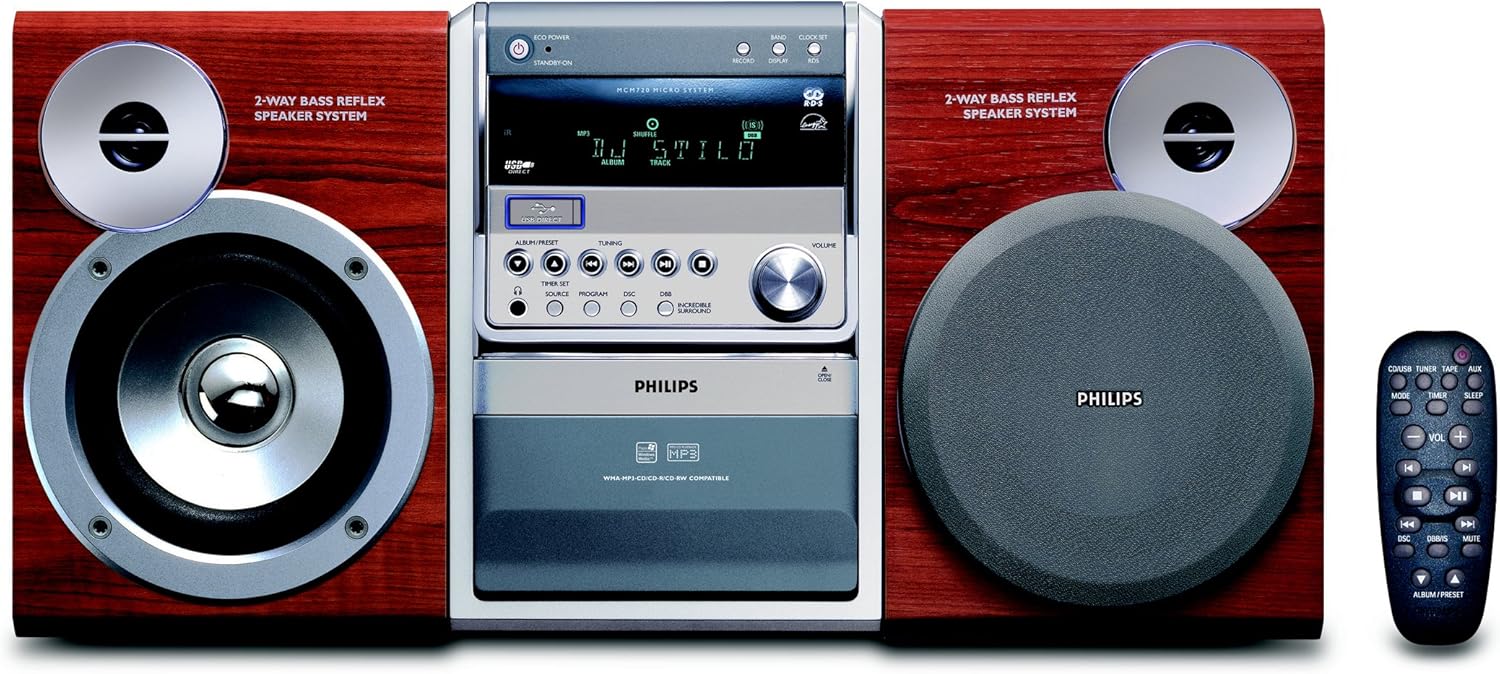
Figure 1: Philips MCM 720 Micro Audio System. The image displays the central unit flanked by two 2-way bass reflex speakers, all featuring a wood-grain finish. A remote control is positioned to the right. The central unit includes a display, control buttons for playback, tuning, volume, and a CD/USB compartment.
Setup
1. Unpacking
Carefully remove all components from the packaging. Ensure you have the main unit, two speakers, the remote control, and any included cables (power cord, speaker wires, FM antenna).
2. Speaker Connection
- Identify the speaker terminals on the rear of the main unit and on each speaker.
- Connect the speaker wires from the main unit to the corresponding terminals on the speakers. Ensure correct polarity (e.g., red to red, black to black) for optimal sound quality.
- Position the speakers for the best stereo effect, typically equidistant from the listening position.
Figure 2: Detail of a Philips MCM 720 speaker. This close-up highlights the 2-way bass reflex speaker system, featuring a tweeter at the top and a larger woofer below, set within a silver-colored ring on a rich wood-grain cabinet.
3. Antenna Connection (FM)
Connect the supplied FM antenna to the FM antenna terminal on the rear of the main unit. Extend the antenna fully and position it for optimal radio reception.
4. Power Connection
Plug the power cord into the AC IN socket on the main unit, then plug the other end into a wall power outlet.
Operating Instructions
1. Power On/Off
- Press the ECO POWER / STANDBY-ON button on the main unit or the power button on the remote control to turn the system on or off (standby mode).
Figure 3: Detail of the Philips MCM 720 main unit's control panel. Visible controls include the ECO POWER/STANDBY-ON button, a display screen showing "MCM720 MICRO SYSTEM" and playback information, and various buttons for source selection, tuning, program, and volume control knob.
2. Source Selection
- Press the SOURCE button on the main unit or the corresponding source buttons (CD/USB, TUNER, TAPE, AUX) on the remote control to select your desired audio source.
3. CD/USB Playback
- Press the OPEN/CLOSE button to open the CD tray. Place a CD (audio CD, MP3-CD, WMA-CD) with the label side up. Close the tray.
- Alternatively, insert a USB device into the USB DIRECT port.
- Select the CD/USB source. Playback should begin automatically.
- Use the playback control buttons (PLAY/PAUSE, STOP, SKIP, SEARCH) on the main unit or remote.
- Press SHUFFLE for random playback.
4. Radio Tuner Operation
- Select the TUNER source.
- Press the TUNING buttons (<< or >>) to manually tune to a station. Press and hold for automatic scanning.
- To store a preset: Tune to the desired station, press PROGRAM, then use ALBUM/PRESET buttons to select a preset number, and press PROGRAM again to confirm.
- To recall a preset: Press ALBUM/PRESET buttons to cycle through stored stations.
- The system supports RDS (Radio Data System) for displaying station information where available.
5. Volume Control
- Rotate the VOLUME knob on the main unit or use the VOL + / - buttons on the remote control to adjust the sound level.
- Press the MUTE button on the remote to temporarily silence the audio. Press again to restore.
Figure 4: Detail of the Philips MCM 720 remote control. The remote features buttons for power, source selection (CD/USB, Tuner, Tape, AUX), mode, timer, sleep, volume control, playback controls (play, pause, stop, skip, search), DSC, DBB/IS, mute, and album/preset navigation.
6. Sound Enhancements
- Press DSC (Digital Sound Control) to cycle through various equalizer presets (e.g., Jazz, Rock, Pop, Classic).
- Press INCREDIBLE SURROUND (or DBB/IS on remote) to activate or deactivate the Incredible Surround feature for an enhanced soundstage.
7. Timer and Sleep Functions
- Sleep Timer: Press the SLEEP button on the remote repeatedly to set a sleep timer (e.g., 15, 30, 60 minutes). The system will automatically turn off after the set time.
- Alarm Timer: Use the TIMER SET button on the main unit to configure an alarm to wake you up to a CD, USB, or radio source. Refer to the full manual for detailed timer setup instructions.
Maintenance
1. Cleaning the Unit
- Disconnect the power cord before cleaning.
- Use a soft, dry cloth to clean the exterior surfaces of the main unit and speakers.
- Do not use abrasive cleaners, benzene, thinner, or alcohol, as these can damage the finish.
2. Disc Handling
- Handle discs by their edges to avoid fingerprints on the playing surface.
- Store discs in their cases when not in use to prevent scratches and dust accumulation.
- If a disc is dirty, wipe it gently with a soft, lint-free cloth from the center outwards.
3. General Care
- Place the system on a stable, level surface.
- Avoid exposing the unit to direct sunlight, extreme temperatures, high humidity, or dusty environments.
- Ensure adequate ventilation around the unit to prevent overheating.
Troubleshooting
Before contacting customer support, please refer to the following table for common issues and their solutions.
| Problem | Possible Cause | Solution |
|---|---|---|
| No power | Power cord not securely connected. | Check if the power cord is firmly plugged into the unit and the wall outlet. |
| No sound | Volume is too low or muted. Speakers not connected correctly. Incorrect source selected. | Increase volume. Press MUTE on the remote. Check speaker wire connections. Select the correct audio source. |
| Disc not playing | Disc is dirty, scratched, or inserted incorrectly. Disc format not supported. | Clean the disc. Insert the disc with the label side up. Ensure the disc is an audio CD, MP3-CD, or WMA-CD. |
| Poor radio reception | FM antenna not properly positioned or connected. Interference from other electronic devices. | Adjust the position of the FM antenna. Move the system away from other electronic devices. |
| Remote control not working | Batteries are depleted or inserted incorrectly. Obstruction between remote and unit. | Replace batteries. Ensure correct polarity. Remove any obstructions. Point the remote directly at the unit's IR sensor. |
Specifications
- Brand: Philips
- Model Number: MCM720/12
- Dimensions (W x H x D): Approximately 17.5 x 30.5 x 25.2 cm (Main Unit, dimensions for speakers are separate but not provided in detail)
- Weight: Approximately 10.8 kg (Total system)
- Power Output: 100 Watts (Total RMS)
- Speaker System: 2-way Bass Reflex
- Playback Media: CD, CD-R, CD-RW, MP3-CD, WMA-CD, USB flash drive
- Tuner: FM Stereo with RDS
- Sound Enhancement: Digital Sound Control (DSC), Incredible Surround
- Connectivity: USB Direct, AUX input
- Color: Red/Silver/Wood Grain
Warranty and Support
Warranty Information
This Philips MCM 720 Micro Audio System comes with a manufacturer's warranty of 1 year from the date of purchase. Please retain your proof of purchase for warranty claims. The warranty covers defects in materials and workmanship under normal use.
Customer Support
For further assistance, technical support, or service inquiries, please visit the official Philips support website or contact your local Philips customer service center. Contact details can typically be found on the Philips website or in the warranty documentation included with your product.
You can visit the Philips brand store for more information: Philips Store


