1. Product Overview
The DuraWater Fleck 5600 Econominder 64,000 Grain Metered Water Softener is designed to provide soft, clean water for your entire home. This system efficiently reduces hard water minerals, protecting your plumbing and appliances while improving the quality of water for bathing, cleaning, and drinking. It features a reliable Fleck 5600 Econominder control valve for metered, on-demand regeneration, ensuring efficient salt and water usage.
Key features include:
- Fleck 5600 Econominder control metered on demand USA made valve with manufacture sticker.
- Ships pre-loaded with USA Structural black fiber glass mineral tank.
- Pentair 14 x 34 black brine tank with 2310 safety float.
- Free 3/4 inch Bypass Male Threaded Noryl Plastic.
2. What's Included
Your DuraWater Fleck 5600 Econominder water softener system includes the following components:
- Fleck 5600 Econominder control valve
- USA Structural black fiber glass mineral tank (pre-loaded with High Capacity Resin)
- Pentair 14 x 34 black brine tank with 2310 safety float
- 3/4 inch Bypass Male Threaded Noryl Plastic valve
- All necessary fittings for assembly

Image: Complete DuraWater Fleck 5600 Econominder water softener system with all included components.
3. Setup and Installation
Before beginning installation, ensure you have turned off the main water supply to your home. It is recommended to consult a qualified plumber for installation to ensure compliance with local plumbing codes. The system comes in two separate packages: one containing the mineral tank and the other containing the brine tank with the valve and fittings.
3.1 Unpacking and Inspection
Carefully unpack all components and inspect for any shipping damage. If the resin tank appears tilted, gently lift it a few inches off the floor and drop it firmly to realign the internal components. Ensure the riser tube is approximately 1/4 inch or less above the top of the tank. If it's slightly off-center, it will straighten during control head installation.

Image: The black fiberglass mineral tank, pre-loaded with resin.
3.2 Control Head Assembly
Lubricate the tank O-ring on the control head using silicone lubricant or cooking oil. Do not use petroleum-based lubricants. If your system includes an upper basket, attach it to the control head. Carefully screw the Fleck 5600 Econominder control head onto the mineral tank. Hand-tighten only; do not use tools on the threads of the control head or tank. The riser tube will straighten as the control head is tightened.

Image: Close-up of the Fleck 5600 Econominder control head with digital display.
3.3 Bypass Valve and Drain Line Connection
Install the barbed drain fitting onto the control head. Wrap the threads on the bypass yoke with Teflon tape and lubricate the O-rings on the bypass valve. Push the bypass onto the male fittings with the O-rings. You may need to loosen the metal clips and screws to fully seat the yoke. Tighten the clips and screws until snug, but do not overtighten to avoid breakage. The meter, bypass, and yoke assembly will have some movement, which is normal for pressure changes.
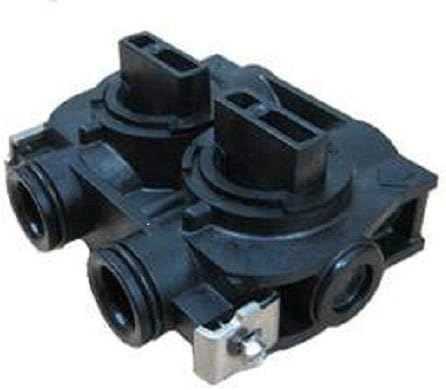
Image: The bypass valve for the water softener system.
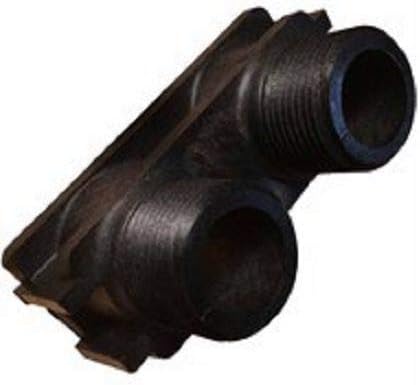
Image: The barbed drain fitting for the control head.
3.4 Brine Tank Connection
Remove the brine line from the brine well. Secure the brine well to the brine tank with the elbow overflow fitting. The rubber gasket goes on the inside of the tank and brine well, and the plastic gasket goes on the outside. Install the brine line small parts kit onto the brine line, ensuring parts are in the correct order and direction. Connect the brine line to the control head and the float assembly on the brine tank. Ensure all connections are snug.

Image: The black brine tank with lid.
3.5 Initial Water Flow and Leak Check
Once everything is installed and secured, slowly open your bypass to the service position. Open the incoming water side first and inspect for leaks. If any leaks are noticed, turn the bypass handles back to the bypass position and re-check connections. When the tank is filled and no leaks are present, plug in the Fleck control head.
3.6 Installation Videos
4. Operating Instructions
The Fleck 5600 Econominder control head is designed for user-friendly operation. It features a digital display and buttons for easy programming.
4.1 Initial Start-up and Flushing
Before running a manual backwash cycle, open the nearest cold water faucet and allow water to flush the system for 15 to 20 minutes. Then, turn the faucet off. This helps to remove any air or fine particles from the system.
4.2 Programming the Control Head
The Fleck 5600 Econominder is a metered, on-demand system, meaning it regenerates based on actual water usage, optimizing salt and water efficiency. Refer to the detailed programming instructions included with your system for setting the time of day, water hardness, and regeneration capacity. The digital display will show the current time and remaining gallons until the next regeneration.
4.3 Manual Regeneration
When no one is using water in the home for about an hour and a half, hold the manual regeneration button to start a backwash cycle. This ensures the system is going through all the steps properly. The regeneration process typically includes backwash (BW), brine draw (BD), rapid rinse (RR), and brine fill (BF) cycles.
5. Maintenance
Regular maintenance ensures the longevity and optimal performance of your water softener.
5.1 Salt Replenishment
Periodically check the salt level in the brine tank. Ensure there is always enough salt for the system to regenerate effectively. The frequency of salt replenishment depends on your water usage and hardness levels.

Image: Close-up of resin beads, which are essential for the water softening process.
5.2 General Cleaning
Keep the exterior of the mineral tank and brine tank clean. Avoid using harsh chemicals that could damage the surfaces.
6. Troubleshooting
If you encounter issues with your water softener, refer to the following common problems and solutions:
| Problem | Possible Cause | Solution |
|---|---|---|
| No soft water | Bypass valve in bypass position; no salt in brine tank; incorrect programming; power outage. | Check bypass valve position; add salt; verify programming; check power connection. |
| Excessive salt usage | Incorrect programming (e.g., regeneration frequency too high); salt bridge in brine tank. | Adjust regeneration settings; break up salt bridge. |
| Water leaks | Loose connections; damaged O-rings or fittings. | Check and tighten all connections; replace damaged O-rings or fittings. |
| Low water pressure | Resin tank clogged; bypass valve partially closed. | Perform manual regeneration; check bypass valve position. |
For more detailed troubleshooting, please refer to the complete manual provided with your system or contact customer support.
7. Specifications
Below are the technical specifications for the DuraWater Fleck 5600 Econominder 64,000 Grain Metered Water Softener:
- Brand: DuraWater
- Model Number: WS4C-64K
- Special Feature: Mechanical water metering system, high efficiency regeneration, separate poly brine tank
- Wattage: 360.00 Watts
- Voltage: 120 Volts
- Unit Count: 1.0 Count
- Number of Items: 1
- Shape: Round
- Material: Fiber Glass, Resin
- Indoor/Outdoor Usage: Outdoor
- Power Source: Corded Electric
- Power Consumption: 360 Watts
- Control Method: Touch
- Efficiency: High
- Manufacturer: Pentair
- Color: Black
- UPC: 670541140116
- Size: 64,000 Grain Capacity
8. Warranty and Support
Your DuraWater Fleck 5600 Econominder water softener is backed by reliable support and a return policy.
8.1 Return Policy
This product is eligible for 30-day easy returns. Please refer to the seller's return policy for full details.
8.2 Customer Support
For any questions, technical assistance, or support regarding your water softener, please contact Aplus Water LLC, the seller. They are available to assist you with installation, operation, and troubleshooting.

Image: A customer support representative ready to assist.


