
Globe Electric 7732001
Globe Electric 7732001 6-Outlet Swivel Surge Protector Wall Adapter Manual
Model: 7732001
Introduction
The Globe Electric 7732001 6-Outlet Swivel Surge Protector Wall Adapter is designed to provide convenient power distribution and surge protection for your electronic devices. Featuring six grounded outlets that swivel 90 degrees, this adapter helps save space and keeps cords organized, allowing furniture to sit closer to the wall. It includes indicator lights for surge protection and proper grounding, ensuring your connected equipment is safeguarded.
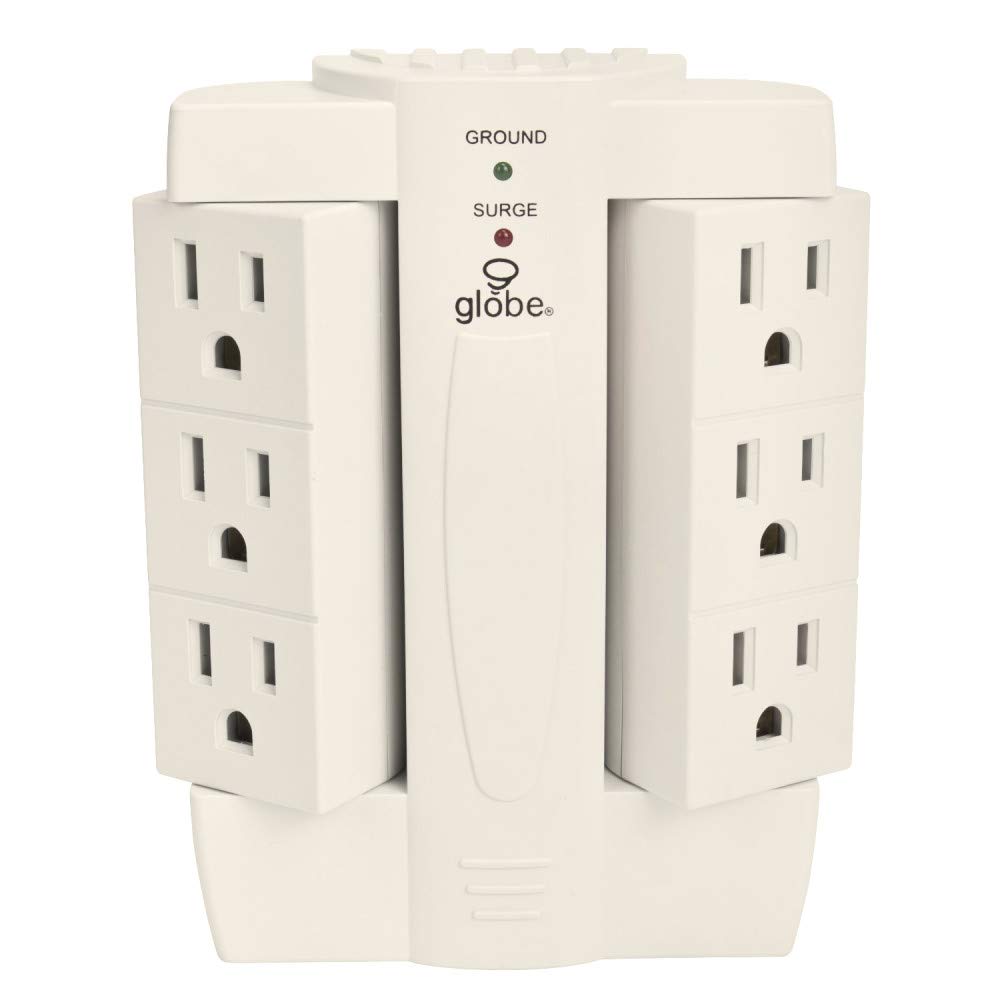
Image: Front view of the Globe Electric 6-Outlet Swivel Surge Protector, showing the central unit with 'SURGE' and 'GROUND' indicators and the two swiveling outlet banks.
Setup Instructions
- Identify a Suitable Outlet: Locate a standard, properly grounded 3-prong wall outlet. Ensure the outlet is easily accessible and not obstructed.
-
Plug In the Surge Protector: Insert the surge protector directly into the wall outlet. Ensure it is firmly seated.

Image: The surge protector plugged into a wall outlet, demonstrating how its swivel design allows it to fit behind furniture, keeping cords tidy.
- Verify Grounding: Once plugged in, check the indicator lights on the front of the unit. The GREEN "GROUND" light should illuminate, indicating a proper ground connection.
-
Adjust Swivel Outlets: The two banks of three outlets can swivel 90 degrees. Adjust them to the desired position to accommodate your plugs and optimize space.

Image: The surge protector illustrating its 90-degree swivel feature and compact dimensions, highlighting its space-saving design.
-
Connect Devices: Plug your electronic devices into the available outlets. Ensure the RED "SURGE" light is illuminated, confirming active surge protection.

Image: The surge protector with various colored plugs inserted into its six swiveling outlets, demonstrating its capacity and flexibility.
Operating Indicators
The surge protector features two indicator lights to provide status information:
-
SURGE Indicator Light (Red):
When this red light is illuminated, it indicates that the surge protection feature is active and functioning. If this light is OFF, the surge protection has been compromised or has absorbed a significant surge. In this event, the unit should be replaced to ensure continued protection for your devices.
-
GROUND Indicator Light (Green):
When this green light is illuminated, it indicates that the surge protector is properly grounded to the electrical system. If this light is OFF, there may be a grounding issue with the wall outlet or the unit itself. Consult a qualified electrician if the light remains off after verifying the unit is fully plugged into a known good outlet.

Image: A close-up view of the surge protector's central panel, clearly showing the red 'SURGE' and green 'GROUND' indicator lights.
Maintenance
- Keep the surge protector clean and dry. Avoid exposure to moisture or extreme temperatures.
- Do not overload the surge protector beyond its specified electrical rating.
- Periodically inspect the unit and connected cords for any signs of damage, such as frayed wires or loose connections.
- If the red "SURGE" indicator light is off, replace the unit.
Troubleshooting
- No Power to Devices:
- Ensure the surge protector is securely plugged into a functioning wall outlet. Check if the wall outlet itself is receiving power by testing it with another device. Verify that the surge protector's indicator lights are on.
- Red "SURGE" Light is Off:
- This indicates that the surge protection components have absorbed a power surge and are no longer active. The unit will still provide power, but without surge protection. For continued protection, the surge protector must be replaced.
- Green "GROUND" Light is Off:
- This suggests a grounding issue. First, ensure the surge protector is fully inserted into the wall outlet. If the light remains off, the wall outlet may not be properly grounded. Consult a qualified electrician to inspect the wiring of your home or office.
Specifications
| Brand | Globe Electric |
| Model Number | 7732001 |
| Total Power Outlets | 6 |
| Surge Protection Rating | 2100 Joules |
| Voltage | Standard Household Voltage (120V AC) |
| Plug Type | Type B (3-prong grounded) |
| Special Features | Surge Protection, 90-degree Swivel Outlets, Grounded Outlets |
| Compatible Devices | Computer, Printer, Smartphone, Tablet, Home Theater |
| Color | White |
Product Video
Video: An official product video from Globe Electric demonstrating the features and benefits of the Space Plug wall tap outlet, including its swivel design, surge protection, and space-saving capabilities.
Warranty and Support
This Globe Electric surge protector comes with a 2-year limited warranty on the surge protector itself. Additionally, it includes a limited connected equipment warranty protecting up to $300,000 for devices properly connected to the unit and damaged by a power surge while the surge protection was active (indicated by the red light being on).
For warranty claims or technical support, please refer to the contact information provided on the product packaging or visit the official Globe Electric website.
For more information, you can visit the Globe Electric Store on Amazon.
Related documents7732001


Ask a question about this manual
Ask about setup, troubleshooting, compatibility, parts, safety, or missing instructions. Manuals+ will review the question and use this page’s manual context to help answer it.