
Leviton S08-CS120-02W
Leviton S08-CS120-02W Commercial Grade AC Quiet Toggle Switch User Manual
Model: S08-CS120-02W
Important Safety Information
WARNING: To avoid fire, shock, or death, turn off power at the circuit breaker or fuse box and test that power is off before wiring. This device must be installed in accordance with all national and local electrical codes. If you are unsure about any part of these instructions, consult a qualified electrician.
- Do not use with dimmers or other non-compatible devices.
- Ensure all wire connections are secure.
- This switch is rated for 120V/277V AC and 20 Amps. Do not exceed these ratings.
- Grounding is required for safe operation.
Product Overview
The Leviton S08-CS120-02W is a commercial-grade, single-pole AC quiet toggle switch designed for reliable ON-OFF control of lighting or other electrical loads. Its quiet operation makes it suitable for various residential and commercial applications. This switch features a grounding screw for enhanced safety and is UL listed, ensuring compliance with safety standards.
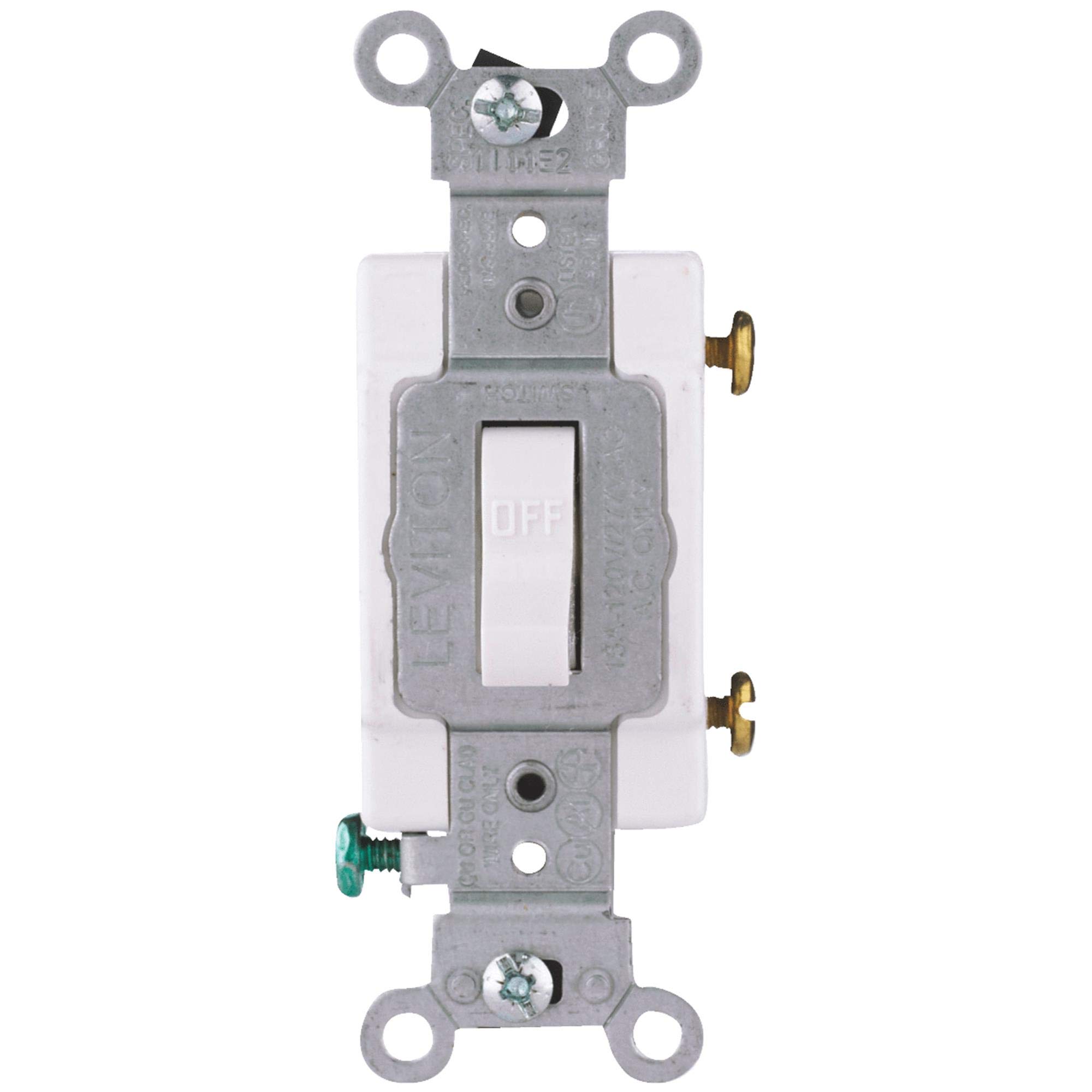
Image: Front view of the Leviton S08-CS120-02W Commercial Grade AC Quiet Toggle Switch. The image displays a white toggle switch with a standard rectangular faceplate, suitable for wall mounting. The toggle lever is visible in the center, designed for simple up/down operation.
Package Contents
Verify that all components are present before beginning installation:
- 1 x Leviton S08-CS120-02W Commercial Grade AC Quiet Toggle Switch
Installation Instructions
Tools Required:
- Screwdriver (Phillips and/or Flathead)
- Wire Strippers
- Electrical Tape (optional)
- Voltage Tester
Wiring (Single-Pole Switch):
- Turn Off Power: Locate the circuit breaker or fuse that controls the switch location and turn it OFF. Verify power is off using a voltage tester.
- Remove Old Switch: Carefully remove the existing wall plate and switch from the electrical box. Disconnect the wires from the old switch, noting their connections.
- Connect Wires: This single-pole switch has three screw terminals: two for the hot (line/load) wires and one for the ground wire.
- Connect the incoming hot wire (from the power source) to one of the brass screw terminals.
- Connect the outgoing hot wire (to the light fixture or load) to the other brass screw terminal.
- Connect the bare copper or green insulated ground wire from the electrical box to the green grounding screw terminal on the switch.
Ensure all wire connections are tight and secure. Use wire nuts if necessary for any splices. The switch is designed for screw terminals.
- Mounting: Carefully fold the wires into the electrical box. Secure the switch to the electrical box using the provided mounting screws. Ensure the switch is oriented correctly.
- Install Wall Plate: Attach the decorative wall plate over the switch.
- Restore Power: Turn the power back ON at the circuit breaker or fuse box. Test the switch to ensure proper operation.
Operation
The Leviton S08-CS120-02W is a simple ON-OFF toggle switch. To operate, simply push the toggle lever up to turn the connected device (e.g., light) ON, and push the toggle lever down to turn it OFF. The switch is designed for quiet operation, minimizing audible clicking sounds during use.
Care and Maintenance
- Cleaning: To clean the switch, ensure power is off at the circuit breaker. Wipe the surface with a soft, damp cloth. Do not use abrasive cleaners or solvents.
- Inspection: Periodically inspect the switch for any signs of damage, loose connections, or discoloration. If any issues are observed, turn off power and consult a qualified electrician.
Troubleshooting
| Problem | Possible Cause | Solution |
|---|---|---|
| Switch does not turn ON/OFF device. | No power to the switch; Loose wiring; Faulty device. | Check circuit breaker/fuse. Verify all wire connections are secure. Test the connected device separately. |
| Switch feels hot to the touch. | Overload; Loose connection. | Immediately turn off power. Reduce load on the circuit. Check for loose wiring. Consult an electrician if the problem persists. |
| Flickering light or intermittent power. | Loose wiring; Faulty bulb/device. | Turn off power and check all wire connections. Replace bulb or test device. |
Specifications
- Model: S08-CS120-02W
- Brand: Leviton
- Type: Commercial Grade AC Quiet Toggle Switch
- Operation Mode: ON-OFF
- Voltage: 120 Volts / 277 Volts AC
- Current Rating: 20 Amps
- Terminal Type: Screw
- Mounting Type: Surface Mount
- Contact Material: Silver-cadmium
- Dielectric Strength: 1500 volts
- Material: Alloy Steel, Polybutylene Terephthalate, Polycarbonate (PC)
- Color: White
- Specification Met: UL
- Item Dimensions (LxWxH): 4.25 x 1.25 x 0.75 inches
- Item Weight: 1 Pound
- UPC: 078477069646
Warranty and Technical Support
For warranty information or technical assistance, please contact Leviton customer support directly or visit their official website. Keep your purchase receipt for warranty claims.
Leviton Official Website: www.leviton.com
Related documentsS08-CS120-02W


Ask a question about this manual
Ask about setup, troubleshooting, compatibility, parts, safety, or missing instructions. Manuals+ will review the question and use this page’s manual context to help answer it.