
Safety Information
WARNING: To avoid fire, shock, or death, turn off power at the circuit breaker or fuse box and test that power is off before wiring. All wiring should be performed by a qualified electrician in accordance with national and local electrical codes.
- Always disconnect power before working on electrical circuits.
- Ensure all wire connections are secure and properly insulated.
- Do not exceed the specified electrical ratings of the device.
- This device is intended for indoor use only.
Product Overview
The Eaton 270V-SP-L is a standard grade straight blade duplex receptacle designed for reliable electrical connections in residential and commercial applications. It features enhanced design elements for easier installation and secure mounting.

Figure 1: Front view of the Eaton 270V-SP-L Duplex Receptacle.
Key Features:
- Longer, wider straps provide 40% more contact area to the wallboard, reducing floating installations.
- Patented built-in wire stripper for No.14 and No.12 wire for faster installation.
- Patented built-in wire looper for pre-looping wires.
- Tri-combo screws accept slotted, Phillips, and Robertson-head tools for installation flexibility.
- Terminal screws are backed out and ready for wiring.
- Side wire terminals accept up to No.10 solid or stranded wire.
- Push-in terminals accept No.14 solid wire.
- 2-Pole/3-wire grounding design.
- UL498, CSA C22.2 No. 42, and NOM certified.
Specifications:
| Brand | Eaton |
| Model | 270V-SP-L |
| Color | Ivory |
| Amperage | 15 Amps |
| Voltage | 125 Volts |
| NEMA Rating | 5-15 |
| Total Power Outlets | 2 |
| Material | Plastic |
| Dimensions (L x W x H) | 2/3-Inch x 1-1/3-Inch x 4-1/5-Inch |
| Certifications | UL498, CSA C22.2 No. 42, NOM |
Installation Instructions
Follow these steps carefully to install your Eaton duplex receptacle. Ensure power is OFF before beginning.
- Turn Off Power: Locate the circuit breaker or fuse box controlling the outlet you are replacing or installing. Turn off the power to that circuit and verify it is off using a voltage tester.
- Prepare Wires: If replacing an old receptacle, carefully disconnect the existing wires. For new installations, strip approximately 1/2 inch of insulation from the ends of the circuit wires (hot, neutral, and ground). The built-in wire stripper on the receptacle can assist with this.
- Connect Wires:
- Ground Wire (Green or Bare Copper): Connect to the green grounding screw on the receptacle.
- Neutral Wire (White): Connect to the silver-colored terminal screws.
- Hot Wire (Black or Red): Connect to the brass-colored terminal screws.
Note: The receptacle features side wire terminals for looping wires around screws or push-in terminals for No.14 solid wire. Ensure connections are tight.
- Mount Receptacle: Carefully fold the wires into the electrical box. Insert the receptacle into the box and secure it using the mounting screws provided. The longer, wider straps help ensure a stable installation.
- Install Wall Plate: Attach the decorative wall plate over the installed receptacle, securing it with the center screw.
- Restore Power: Turn the power back on at the circuit breaker or fuse box. Test the receptacle to ensure proper function.
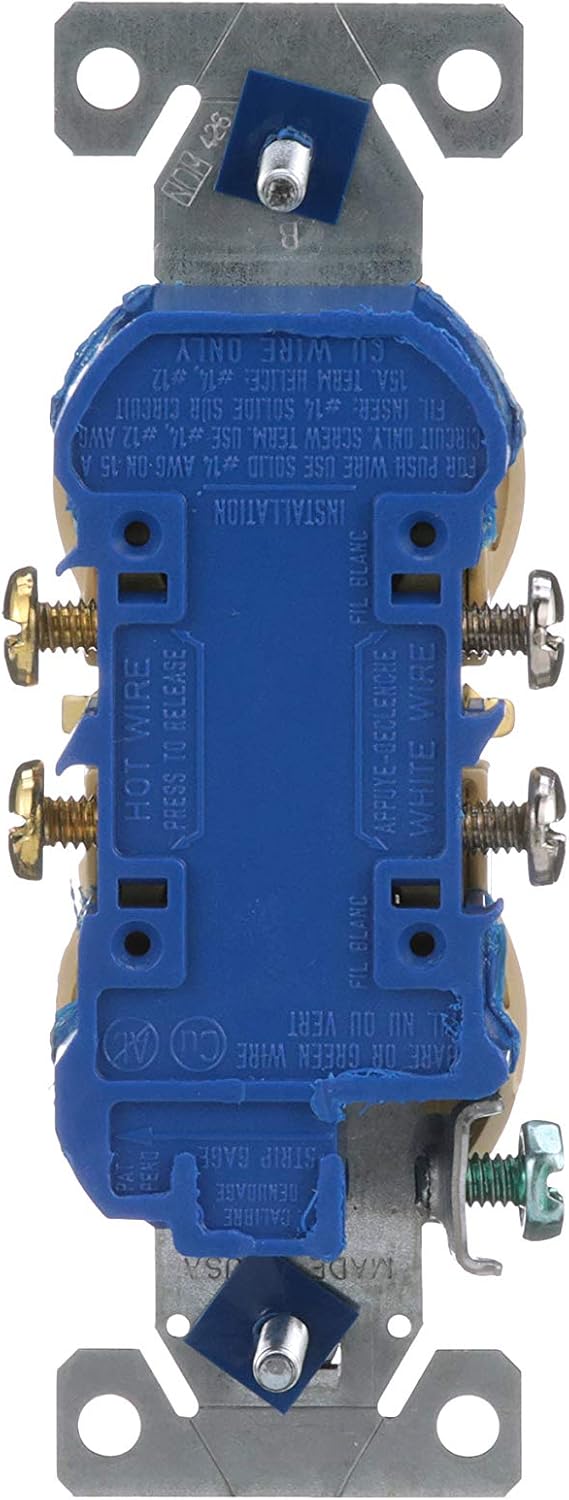
Figure 2: Back view illustrating wiring terminals for hot, neutral, and ground connections.
Operation
Once properly installed and power is restored, the Eaton 270V-SP-L duplex receptacle functions as a standard electrical outlet. Simply insert a compatible 2-prong or 3-prong plug into either of the two receptacles to draw power.
- Ensure plugs are fully inserted into the receptacle.
- Do not force plugs into the receptacle.
- Avoid overloading the circuit by plugging in too many high-power devices.
Maintenance
The Eaton duplex receptacle requires minimal maintenance. Regular inspection and cleaning can help ensure its longevity and safe operation.
- Cleaning: Periodically wipe the surface of the receptacle and wall plate with a soft, damp cloth. Do not use abrasive cleaners or solvents. Ensure power is off before cleaning.
- Inspection: Regularly check for any signs of damage, such as cracks, discoloration, or loose connections. If any damage is observed, turn off power and have the receptacle inspected and replaced by a qualified electrician.
- Loose Plugs: If plugs feel loose when inserted, it may indicate wear. Consider replacing the receptacle to maintain a secure connection and prevent arcing.
Troubleshooting
| Problem | Possible Cause | Solution |
|---|---|---|
| No power at the receptacle. | Circuit breaker tripped or fuse blown. Loose wiring connection. | Check and reset the circuit breaker or replace the fuse. Turn off power and inspect wiring connections for tightness. |
| Receptacle feels warm. | Overloaded circuit. Loose connection. Faulty device. | Unplug some devices to reduce load. Turn off power and check wiring connections. If problem persists, replace the receptacle. |
| Plug falls out easily. | Worn out receptacle contacts. | Replace the receptacle. |
If you experience issues not listed here or if troubleshooting steps do not resolve the problem, consult a qualified electrician.
Warranty and Support
Eaton products are manufactured to high-quality standards. For specific warranty information and technical support, please refer to the documentation included with your purchase or visit the official Eaton website. Keep your purchase receipt as proof of purchase for warranty claims.
For further assistance, you may contact Eaton customer service through their official channels.


