
1. Introduction
The BRIO World 33476 Turntable & Figure is an accessory designed to enhance your BRIO World railway system. This manual provides instructions for the proper setup, operation, and care of your turntable and accompanying figure. It is intended for users aged 3 years and older.

Figure 1.1: The BRIO World 33476 Turntable and Figure, fully assembled and ready for play.
2. Safety Information
Please read and understand all safety instructions before use. Keep these instructions for future reference.
- Age Recommendation: This product is suitable for children aged 36 months to 10 years. Small parts may pose a choking hazard for younger children.
- Supervision: Adult supervision is recommended during play.
- Material Safety: The product is made from durable, child-safe materials, including wood from well-managed forests (FSC certified).
- Intended Use: Use this product only as intended for toy railway play. Do not modify the product.
3. Package Contents
Verify that all items listed below are present in your package:
- 1 x Turntable
- 1 x Poseable Train Engineer Figure

Figure 3.1: The two main components included in the package: the turntable base and the train engineer figure.
4. Setup Instructions
Follow these steps to set up your BRIO World 33476 Turntable:
- Unpack Components: Carefully remove the turntable and figure from their packaging.
- Place Turntable: Position the turntable on a flat, stable surface as part of your BRIO World railway layout.
- Connect Tracks: The turntable features seven track connection points around its perimeter. Connect existing BRIO World railway tracks (sold separately) to any of these points to integrate the turntable into your railway system.
- Position Figure: Place the poseable train engineer figure in the two-level control station on the turntable. The figure can be positioned to appear as if operating the turntable.
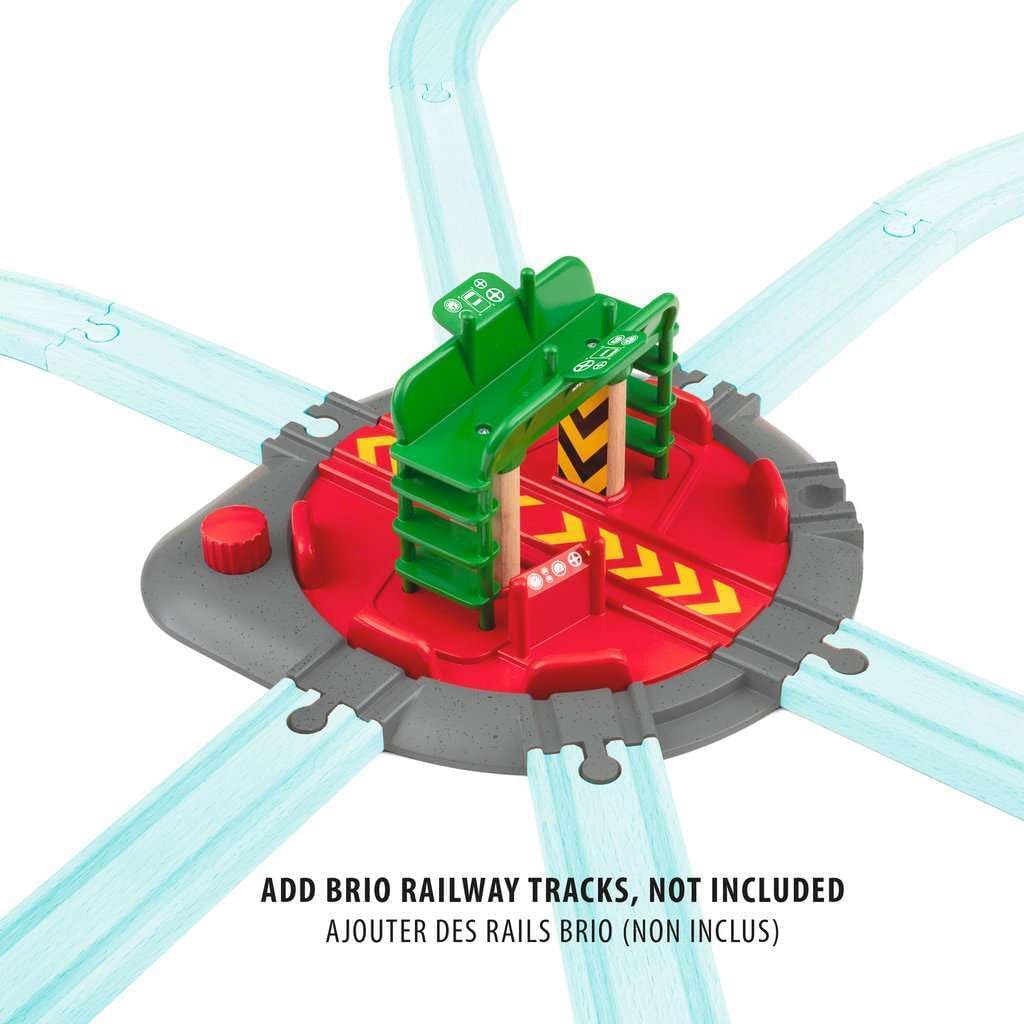
Figure 4.1: The turntable integrated into a railway layout, demonstrating multiple track connection points. Tracks are not included.

Figure 4.2: A close-up view of the two-level control station where the train engineer figure can be placed.
5. Operating Instructions
The turntable allows for easy redirection of trains within your railway system.
- Place Engine: Position any BRIO World engine (sold separately) onto the central rotating platform of the turntable. The platform is designed to accommodate various engine sizes.
- Rotate Turntable: To change the direction of the engine, twist the red knob located on the side of the turntable. This will cause the central platform to rotate.
- Align Tracks: Continue rotating the knob until the central platform aligns with the desired exit track. The platform will click into position when properly aligned with one of the seven connection points.
- Move Engine: Once aligned, the engine can be moved off the turntable onto the connected track.

Figure 5.1: An engine placed on the turntable's central platform, ready for rotation.

Figure 5.2: Demonstrates how to twist the red knob to rotate the turntable platform and align tracks.
6. Maintenance
To ensure the longevity and proper function of your BRIO World 33476 Turntable & Figure, follow these simple maintenance guidelines:
- Cleaning: Wipe the turntable and figure with a clean, damp cloth. Do not immerse in water. Avoid using harsh chemicals or abrasive cleaners.
- Storage: Store the product in a dry place away from direct sunlight and extreme temperatures when not in use.
- Inspection: Periodically inspect the product for any signs of damage or wear. Discontinue use if any parts are broken or loose.
7. Troubleshooting
If you encounter any issues with your turntable, refer to the following common solutions:
| Problem | Possible Cause | Solution |
|---|---|---|
| Turntable does not rotate smoothly. | Debris or dust in the mechanism. | Ensure the turntable is clean and free of obstructions. |
| Tracks do not connect securely. | Incorrect alignment or incompatible tracks. | Ensure tracks are BRIO World compatible and aligned correctly with the connection points. |
| Figure does not stay in place. | Figure not seated properly. | Ensure the figure's feet are securely placed in the designated slots on the control station. |
8. Specifications
| Feature | Detail |
|---|---|
| Product Model Number | 63347600 |
| Product Dimensions | 9.21 x 9.21 x 3.9 inches |
| Item Weight | 11 ounces |
| Recommended Age | 36 months - 10 years |
| Material | Wood (FSC certified) and plastic |
| Track Connection Points | 7 |
9. Warranty and Support
Warranty: BRIO products are manufactured to high-quality standards. For specific warranty information, please refer to the documentation included with your purchase or visit the official BRIO website. Keep your proof of purchase for warranty claims.
Customer Support: If you have any questions, require assistance, or need to report a defect, please contact BRIO customer support through their official website or the retailer where the product was purchased. Provide the model number (63347600) when contacting support.
Note: No official seller videos were provided for embedding in this manual.


