
Introduction
This manual provides essential information for the safe and proper installation, operation, and maintenance of your Leviton Commercial Grade Single Receptacle Outlet, Model 5821-W. This 20 Amp, 250 Volt, NEMA 6-20R, 2-Pole, 3-Wire receptacle is designed for commercial and institutional applications, offering durability and reliable performance. Please read all instructions carefully before beginning installation.
Important Safety Information
WARNING: Risk of Electric Shock or Fire.
- Always turn off power at the circuit breaker or fuse box before installing or servicing this device.
- Installation must be performed by a qualified electrician in accordance with all national and local electrical codes.
- Use only copper or copper-clad wire. Do not use with aluminum wiring.
- Ensure all wire connections are secure and properly insulated.
- Do not exceed the specified electrical ratings of 20 Amps and 250 Volts.
- This device is for indoor use only.
Failure to follow these instructions may result in serious injury, death, or property damage.
Product Overview
The Leviton 5821-W is a commercial specification grade single receptacle outlet. It features a smooth face and is designed for side wiring. The NEMA 6-20R configuration indicates it is a 2-pole, 3-wire grounding receptacle rated for 20 Amps at 250 Volts.

Figure 1: Front view of the Leviton 5821-W Single Receptacle Outlet, showing the NEMA 6-20R configuration.

Figure 2: Side view of the Leviton 5821-W Single Receptacle Outlet, highlighting the side wire terminals.
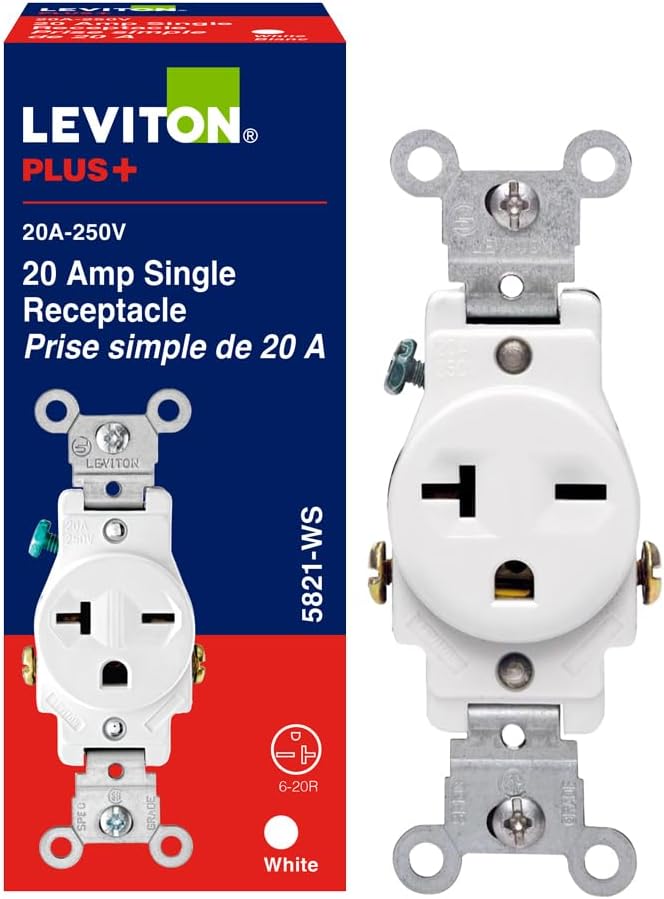
Figure 3: Back view of the Leviton 5821-W Single Receptacle Outlet, showing the robust construction and wiring access points.
Setup and Installation
Tools Required: Screwdriver (Phillips and flathead), Wire Strippers, Electrical Tape, Voltage Tester.
- Turn Off Power: Locate the circuit breaker or fuse that controls the outlet you are replacing or installing. Turn it OFF. Verify power is off using a voltage tester.
- Remove Old Receptacle (if applicable): Unscrew the wall plate and then the mounting screws holding the old receptacle in the electrical box. Carefully pull the old receptacle out of the box. Disconnect the wires, noting which wire was connected to which terminal.
- Prepare Wires: Strip approximately 1/2 inch (12.7 mm) of insulation from the ends of the circuit wires. Ensure the wire ends are clean and straight.
- Connect Wires: The Leviton 5821-W is a side-wire only device.
- Connect the BLACK or RED (hot) wire to the BRASS terminal screw.
- Connect the WHITE (neutral) wire to the SILVER terminal screw.
- Connect the GREEN or bare copper (ground) wire to the GREEN terminal screw.
- Mount Receptacle: Carefully fold the wires into the electrical box, leaving enough room for the receptacle. Insert the receptacle into the box and secure it with the mounting screws.
- Install Wall Plate: Attach the wall plate over the receptacle and secure it with the provided screw(s).
- Restore Power: Turn the power back ON at the circuit breaker or fuse box.
- Test: Verify the receptacle is functioning correctly with a suitable device.
Operating Instructions
The Leviton 5821-W Single Receptacle Outlet operates by providing a 20 Amp, 250 Volt power connection for compatible NEMA 6-20P plugs. Simply insert the plug of your electrical device into the receptacle. Ensure the plug is fully inserted for a secure connection.
This receptacle is designed for continuous duty within its specified ratings. It does not feature any user-operable controls or indicators.
Maintenance
The Leviton 5821-W receptacle requires minimal maintenance. Regular inspection and cleaning are recommended to ensure optimal performance and safety.
- Cleaning: To clean the surface of the receptacle, first turn off power at the circuit breaker. Use a soft, damp cloth with a mild detergent. Do not use abrasive cleaners or solvents. Ensure the surface is completely dry before restoring power.
- Inspection: Periodically inspect the receptacle for any signs of damage, such as cracks, discoloration, or loose connections. If any damage is observed, turn off power immediately and have the receptacle inspected and replaced by a qualified electrician.
- Tightness: Over time, wire connections can loosen. If you suspect a loose connection (e.g., flickering power, heat from the outlet), turn off power and have a qualified electrician check and tighten all terminal screws.
Troubleshooting
If you experience issues with your Leviton 5821-W receptacle, refer to the following common troubleshooting steps. Always ensure power is OFF before performing any inspection or repair.
| Problem | Possible Cause | Solution |
|---|---|---|
| No power at the outlet. | Circuit breaker tripped or fuse blown. Loose wiring connection. Faulty receptacle. | Check and reset the circuit breaker or replace the fuse. Turn off power and check wire connections; tighten if loose. If problem persists, replace the receptacle. |
| Plug does not fit or is loose. | Incorrect plug type (not NEMA 6-20P). Worn receptacle contacts. | Ensure the device plug is NEMA 6-20P. If contacts are worn, replace the receptacle. |
| Receptacle feels warm. | Overload. Loose wiring connection. | Reduce the load on the circuit. Turn off power and check wire connections; tighten if loose. If warmth persists, consult a qualified electrician. |
If troubleshooting steps do not resolve the issue, contact a qualified electrician for assistance.
Specifications
| Feature | Detail |
|---|---|
| Brand | Leviton |
| Model | 5821-W |
| Type | Single Receptacle Outlet |
| Grade | Commercial Specification Grade |
| Amperage | 20 Amps |
| Voltage | 250 Volts |
| NEMA Configuration | 6-20R |
| Poles/Wires | 2-Pole, 3-Wire Grounding |
| Wiring Method | Side Wire Only |
| Material | Nylon |
| Color | White |
| Product Dimensions | 12.5"L x 8"W (Note: This dimension seems unusually large for an outlet. It might refer to packaging or a different measurement. Actual device dimensions are typically smaller.) |
| Certifications | UL Listed 498, CSA Certified, NOM Certified, Meets NEMA WD-1 and WD-6, ANSI Standards |
| UPC | 078477790281 |
Warranty and Support
Warranty: This Leviton product is backed by a limited 10-year warranty on parts. For specific terms and conditions, please refer to the warranty documentation included with your purchase or visit the official Leviton website.
Customer Support: For technical assistance, product inquiries, or warranty claims, please contact Leviton customer support through their official website or the contact information provided in your product packaging. Always provide the model number (5821-W) when seeking support.
You can visit the official Leviton store for more information: Leviton Store


