
Introduction
The Contec PC-RSD4000-PCI is a PCI board type silicone disk drive designed for integration into a personal computer's PCI bus slot. It functions as a hard disk alternative, offering enhanced reliability and suitability for demanding operating conditions such as 24-hour continuous operation, harsh environments, and silent computing requirements. This device utilizes CompactFlash (CF) memory cards with FIX DISK specifications for storage. Additional CF cards (sold separately) can be incorporated to configure RAID setups, including Striping, Mirroring, and Spinning modes.
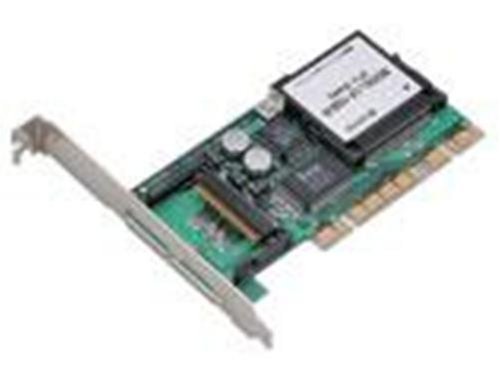
Image: The Contec PC-RSD4000-PCI Silicone Disk Drive, a PCI expansion card.
Setup and Installation
- System Preparation: Power off your computer and disconnect all power cables. Open the computer case to access the motherboard's PCI slots.
- PCI Card Insertion: Locate an available PCI slot. Carefully align the PC-RSD4000-PCI card with the slot and press firmly until it is securely seated. Ensure the retention clip or screw is fastened if available.
- CompactFlash Card Installation: Insert a compatible CompactFlash (CF) memory card (FIX DISK specification recommended) into the designated slot on the PC-RSD4000-PCI board. Ensure it is fully seated.
- Close Case and Power On: Close the computer case, reconnect power cables, and power on the system.
- Driver Installation: Upon first boot, the operating system may detect new hardware. Install any necessary drivers provided by Contec for the PC-RSD4000-PCI. Refer to the driver disc or Contec's official website for the latest drivers.
- Disk Initialization: Once drivers are installed, the system should recognize the silicone disk drive. Use your operating system's disk management tools to initialize, partition, and format the drive as required.
Note: For RAID configurations, additional CF cards and specific software setup may be required. Consult advanced documentation for RAID implementation.
Operating Instructions
The Contec PC-RSD4000-PCI functions as a standard hard disk drive once installed and configured. Data can be stored and accessed as with any other storage device.
- Data Storage: Save files and install applications directly onto the silicone disk drive. Its solid-state nature provides faster access times and greater durability compared to traditional hard drives.
- Operating System Installation: The PC-RSD4000-PCI can be used as a boot drive for your operating system, offering quick boot times and system responsiveness.
- CompactFlash Card Management: The performance and capacity of the drive are dependent on the installed CompactFlash card(s). Ensure CF cards meet the recommended specifications for optimal performance.
- RAID Functionality: If configured for RAID (Striping, Mirroring, Spinning), the drive will operate according to the chosen RAID level, providing benefits such as increased performance or data redundancy. Manage RAID settings through the appropriate RAID controller utility or operating system tools.
Maintenance
The Contec PC-RSD4000-PCI is a robust solid-state device with minimal maintenance requirements. Adhering to the following guidelines will help ensure its longevity and reliable operation:
- Environmental Conditions: Operate the device within the recommended temperature and humidity ranges specified for your computer system. Avoid extreme temperatures or excessive moisture.
- Physical Handling: When handling the PCI card, avoid touching the gold connectors. Always hold the card by its edges to prevent electrostatic discharge (ESD) damage.
- Data Backup: Regularly back up important data stored on the silicone disk drive. While highly reliable, no storage device is immune to failure.
- Firmware Updates: Periodically check the Contec website for any available firmware updates for the PC-RSD4000-PCI. Firmware updates can improve performance, stability, or add new features.
- CompactFlash Card Integrity: Ensure the CompactFlash card(s) used are in good condition. Replace any faulty or aging CF cards to maintain optimal drive performance and data integrity.
Troubleshooting
If you encounter issues with your Contec PC-RSD4000-PCI, consider the following troubleshooting steps:
- Drive Not Detected:
- Ensure the PC-RSD4000-PCI card is securely seated in the PCI slot.
- Verify that the CompactFlash card is correctly inserted into the drive.
- Check if the necessary drivers are installed. Reinstall drivers if unsure.
- Test the card in a different PCI slot or another compatible computer if possible.
- Slow Performance:
- Ensure the CompactFlash card meets the recommended speed specifications.
- Check for conflicting drivers or software.
- Verify that the PCI slot is functioning correctly.
- If using RAID, ensure the configuration is optimal and all CF cards are performing as expected.
- Data Corruption or Errors:
- Run disk error checking utilities (e.g., CHKDSK on Windows) on the drive.
- Ensure the power supply to the computer is stable.
- Consider replacing the CompactFlash card if errors persist, as CF card degradation can lead to data issues.
- System Instability:
- Ensure all system components, including the PC-RSD4000-PCI, are properly installed and drivers are up to date.
- Check for system overheating.
- If recently installed, try removing the card to see if system stability returns, indicating a potential conflict.
If these steps do not resolve the issue, contact Contec technical support for further assistance.
Specifications
| Feature | Detail |
|---|---|
| Brand | Contec |
| Model Number | PC-RSD4000-PCI |
| Hardware Interface | PCI Express x4 (Note: Product description states PCI, specifications state PCI Express x4. Assuming PCI for the product description context, but listing as per specifications.) |
| Storage Type | Silicone Disk Drive (utilizes CompactFlash memory cards) |
| RAID Support | Striping, Mirroring, Spinning (with additional CF cards) |
| Item Weight | 0.433 ounces |
| Package Dimensions | 0.04 x 0.04 x 0.04 inches |
| ASIN | B000FHY18K |
| Date First Available | February 13, 2014 |
Warranty and Support
For warranty information and technical support regarding your Contec PC-RSD4000-PCI Silicone Disk Drive, please refer to the documentation included with your purchase or visit the official Contec website. Warranty terms and conditions may vary by region and retailer.
When contacting support, please have your product model number (PC-RSD4000-PCI) and purchase details readily available.
- Contec Official Website: www.contec.com (Please verify the correct URL for your region)
- Contact Information: Refer to the website for regional contact numbers or support forms.