
1. Introduction
The Korg CA-40 Chromatic Tuner is a compact, high-precision electronic tuner designed for a wide range of musical instruments, including wind, string, and keyboard instruments. It features a large, easy-to-see LCD needle-style display for accurate pitch detection and adjustment. This manual provides essential information for the proper setup, operation, and maintenance of your CA-40 tuner.
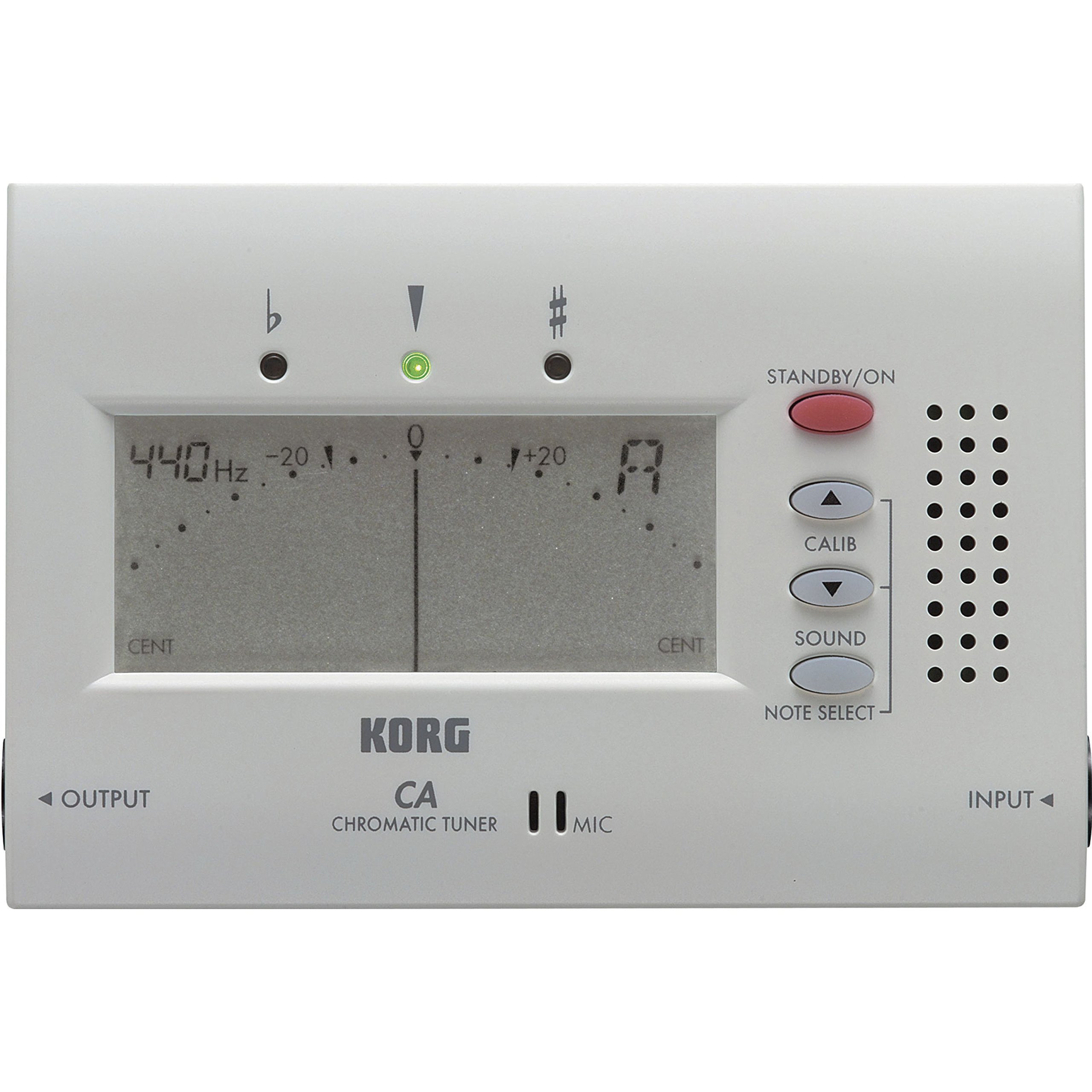
An overall view of the Korg CA-40 Chromatic Tuner, showcasing its compact design and large LCD display.
2. Safety Precautions
- Do not expose the unit to direct sunlight, high temperatures, humidity, or excessive dust.
- Avoid dropping the unit or subjecting it to strong impacts.
- Do not attempt to disassemble or modify the unit.
- Remove batteries if the unit will not be used for an extended period to prevent leakage.
- Keep out of reach of small children.
3. Package Contents
Verify that your package contains the following items:
- Korg CA-40 Chromatic Tuner Unit
- AAA Batteries (x2)
4. Part Names and Functions

Close-up of the Korg CA-40 Chromatic Tuner's front panel, highlighting the LCD screen, STANDBY/ON, CALIB, SOUND, and NOTE SELECT buttons, along with input and output jacks.
- LCD Display: Shows the detected note, pitch deviation, and calibration settings. Features a needle-style meter and red/green LEDs for visual tuning guidance.
- STANDBY/ON Button: Powers the unit on or off.
- CALIB Button: Adjusts the calibration (concert pitch) in 1 Hz steps.
- SOUND Button: Activates the Sound Out function, playing a reference tone through the internal speaker.
- NOTE SELECT Buttons (Up/Down): Used to select the reference tone for the Sound Out function.
- INPUT Jack (1/4"): Connect an instrument directly for tuning.
- OUTPUT Jack (1/4"): Provides a bypass signal from the input, allowing tuning during performance.
- Built-in Microphone: Detects the pitch of acoustic instruments when no cable is connected to the INPUT jack.
- Speaker: Emits the reference tone for the Sound Out function.
- Battery Compartment: Located on the rear, holds two AAA batteries.
- Stand: Fold-out stand on the rear for convenient placement.
5. Setup
5.1 Battery Installation
- Open the battery compartment cover on the rear of the unit.
- Insert two AAA batteries, ensuring correct polarity (+/-).
- Close the battery compartment cover securely.
5.2 Powering On/Off
- To turn on: Press the STANDBY/ON button.
- To turn off: Press and hold the STANDBY/ON button for approximately one second.
5.3 Using the Stand
Fold out the stand located on the rear of the unit to position the tuner upright on a flat surface for better visibility.
6. Operating Instructions
6.1 Tuning an Instrument (Meter Mode)
- Turn on the CA-40 tuner.
- Connect your instrument to the INPUT jack, or place the tuner near your acoustic instrument to use the built-in microphone.
- Play a single note on your instrument. The tuner will automatically detect the pitch.
- Observe the LCD display:
- The note name (e.g., A, C#, F) will be displayed.
- The needle-style meter indicates pitch deviation. Adjust your instrument until the needle is centered.
- Red LEDs indicate flat or sharp, while a green LED illuminates when the pitch is accurate.
- Adjust your instrument's tuning until the green LED lights up and the needle is centered.
6.2 Calibration Function
The calibration function allows you to adjust the concert pitch (A4) to match other instruments or specific requirements.
- Press the CALIB button. The current calibration value (e.g., 440 Hz) will be displayed.
- Use the NOTE SELECT (Up/Down) buttons to adjust the calibration in 1 Hz steps within the range of 410 Hz to 480 Hz.
- The tuner will automatically return to meter mode after a few seconds of inactivity, or you can press CALIB again to exit.
6.3 Sound Out Function
The Sound Out function plays a reference tone through the internal speaker, allowing you to tune by ear.
- Press the SOUND button. A reference tone will begin to play.
- Use the NOTE SELECT (Up/Down) buttons to change the reference tone. You can select any note within the range of C4 to C5 (one octave).
- Tune your instrument by matching its pitch to the reference tone.
- Press the SOUND button again to stop the tone and return to meter mode.
6.4 Input and Output Jacks
- The INPUT jack allows direct connection of an instrument, which is useful in noisy environments or for instruments with pickups.
- The OUTPUT jack provides a bypass signal, meaning the instrument's signal passes through the tuner without being processed. This allows you to keep the tuner connected in your signal chain during performance for quick tuning checks.
6.5 Auto Power Off
The CA-40 features an auto power-off function. If the unit is left powered on for approximately 20 minutes without any operation or sound input, it will automatically turn off to conserve battery life.
6.6 Memory Backup
The tuner remembers your last calibration setting and Sound Out reference pitch even after being turned off. However, these settings will be initialized to their default values (calibration to 440 Hz, Sound Out to A) when the batteries are replaced.
7. Maintenance
- Cleaning: Wipe the unit with a soft, dry cloth. Do not use abrasive cleaners, waxes, or solvents.
- Battery Replacement: Replace batteries when the display becomes dim or the unit fails to power on. Always replace both batteries at the same time with new ones of the same type.
- Storage: When storing the unit for an extended period, remove the batteries to prevent leakage and store in a cool, dry place away from direct sunlight.
8. Troubleshooting
- Unit does not power on: Check if the batteries are inserted correctly and if they are fresh. Replace if necessary.
- Inaccurate tuning or difficulty detecting pitch:
- Ensure the instrument is played clearly and sustained.
- Check the calibration setting (A4).
- If using the built-in microphone in a noisy environment, try connecting the instrument directly via the INPUT jack or use a contact microphone (sold separately).
- No sound from speaker in Sound Out mode: Ensure the Sound Out function is activated by pressing the SOUND button.
9. Specifications
- Model: TUCA40
- Scale: 12-note equal temperament
- Detection Range: A0 (27.50 Hz) – C8 (4186.01 Hz)
- Reference Tone: C4 (261.63 Hz) – C5 (523.25 Hz), one octave
- Calibration Range: A4 = 410 Hz – 480 Hz (1 Hz steps)
- Detection Accuracy: +/- 1 cent
- Sound Accuracy: +/- 1.5 cent
- Input: 1/4" mono jack
- Output: 1/4" mono jack
- Power Supply: Two AAA batteries (3V)
- Battery Life: Approximately 85 hours (continuous A4 input, Meter mode, zinc-carbon batteries)
- Dimensions (W x D x H): 3.94 x 2.64 x 0.67 inches (100 x 67 x 17 mm)
- Weight: 0.19 lbs (88 g) (including batteries)
10. Warranty and Support
For warranty information and customer support, please refer to the warranty card included with your product or visit the official Korg website. Keep your purchase receipt as proof of purchase for any warranty claims.


