
1. Introduction
Welcome to the user manual for your new Singing Machine SMVG-620 CD+G Karaoke System. This system is designed to provide hours of entertainment with its CD+G playback capabilities, built-in camera, 5.5-inch monitor, and AM/FM radio. Please read this manual thoroughly before operating your unit to ensure proper use and to maximize your enjoyment.
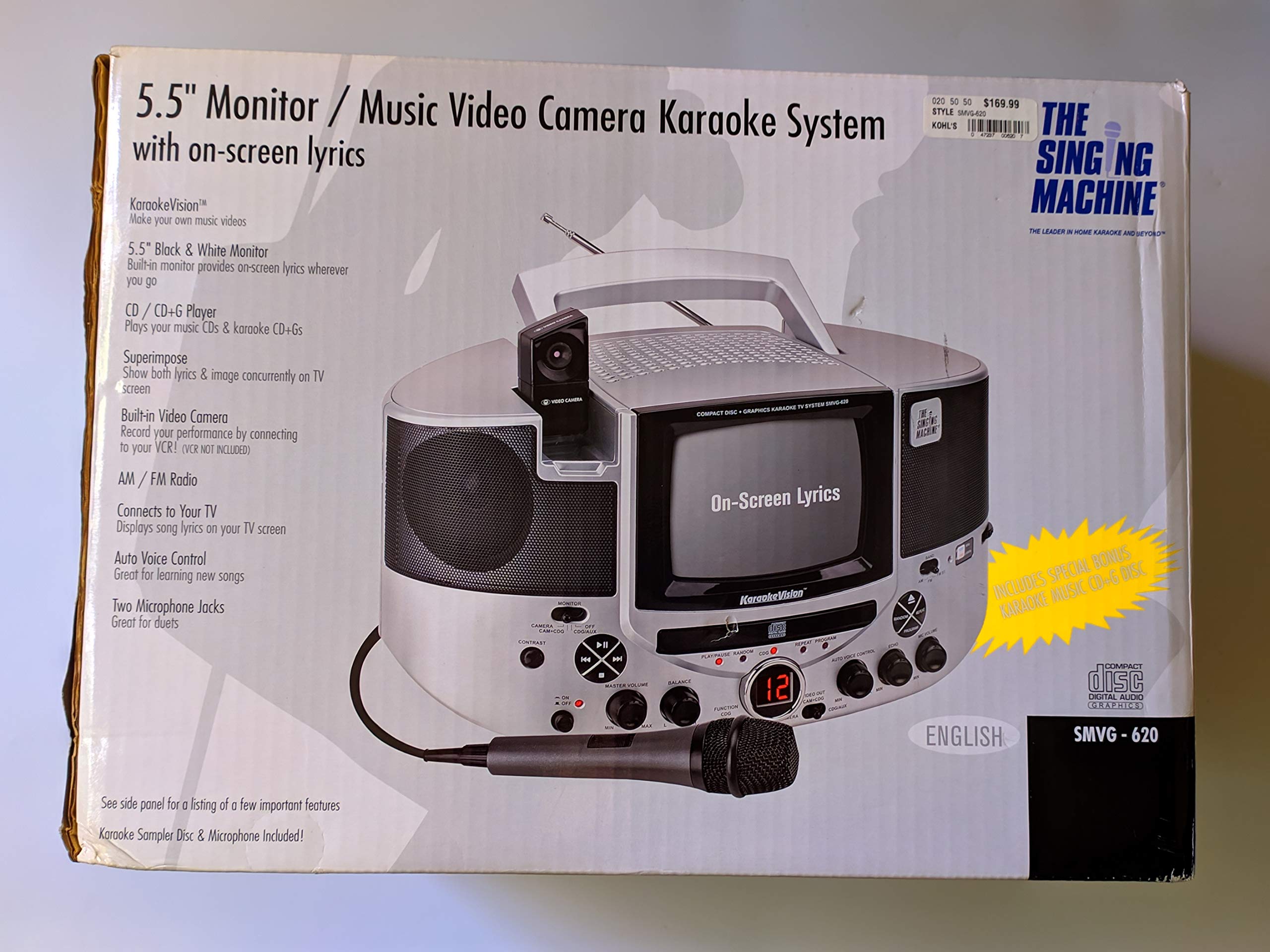
Figure 1.1: The Singing Machine SMVG-620 CD+G Karaoke System.
For optimal performance and safety, always follow the instructions and warnings provided.
2. Important Safety Information
- Read Instructions: All safety and operating instructions should be read before the appliance is operated.
- Retain Instructions: The safety and operating instructions should be retained for future reference.
- Heed Warnings: All warnings on the appliance and in the operating instructions should be adhered to.
- Follow Instructions: All operating and use instructions should be followed.
- Water and Moisture: Do not use this apparatus near water.
- Cleaning: Clean only with a dry cloth.
- Ventilation: Do not block any ventilation openings. Install in accordance with the manufacturer's instructions.
- Heat: Do not install near any heat sources such as radiators, heat registers, stoves, or other apparatus (including amplifiers) that produce heat.
- Power-Cord Protection: Protect the power cord from being walked on or pinched, particularly at plugs, convenience receptacles, and the point where they exit from the apparatus.
- Attachments/Accessories: Only use attachments/accessories specified by the manufacturer.
- Lightning: Unplug this apparatus during lightning storms or when unused for long periods of time.
- Servicing: Refer all servicing to qualified service personnel. Servicing is required when the apparatus has been damaged in any way.
3. Package Contents
Carefully unpack your Singing Machine SMVG-620 system and ensure all items listed below are present and in good condition.
- SMVG-620 CD+G Karaoke System
- One (1) Microphone
- Sampler CD+G Disc
- Audio/Video RCA Cables
- AC Power Adapter
- Instruction Manual

Figure 3.1: Contents of the box, including the microphone, RCA cables, and the instruction manual.
4. Product Overview
Familiarize yourself with the various parts and controls of your SMVG-620 Karaoke System.

Figure 4.1: Rear view of the product packaging highlighting key features and components of the SMVG-620 system.
Key Features:
- 5.5" Black & White Monitor: For on-screen lyrics from CD+G discs.
- Built-in Color Camera: Allows you to see yourself on the monitor or connected TV.
- Dual Microphone Jacks: Connect two microphones for duets (one microphone included).
- AM/FM Radio: Tune into your favorite radio stations.
- CD+G Player: Plays standard audio CDs and CD+Graphics discs.
- Auto Voice Control (AVC): Helps maintain vocal balance by automatically reducing the main vocal track when you sing.
- Echo Control: Adds depth and resonance to your voice.
- Professional Style Microphone: For clear vocal pickup.
- Audio/Video Output: Connects to your TV for larger screen display and enhanced audio.
5. Setup
5.1 Power Connection
- Ensure the unit is placed on a stable, flat surface.
- Connect the AC power adapter to the DC IN jack on the back of the SMVG-620 unit.
- Plug the other end of the AC power adapter into a standard wall outlet (AC 120V ~ 60Hz).
5.2 Connecting to a Television
To view lyrics on a larger screen and enhance audio, connect the SMVG-620 to your television using the supplied Audio/Video RCA cables.
- Locate the AUDIO OUT (white and red) and VIDEO OUT (yellow) jacks on the back of the SMVG-620.
- Connect the white plug of the RCA cable to the white AUDIO OUT jack on the karaoke system and to the white AUDIO IN jack on your TV.
- Connect the red plug of the RCA cable to the red AUDIO OUT jack on the karaoke system and to the red AUDIO IN jack on your TV.
- Connect the yellow plug of the RCA cable to the yellow VIDEO OUT jack on the karaoke system and to the yellow VIDEO IN jack on your TV.
- Turn on your TV and select the correct A/V input source (e.g., AV1, Video 1) that corresponds to the jacks you used.
5.3 Microphone Connection
Plug the microphone into either the MIC 1 or MIC 2 jack on the front of the SMVG-620 unit.
6. Operation
6.1 Powering On/Off
Press the POWER button located on the front panel to turn the unit ON or OFF.
6.2 CD+G Playback
- Open the CD compartment door and carefully place a CD+G disc (or standard audio CD) onto the spindle with the label side facing up. Close the door.
- Select CD+G mode using the FUNCTION selector.
- Press the PLAY/PAUSE button to start playback.
- Adjust the MASTER VOLUME knob to your desired listening level.
- Use the SKIP buttons (<< or >>) to navigate between tracks.
- To pause, press PLAY/PAUSE again. Press again to resume.
- To stop playback, press the STOP button.
6.3 Microphone Usage
- Ensure the microphone is connected to a MIC jack.
- Adjust the MIC VOLUME knob to control the microphone's output level.
- Turn the ECHO knob to add an echo effect to your voice.
- The AUTO VOICE CONTROL (AVC) switch can be toggled ON/OFF. When ON, the original vocal track on a CD+G disc will be reduced when you sing into the microphone.
6.4 AM/FM Radio
- Select AM or FM mode using the FUNCTION selector.
- Extend the FM antenna for better reception.
- Turn the TUNING knob to select your desired radio station.
- Adjust the MASTER VOLUME knob.
6.5 Camera Function
The built-in camera allows you to display your image on the 5.5-inch monitor or a connected TV.
- Ensure the unit is powered on and connected to a TV if you wish to use an external display.
- The camera feed will automatically display when the unit is in CD+G or Video mode, or when no other video source is active.
7. Maintenance
7.1 Cleaning the Unit
- Always unplug the unit from the power outlet before cleaning.
- Use a soft, dry cloth to clean the exterior surfaces.
- Do not use abrasive cleaners, waxes, or solvents as they may damage the finish.
- For the CD lens, use a specialized CD lens cleaner disc.
7.2 CD Care
- Handle CDs by their edges to avoid fingerprints on the playing surface.
- Keep discs in their cases when not in use to prevent scratches.
- Clean discs with a soft, lint-free cloth, wiping from the center outwards.
8. Troubleshooting
If you encounter any issues with your SMVG-620, please refer to the following common problems and solutions.
| Problem | Possible Cause | Solution |
|---|---|---|
| No power | Power cord not connected properly. | Ensure the AC adapter is securely plugged into the unit and a working wall outlet. |
| No sound from speakers | Master Volume is too low. Incorrect function mode selected. | Increase the MASTER VOLUME. Select the correct FUNCTION (CD+G, AM, FM). |
| No sound from microphone | Microphone not connected. MIC VOLUME is too low. Microphone switch is OFF. | Plug microphone into MIC 1 or MIC 2 jack. Increase the MIC VOLUME. Ensure microphone switch is ON. |
| No video on TV / No lyrics | RCA cables not connected correctly. Incorrect TV input selected. Not a CD+G disc. | Check all RCA cable connections (yellow for video). Select the correct A/V input on your TV. Ensure you are playing a CD+G disc for lyrics. |
| CD skipping | Disc is dirty or scratched. Unit is on an unstable surface. | Clean the disc or try another disc. Place the unit on a stable, vibration-free surface. |
9. Specifications
| Model Number | SMVG-620 (SIN SMVG620) |
| Power Source | AC 120V ~ 60Hz (via AC Adapter) |
| Monitor | 5.5-inch Black & White |
| Speaker Count | 2 |
| Compatible Devices | Television |
| Media Type | CD, CD+G |
| Product Dimensions (LxWxH) | 35.8 x 20.8 x 19.3 cm (14.1 x 8.2 x 7.6 inches) |
| Item Weight | 3.9 kg (8.6 lbs) |
10. Warranty and Support
For warranty information and customer support, please refer to the warranty card included with your product or contact The Singing Machine directly. You may also consult your retailer for details regarding their return and warranty policies.
Manufacturer: THE SINGING MACHINE


