
Introduction
This manual provides detailed instructions for the safe and efficient operation of your Elta 6925 Stereo Radio-Corder. Please read this manual thoroughly before using the device and retain it for future reference. This unit combines an FM/MW radio, a programmable CD/MP3 player, and a cassette deck, offering versatile audio playback options.
Safety Instructions
- Do not expose the unit to rain or moisture to prevent fire or electric shock.
- Do not block ventilation openings. Ensure adequate space around the unit for proper airflow.
- Place the unit on a stable, flat surface.
- Avoid placing the unit near heat sources such as radiators, heat registers, stoves, or other apparatus (including amplifiers) that produce heat.
- Use only attachments/accessories specified by the manufacturer.
- Unplug the unit during lightning storms or when unused for long periods.
- Refer all servicing to qualified service personnel.
Product Overview
The Elta 6925 is a portable stereo radio-corder featuring a robust 4-way speaker system. It includes an FM/MW radio tuner, a programmable CD player with MP3 compatibility and 100 seconds anti-shock protection, and a cassette deck. The unit also features a pre-programmed equalizer with settings for DBB, Pop, Classic, Jazz, Rock, and Normal audio profiles.
Key components include:
- Front Panel: CD compartment, cassette deck, function buttons (Play, Pause, Stop, Skip, etc.), volume control, equalizer button, display.
- Rear Panel: AC power input, battery compartment, antenna.
- Remote Control: For convenient operation of CD/MP3 functions.
Setup
Power Connection
The Elta 6925 can be powered by AC mains or batteries.
- AC Power: Connect the supplied AC power cord to the AC input jack on the rear of the unit and then to a standard wall outlet.
- Battery Power: Open the battery compartment on the rear of the unit. Insert the required number of batteries (e.g., C-size, not specified in input, so general instruction) ensuring correct polarity (+/-). Close the compartment securely.
Antenna
For optimal FM reception, fully extend the telescopic antenna. For MW reception, the unit has a built-in ferrite bar antenna. Rotate the unit for the best MW reception.
Operating the Radio
- Turn on the unit using the Power button.
- Select the desired band (FM or MW) using the band selector switch, usually located on the front or side panel.
- Rotate the Tuning knob to search for radio stations.
- Adjust the Volume control to your preferred listening level.
Operating the CD/MP3 Player
Loading a CD/MP3 Disc
- Open the CD compartment door.
- Place a CD or MP3 disc onto the spindle with the label side facing up.
- Close the CD compartment door securely. The unit will read the disc.
Basic Playback
- Press the PLAY/PAUSE button (⏸/⏴) to start playback.
- Press PLAY/PAUSE again to pause playback. Press it once more to resume.
- Press the STOP button (⏹) to stop playback.
- Use the PREV (⏮) or NEXT (⏭) buttons to skip tracks. Hold them down to fast forward or rewind within a track.
Programmable Playback (20 Titles)
- In STOP mode, press the PROGRAM button on the remote control or unit.
- Use the PREV or NEXT buttons to select the desired track number.
- Press PROGRAM again to confirm the selection. Repeat for up to 20 tracks.
- Press PLAY/PAUSE to start programmed playback.
Equalizer Settings
Press the EQ button to cycle through pre-programmed equalizer settings: DBB (Dynamic Bass Boost), Pop, Classic, Jazz, Rock, and Normal.
Anti-Shock Protection (100 seconds for MP3)
The unit features an anti-shock buffer to prevent audio interruptions during movement. This is particularly effective for MP3 playback, offering up to 100 seconds of protection.
Remote Control Functions
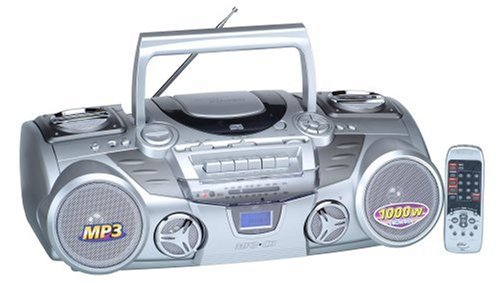
Image: Elta 6925 Stereo Radio-Corder Remote Control. This remote allows for convenient control of CD/MP3 playback functions, including power, mute, volume, track selection, repeat modes, random play, and program setup.
The remote control provides access to various functions:
- POWER: Turns the unit on or off.
- MUTE: Mutes or unmutes the audio output.
- RANDOM: Initiates random playback of tracks on the disc.
- REPEAT 1: Repeats the current track.
- REPEAT DIR: Repeats all tracks within the current directory (for MP3 discs).
- REPEAT ALL: Repeats all tracks on the disc.
- Numeric Keypad (0-9, +10): Direct track selection. Use +10 to jump by tens.
- PROGRAM: Enters/confirms program mode for track sequencing.
- VOLUME UP/DOWN: Adjusts the volume level.
- PLAY/PAUSE: Starts or pauses playback.
- STOP: Stops playback.
- PREV/NEXT: Skips to the previous or next track.
- EQ: Cycles through equalizer presets.
- CD ESP: Likely activates/deactivates Electronic Skip Protection (Anti-Shock).
- DIR - / DIR +: Navigates between directories on an MP3 disc.
- INTRO: Plays the first few seconds of each track.
Operating the Cassette Deck
Playing a Cassette
- Open the cassette compartment door.
- Insert a cassette tape with the open edge facing upwards and the tape side facing the play head.
- Close the cassette compartment door.
- Press the PLAY button (usually indicated by a triangle symbol) on the cassette deck controls.
- Adjust the Volume control.
- To stop playback, press the STOP/EJECT button.
- Use the FAST FORWARD and REWIND buttons to navigate the tape.
Maintenance
- Cleaning the Unit: Use a soft, dry cloth to clean the exterior of the unit. Do not use abrasive cleaners or solvents.
- CD Lens Cleaning: If playback issues occur, use a commercially available CD lens cleaner disc.
- Cassette Head Cleaning: Periodically clean the cassette deck's play head, pinch roller, and capstan with a cotton swab lightly dampened with isopropyl alcohol.
- Storage: When not in use for extended periods, remove batteries and unplug the AC power cord. Store the unit in a cool, dry place.
Troubleshooting
| Problem | Possible Cause | Solution |
|---|---|---|
| No power | Power cord not connected; Batteries depleted or incorrectly inserted. | Ensure AC cord is firmly plugged in; Replace batteries or check polarity. |
| No sound | Volume too low; Mute function active; Incorrect function selected. | Increase volume; Press MUTE button; Select correct function (CD, Radio, Tape). |
| CD/MP3 disc skips or does not play | Disc is dirty or scratched; Disc inserted incorrectly; Unit is subject to strong vibrations. | Clean disc with a soft cloth; Reinsert disc correctly; Place unit on a stable surface. |
| Poor radio reception | Antenna not extended; Unit position. | Fully extend FM antenna; Rotate unit for better MW reception. |
Specifications
- Model Number: 6925
- Brand: Elta
- Radio Bands: FM/MW
- CD Player: Programmable (20 titles), MP3 compatible
- Anti-Shock: 100 seconds for MP3
- Equalizer: Pre-programmed (DBB, Pop, Classic, Jazz, Rock, Normal)
- Speaker Type: Stereo, 4-way speaker system
- Item Weight: 5.64 Kilograms
- Package Dimensions: 58.2 x 31 x 21 cm
- Supported Standards: MP3
- Manufacturer: elta GmbH
Warranty and Support
This product is covered by a standard manufacturer's warranty. For specific warranty terms and conditions, please refer to the warranty card included with your purchase or contact your retailer. For technical support or service inquiries, please contact the manufacturer or your local distributor.
Note: "Gegarandeerde software-updates tot: onbekend" indicates that information regarding software updates is not available or applicable for this model.