
1. Introduction
The Sony 75-300mm f/4.5-5.6 Compact Super Telephoto Zoom Lens (Model SAL75300) is designed for Sony Alpha Digital SLR cameras. This lens offers a versatile 4x zoom range, making it suitable for capturing distant subjects, sports action, and portraits with a pleasing background blur. Its compact and lightweight design ensures comfortable handling and portability.
This manual provides essential information for the proper use, setup, and maintenance of your lens to ensure optimal performance and longevity.
2. What's in the Box
Verify that all the following items are included with your lens package:
- Sony 75-300mm f/4.5-5.6 Compact Super Telephoto Zoom Lens
- Front Lens Cap
- Rear Lens Cap
- SH0007 Lens Hood
3. Setup
Attaching the Lens
- Ensure your camera is powered off before attaching or detaching the lens.
- Remove the rear lens cap from the lens and the body cap from your camera.
- Align the mounting index (usually a white dot) on the lens with the corresponding mounting index on the camera body.
- Insert the lens into the camera mount and turn it clockwise until it clicks into place. Do not force the lens.
Compatibility Note: This lens is compatible with the Sony Alpha camera system (A-Mount). It is not compatible with the Sony NEX system (E-Mount).
Attaching the Lens Hood
The included lens hood helps to reduce flare and ghosting caused by extraneous light. Align the lens hood with the front of the lens and turn it until it locks securely. For storage, the lens hood can be reversed and attached to the lens.
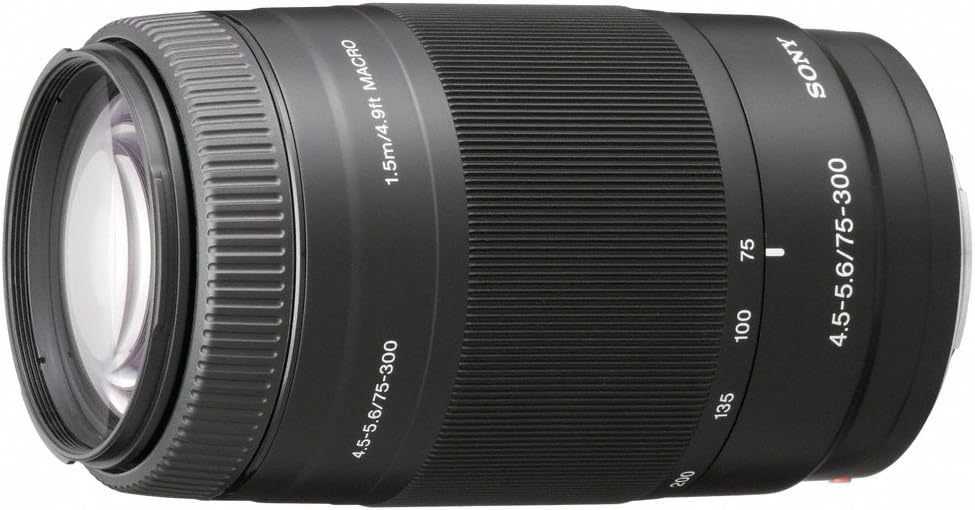
Figure 3.1: Side view of the Sony 75-300mm lens, showing the zoom and focus rings.
4. Operating the Lens
Zooming
To adjust the focal length, rotate the zoom ring on the lens. The lens offers a focal length range from 75mm (wide telephoto) to 300mm (super telephoto). This allows you to frame your subjects from various distances without changing your position.
Focusing
This lens supports both autofocus (AF) and manual focus (MF) modes, depending on your camera settings. For autofocus, ensure your camera is set to AF mode. The lens will automatically adjust focus when the shutter button is half-pressed.
For manual focus, set your camera to MF mode. Rotate the focus ring on the lens until your subject appears sharp in the viewfinder or on the camera's LCD screen. The minimum focusing distance for this lens is approximately 4 feet, 11 inches (1.5 meters).
Aperture
The lens features a variable maximum aperture of f/4.5 at 75mm and f/5.6 at 300mm. It utilizes 7 aperture blades to create a circular aperture, which contributes to a pleasing defocused effect (bokeh) in the background, making your subject stand out.

Figure 4.1: Angled view of the Sony 75-300mm lens, highlighting its compact design.
5. Maintenance
Cleaning the Lens
- Use a blower brush to remove dust and loose particles from the lens surface.
- For smudges or fingerprints, use a soft, clean lens cloth specifically designed for optical surfaces. Apply a small amount of lens cleaning solution to the cloth, not directly to the lens.
- Never use abrasive materials, solvents, or harsh chemicals to clean the lens.
Storage
- Always attach the front and rear lens caps when the lens is not in use to protect the optical elements.
- Store the lens in a cool, dry place, away from direct sunlight and extreme temperatures.
- If storing for an extended period, consider using a dehumidifying agent to prevent mold growth.
6. Troubleshooting
Blurry Images
- Check Focus: Ensure the lens is properly focused on your subject. If using autofocus, confirm the camera has locked focus.
- Shutter Speed: For telephoto lenses, a faster shutter speed is often required to prevent camera shake, especially at longer focal lengths. Consider using a tripod or increasing ISO.
- Lens Cleanliness: A dirty lens can cause soft or hazy images. Clean the lens elements as described in the Maintenance section.
Lens Not Attaching Properly
- Ensure the mounting indexes on both the lens and camera body are correctly aligned.
- Do not force the lens. If it does not click into place, re-align and try again.
Autofocus Issues
- Ensure the camera is set to autofocus mode.
- Check for sufficient light on the subject; autofocus systems perform best in well-lit conditions.
- If the lens makes unusual noises during autofocus, consult Sony customer support.
7. Specifications
| Feature | Specification |
|---|---|
| Model Number | SAL75300 |
| Focal Length | 75-300mm (112.5-450mm 35mm equivalent) |
| Maximum Aperture | f/4.5-5.6 |
| Minimum Aperture | f/28-32 |
| Filter Diameter | 55mm |
| Minimum Focus Distance | 4 feet, 11 inches (1.5 meters) |
| Lens Construction | 10 groups, 13 elements |
| Aperture Blades | 7 (circular) |
| Dimensions (Diameter x Length) | 2.81 inches x 4.81 inches (71.4mm x 122.2mm) |
| Weight | 1 pound, 2 ounces (510 grams) |
| Compatible Mountings | Sony Alpha, Minolta AF |

Figure 7.1: MTF (Modulation Transfer Function) chart illustrating lens performance at 75mm and 300mm focal lengths.
8. Warranty and Support
For detailed warranty information, please refer to the warranty card included with your product or visit the official Sony support website. Sony provides customer support for product inquiries, technical assistance, and service requests.
To access support resources, including FAQs, software updates, and contact information, please visit the official Sony website or contact your regional Sony customer service center.
Online Support: https://www.sony.com/electronics/support