
Introduction
The Nikon D200 is a powerful and versatile digital SLR camera designed for passionate amateur photographers, business users, and professionals seeking a robust secondary camera. It combines the advanced operation of Nikon's D2 professional series with user-friendliness and exceptional image quality. This manual provides essential information for setting up, operating, and maintaining your Nikon D200 camera and its accompanying 18-200mm f/3.5-5.6G ED-IF AF-S Nikkor Zoom Lens.

Figure 1: Front view of the Nikon D200 DSLR camera body, showcasing the lens mount, mode dial, and various controls. A body cap and a lens cap are also visible.
Key Features
- 10.2-Megapixel DX Format CCD Sensor: Captures high-resolution images (3,872 x 2,592 pixels) suitable for large enlargements and creative cropping.
- Included AF-S DX Zoom-Nikkor 18-200mm f/3.5-5.6G ED-IF Lens: A versatile 11.1x zoom lens with Extra Low Dispersion (ED) glass, Silent Wave Motor (SWM), and Enhanced Vibration Reduction (VR II).
- Fast Performance: 0.15-second power-up, 50-millisecond shutter lag, and 5 frames per second continuous shooting.
- Advanced Autofocus System: Multi-CAM1000 with 11-area AF and 7-area wide AF for precise subject tracking.
- 3D-Colour Matrix Metering II: Utilizes a 1,005-pixel RGB sensor for accurate exposure calculation across various scenes.
- Durable Construction: Lightweight, robust magnesium-alloy body with advanced sealing for moisture and dust protection.
- 2.5-inch LCD Display: High-resolution screen with a 170-degree viewing angle, allowing up to 400% image magnification for detail checking.
- Extensive Custom Settings: Over 40 customizable settings inherited from the Nikon D2x series.
- Long Battery Life: EN-EL3e rechargeable lithium-ion battery supports up to 1,800 images on a single charge.
- Total Imaging System Compatibility: Works with over 50 AF Nikkor lenses and Nikon's Creative Lighting System.
Setup
1. Unpacking and Checking Contents
Carefully unpack all items from the product box. Ensure the following components are present:
- Nikon D200 Camera Body
- AF-S DX Zoom-Nikkor 18-200mm f/3.5-5.6G ED-IF Lens
- EN-EL3e Rechargeable Li-ion Battery
- Battery Charger
- USB Cable
- Video Cable
- Camera Strap
- Body Cap
- Front and Rear Lens Caps
- Instruction Manual (this document)

Figure 2: Included accessories for the Nikon D200, featuring chargers, batteries, cables, and the camera strap.
2. Charging the Battery
Before first use, fully charge the EN-EL3e battery. Connect the battery charger to a power outlet and insert the battery. The charging indicator will show the charging status. A full charge typically takes approximately 2.5 hours. Ensure the battery is fully charged for optimal performance, supporting up to 1,800 images on a single charge.
3. Inserting the Battery and Memory Card
Open the battery chamber cover on the bottom of the camera and insert the charged EN-EL3e battery with the correct orientation. Close the cover securely. The D200 uses CompactFlash (CF) cards or Microdrives. Open the memory card slot cover, insert the CF card into the slot until it clicks into place, and then close the cover.
4. Attaching the Lens
Remove the body cap from the camera body and the rear lens cap from the 18-200mm Nikkor lens. Align the mounting mark on the lens with the corresponding mark on the camera body. Rotate the lens clockwise until it clicks into place. Ensure the lens is securely attached before use.

Figure 3: Rear view of the 18-200mm Nikkor lens, highlighting the F-mount and electronic contacts for communication with the camera body.
Operating the Camera
1. Powering On and Basic Shooting
To power on the camera, rotate the power switch around the shutter release button. The D200 has a quick power-up time of approximately 0.15 seconds. To take a picture, compose your shot through the viewfinder and press the shutter release button halfway to focus, then press fully to capture the image. The camera boasts a speedy shutter lag time of just 50 milliseconds.

Figure 4: Rear view of the Nikon D200, displaying the 2.5-inch LCD monitor and various control buttons for menu navigation and image review.
2. Autofocus System
The D200 features a highly flexible Multi-CAM1000 Autofocus system. You can select between an 11-area AF system for precise focusing or a 7-area wide AF for larger, moving subjects. Refer to the camera's menu for AF mode selection (Single Area AF, Dynamic AF, Closest Subject Priority Dynamic AF, Group Dynamic AF).
3. Metering Modes
The camera utilizes 3D-Colour Matrix Metering II, which evaluates brightness, color, contrast, selected focus area, and camera-to-subject distance to determine optimal exposure. Other metering options include variable size center-weighted metering and spot metering.
4. Image Optimization Modes
Customize your image output with various optimization modes, including Normal, Softer, Vivid, More vivid, Portrait, Custom, and Black-and-white. These modes allow adjustment of sharpening, tone (contrast), color, saturation, and hue directly in-camera.
5. Using the 18-200mm Nikkor Lens
This lens offers an 11.1x zoom range, covering wide-angle to telephoto perspectives. The Vibration Reduction (VR II) feature helps reduce blur caused by camera shake, especially useful in low light or at longer focal lengths. The Silent Wave Motor (SWM) ensures quiet and fast autofocus operation. For best results, ensure the VR switch on the lens is set appropriately for your shooting conditions.
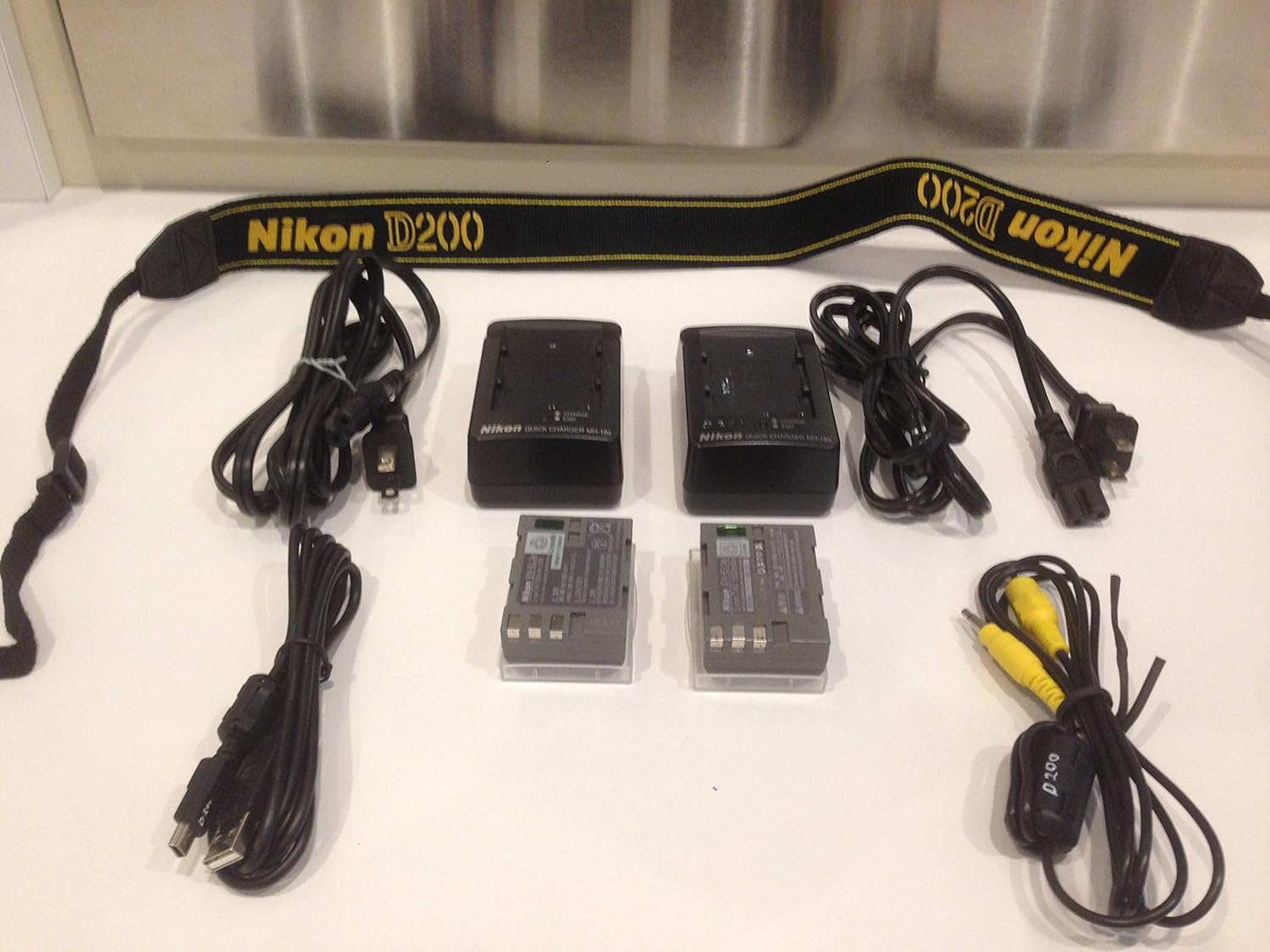
Figure 5: Side view of the 18-200mm Nikkor lens, illustrating its compact design and the VR switch for image stabilization.
Maintenance
1. Cleaning the Camera and Lens
Regularly clean the camera body with a soft, dry cloth. For the lens, use a lens brush or blower to remove dust, followed by a lens cleaning cloth and solution if necessary. Avoid touching the lens elements directly. The D200's advanced sealing system protects against moisture and dust, but proper cleaning practices are still essential, especially for the image sensor. If dust spots appear on your images, professional sensor cleaning may be required.
2. Battery Care and Storage
Store batteries in a cool, dry place when not in use. If storing for extended periods, charge them periodically to maintain their capacity. An optional MB-D200 battery pack can extend shooting capability using AA-size batteries or two EN-EL3e batteries.
Troubleshooting
This section addresses common issues you might encounter with your Nikon D200.
| Problem | Possible Cause | Solution |
|---|---|---|
| Camera does not power on. | Battery is depleted or incorrectly inserted. | Ensure battery is fully charged and inserted correctly. |
| Images are blurry. | Improper focus, camera shake, or lens not securely attached. | Check focus settings, use VR (Vibration Reduction) on lens, ensure lens is clicked into place. Use a tripod if necessary. |
| Dark spots appear on images. | Dust on the image sensor. | Attempt to clean the sensor using a blower. If persistent, professional sensor cleaning is recommended. |
| Autofocus is slow or inaccurate. | Low light conditions, low contrast subject, or incorrect AF mode selected. | Ensure sufficient light. Select an appropriate AF mode for the subject. Refer to the AF system section for details. |
| Battery drains quickly. | Frequent use of LCD, continuous shooting, or old battery. | Reduce LCD usage, carry spare batteries, or consider replacing an aging battery. |
Specifications
| Feature | Detail |
|---|---|
| Model Name | Nikon D200 |
| Sensor Type | DX Format CCD |
| Effective Pixels | 10.2 MP |
| Image Size | 3,872 x 2,592 pixels |
| Lens Mount | Nikon F-Mount |
| Included Lens | AF-S DX Zoom-Nikkor 18-200mm f/3.5-5.6G ED-IF |
| ISO Sensitivity | 100 to 1600 (expandable to 3200 in Hi-1) |
| Shutter Speed | 1/8000 to 30 seconds, Bulb, X-sync at 1/250 sec |
| Continuous Shooting | Up to 5 frames per second |
| Autofocus System | Multi-CAM1000 AF sensor module with 11 AF points |
| Metering System | 3D-Colour Matrix Metering II, Center-weighted, Spot |
| LCD Monitor | 2.5-inch, 230,000-dot TFT LCD with 170° viewing angle |
| Storage Media | CompactFlash (Type I/II) and Microdrive |
| Battery | EN-EL3e rechargeable Li-ion battery |
| Dimensions (W x H x D) | Approx. 5.8 x 4.4 x 2.9 inches (147 x 113 x 74 mm) |
| Weight | Approx. 1.8 lbs (830 g) camera body only |
Warranty Information
Warranty details for your Nikon D200 camera are typically provided with your purchase documentation. Please refer to the warranty card or leaflet included in your product packaging for specific terms, conditions, and registration procedures. Keep your proof of purchase for warranty claims.
Support and Resources
For additional support, firmware updates, software downloads, and frequently asked questions, please visit the official Nikon support website. You can also find a wealth of information and tips from the Nikon community.
Official Nikon Website: www.nikonusa.com (or your regional Nikon website)
Nikon Store: Visit the Nikon Store on Amazon
Official Product Videos
There are no official product videos provided by the seller for this model at this time.


