
1. Introduction
This manual provides comprehensive instructions for the installation, operation, and maintenance of the Dorman 85936 Key Style Metal Electrical Starter Switch. This product is designed for various automotive and industrial applications requiring a reliable ignition starter switch. Please read this manual thoroughly before proceeding with installation or operation.

Image 1.1: The Dorman 85936 Key Style Metal Electrical Starter Switch, shown with its accompanying set of four keys.
2. Safety Information
Adherence to safety precautions is crucial during installation and operation to prevent injury or damage to the product and vehicle.
- Disconnect Power: Always disconnect the vehicle's battery before attempting any electrical installation or maintenance.
- Proper Tools: Use appropriate tools for installation to avoid damage to the switch or surrounding components.
- Wiring: Ensure all wiring connections are secure and correctly insulated to prevent short circuits. Refer to the vehicle's specific wiring diagram if available.
- Professional Assistance: If you are unsure about any part of the installation or wiring process, consult a qualified automotive technician.
- Voltage Compatibility: This switch is designed for 12-volt systems. Verify compatibility with your application's voltage requirements.
3. Package Contents
Verify that all components are present in the package:
- Dorman 85936 Electrical Starter Switch (1 unit)
- Keys (4 units)
4. Specifications
Key technical specifications for the Dorman 85936 Starter Switch:
| Feature | Specification |
|---|---|
| Operation Mode | Manual |
| Current Rating | 30 Amps |
| Operating Voltage | 12 Volts |
| Contact Type | Normally Closed |
| Connector Type | Plug In |
| Terminal Type | Solder |
| Dimensions (L x W x H) | 5.3 x 4 x 1.9 inches |
| Circuit Type | 1-way |
| Actuator Type | Push Button (Key Style) |
| Contact Material | Metal |
| International Protection Rating | IP54 |
| Number of Positions | 2 (Note: While listed as 2, the switch functionally provides OFF, ACC, IGN, and START positions. Refer to wiring for full functionality.) |
| Item Weight | 0.01 ounces |
5. Installation and Setup
Follow these steps for proper installation of the Dorman 85936 Starter Switch:
- Preparation:
- Ensure the vehicle's battery is disconnected to prevent electrical hazards.
- Identify the mounting location for the switch. The switch requires a circular opening for mounting.
- Gather necessary tools: wrenches, wire strippers, crimpers, electrical tape, and a multimeter for testing.
- Mounting the Switch:
- Insert the switch body into the prepared mounting hole.
- Secure the switch using the provided retaining nut on the front side. Tighten firmly but do not overtighten.

Image 5.1: Side view of the switch, illustrating the mounting nut and terminal posts.
- Wiring Connections:
The Dorman 85936 switch typically features four terminal posts on the rear, labeled for specific functions. Refer to the image below for terminal identification.
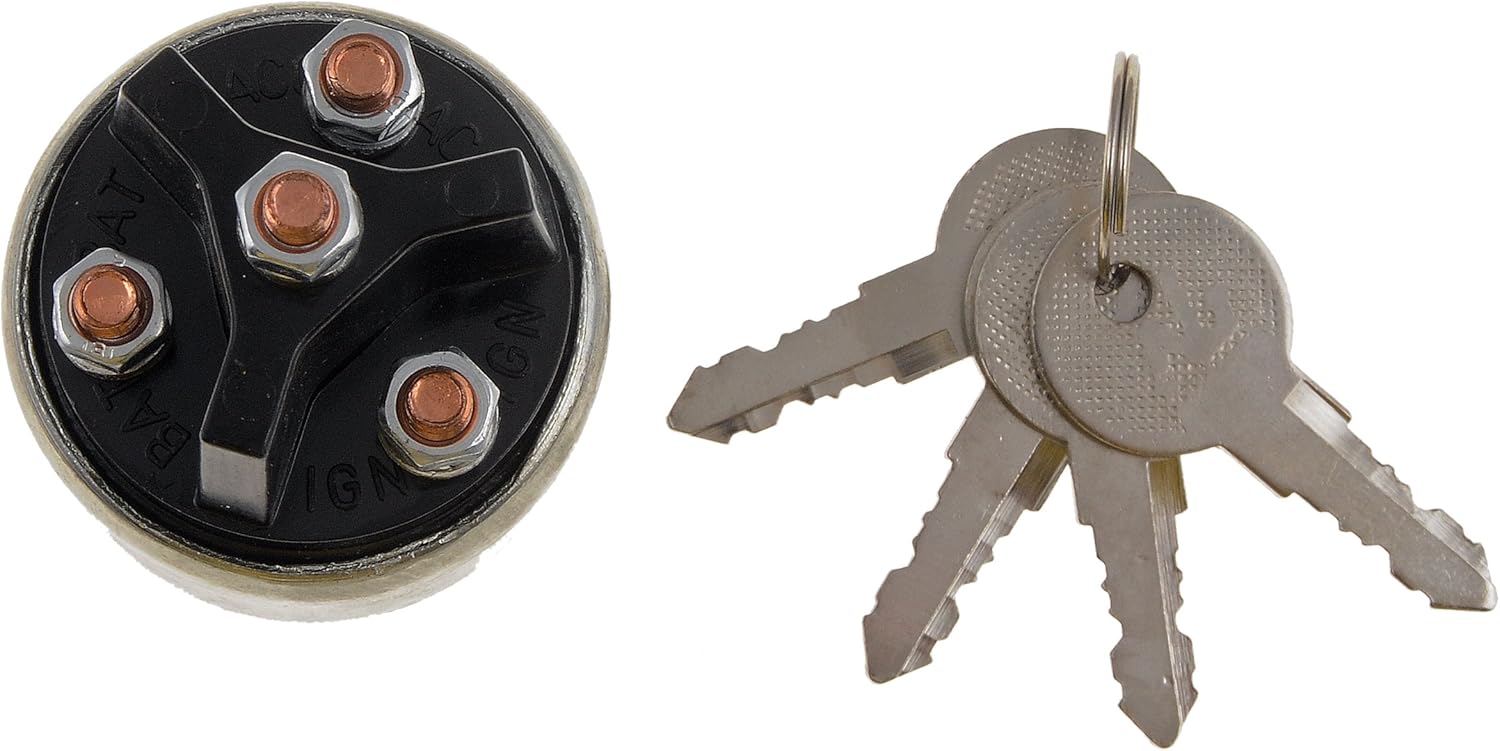
Image 5.2: Bottom view of the switch, showing the labeled terminal posts.
- BAT (Battery): Connect this terminal to the main positive (+) 12V power source from the battery, typically through a fused circuit.
- IGN (Ignition): Connect this terminal to the ignition system components that require power when the key is in the "IGN" or "RUN" position (e.g., engine spark, gauges, charging feedback).
- ACC (Accessory): Connect this terminal to accessories that require power when the key is in the "ACC" position (e.g., radio, wipers). Note that the ACC terminal may lose power during the "START" position to protect accessories.
- START (Unmarked Middle Post): This is the momentary contact terminal. Connect this to the starter solenoid trigger wire. This terminal is active only when the key is turned to the "START" position and springs back to "IGN" when released.
Ensure all connections are clean, tight, and properly insulated. Verify correct polarity before reconnecting the battery.
- Final Check:
- Double-check all wiring against your vehicle's diagram and the switch's terminal functions.
- Reconnect the vehicle's battery.
- Test the switch functionality as described in the "Operation" section.
6. Operation
The Dorman 85936 Key Style Metal Electrical Starter Switch operates with four key positions:

Image 6.1: Top view of the switch, showing the keyhole.
- OFF Position:
- This is the default position where the key can be inserted or removed.
- All electrical circuits connected to IGN, ACC, and START terminals are de-energized.
- ACC (Accessory) Position:
- Turn the key clockwise from OFF to the ACC position.
- This position provides power to accessory circuits (e.g., radio, wipers) without engaging the ignition.
- IGN (Ignition/RUN) Position:
- Turn the key clockwise from ACC to the IGN position.
- This position energizes the ignition system and other essential vehicle components.
- The engine will run in this position.
- START Position:
- From the IGN position, turn the key further clockwise to the momentary START position.
- This engages the starter motor.
- Release the key once the engine starts; it will automatically spring back to the IGN position.
7. Maintenance
The Dorman 85936 Starter Switch is designed for durability and requires minimal maintenance.
- Regular Inspection: Periodically check the wiring connections at the back of the switch to ensure they remain tight and free from corrosion.
- Cleaning: Keep the exterior of the switch clean and free from dirt, dust, and moisture. Use a dry cloth for cleaning.
- Key Care: Avoid excessive force when inserting or turning the key. Do not use damaged or bent keys.
8. Troubleshooting
If you encounter issues with your Dorman 85936 Starter Switch, consider the following troubleshooting steps:
| Problem | Possible Cause | Solution |
|---|---|---|
| Engine does not start when key is in START position. |
|
|
| Accessories (radio, wipers) do not work in ACC position. |
|
|
| Key sticks or is difficult to turn. |
|
|
| Starter remains engaged after engine starts (key returns to IGN). |
|
|
9. Warranty and Support
Dorman products are manufactured to high-quality standards. For specific warranty information or technical support, please refer to the official Dorman website or contact Dorman customer service directly. Keep your purchase receipt for warranty claims.
Dorman Products: www.dormanproducts.com