
Introduction
Thank you for choosing the Stax SRS-3010 Electrostatic Headphone System. This system comprises the SR-202 electrostatic headphones and the SRM-310 driver unit, designed to deliver high-fidelity audio reproduction. This manual provides essential information for the safe and optimal use of your new audio equipment. Please read it thoroughly before operation and retain it for future reference.
Safety Information
- Power Source: Connect the SRM-310 driver unit only to an AC power outlet of the specified voltage. Refer to the label on the rear panel for voltage requirements.
- Ventilation: Ensure adequate ventilation around the driver unit. Do not block ventilation openings.
- Moisture: Do not expose the unit to rain or moisture. Avoid placing objects filled with liquids, such as vases, on the unit.
- Heat: Keep the unit away from heat sources such as radiators, heat registers, stoves, or other apparatus that produce heat.
- Cleaning: Disconnect the power cord before cleaning. Use a dry, soft cloth. Do not use liquid cleaners or aerosol cleaners.
- Servicing: Do not attempt to service this product yourself. Refer all servicing to qualified service personnel.
- Hearing Protection: Prolonged listening at high volume levels can cause permanent hearing damage. Adjust the volume to a comfortable level.
Package Contents
Verify that all items are present in the package:
- Stax SR-202 Electrostatic Headphones
- Stax SRM-310 Driver Unit
- AC Power Cord
- User Manual (this document)
Setup
Follow these steps to set up your Stax Electrostatic Headphone System:
- Placement of Driver Unit: Place the SRM-310 driver unit on a stable, flat surface with adequate ventilation. Ensure it is not near strong magnetic fields or heat sources.
- Connecting Audio Source: Connect your audio source (e.g., CD player, DAC, preamplifier) to the input jacks on the rear panel of the SRM-310 driver unit. Use high-quality RCA cables for optimal sound.
- Connecting Headphones: Plug the 5-pin connector of the SR-202 electrostatic headphones into the dedicated output jack on the front panel of the SRM-310 driver unit. Ensure the connector is fully inserted and securely seated.
- Power Connection: Connect the supplied AC power cord to the power inlet on the rear of the SRM-310 driver unit, then plug the other end into a suitable AC power outlet.
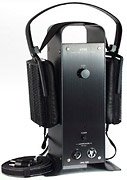
Image: Stax SRS-3010 Electrostatic Headphone System. This image displays the SR-202 headphones connected to the SRM-310 driver unit, illustrating a typical setup configuration.
Operating Instructions
- Power On: After all connections are made, press the power button on the front panel of the SRM-310 driver unit. The power indicator light will illuminate.
- Volume Control: Start with the volume knob on the SRM-310 driver unit set to its minimum position. Begin playing audio from your source, then slowly increase the volume to a comfortable listening level.
- Listening: Place the SR-202 headphones comfortably over your ears. Enjoy the high-quality audio reproduction.
- Power Off: When finished listening, turn the volume knob to its minimum position, then press the power button to turn off the SRM-310 driver unit.
Maintenance
- Cleaning the Driver Unit: Use a soft, dry cloth to wipe the exterior of the SRM-310 driver unit. Do not use abrasive cleaners or solvents.
- Cleaning the Headphones: Gently wipe the ear pads and headband of the SR-202 headphones with a slightly damp cloth. Avoid getting moisture into the driver elements.
- Storage: When not in use, store the headphones and driver unit in a clean, dry environment, away from direct sunlight and extreme temperatures.
- Cable Care: Avoid sharply bending or twisting the headphone cable.
Troubleshooting
| Problem | Possible Cause | Solution |
|---|---|---|
| No sound |
|
|
| Distorted sound |
|
|
| No power indicator light |
|
|
Specifications
- Model: Stax SRS-3010 (System comprising SR-202 Headphones and SRM-310 Driver Unit)
- Manufacturer: Stax
- ASIN: B000CCEQJM
- GTIN: 04996476000261
- First Available: 21 February 2020
- Note: Detailed technical specifications for the SR-202 headphones and SRM-310 driver unit are typically provided in separate technical datasheets.
Warranty and Support
Stax products are manufactured to high standards and are covered by a limited warranty. For specific warranty terms and conditions, please refer to the warranty card included with your product or visit the official Stax website. For technical support, service, or inquiries, please contact your authorized Stax dealer or distributor.
Please retain your proof of purchase for warranty claims.