
Introduction
This manual provides essential information for the proper installation, operation, and maintenance of your Cardone 77-7730 Remanufactured General Motors Computer. Please read these instructions carefully before proceeding with installation or use. Retain this manual for future reference.
Product Overview
The Cardone 77-7730 is a remanufactured Electronic Control Module (ECM) or Powertrain Control Module (PCM) designed for specific General Motors vehicles. These units are engineered to meet or exceed original equipment (OE) performance standards. The remanufacturing process involves identifying and correcting original design weaknesses through reverse engineering, replacing or re-soldering critical components, and rigorous computer testing to ensure reliability and functionality.

Image: The Cardone 77-7730 Remanufactured General Motors Computer.
Key Features:
- On-car vehicle validation testing: Ensures the product fits and functions correctly in the intended application.
- 100% replacement of high-failure rate OE components: Addresses common issues found in original units.
- 100% electronic module testing: Verifies that the unit meets OE requirements for the specific application.
- Advanced robotic equipment: Utilized for precision manufacturing and consistent high quality.
- Comprehensive testing: Each unit undergoes 100% testing for quality and reliability.
Setup and Installation
Installation of an automotive computer module requires technical knowledge and should ideally be performed by a qualified automotive technician. Incorrect installation can lead to vehicle damage or improper operation.
Pre-Installation Steps:
- Verify Compatibility: Ensure the Cardone 77-7730 is the correct part number for your vehicle's make, model, year, and engine configuration. Refer to your vehicle's service manual or a reputable parts catalog.
- Disconnect Battery: Always disconnect the vehicle's negative battery terminal before beginning any electrical work to prevent electrical shorts or damage to components.
- Locate Existing Module: Identify the location of the original General Motors computer module in your vehicle. This is typically found under the dashboard, in the engine bay, or sometimes in the trunk.
- Observe Static Precautions: Electronic modules are sensitive to static electricity. Handle the new module by its casing, avoiding contact with the electrical pins or circuit board.
Installation Procedure:
- Remove Old Module: Carefully disconnect all electrical connectors from the old module. Note their orientation and position. Unbolt or unclip the old module from its mounting bracket.
- Install New Module: Position the Cardone 77-7730 module in the same location as the old one. Secure it using the original mounting hardware.
- Connect Electrical Connectors: Reconnect all electrical connectors to the new module. Ensure each connector is fully seated and locked into place. The connector type is Plug-In.
- Reconnect Battery: Reconnect the vehicle's negative battery terminal.
- Initial Power-Up and Programming (if required): Some vehicle computers require programming or a "relearn" procedure after installation to synchronize with the vehicle's other systems (e.g., anti-theft, key fobs). Consult your vehicle's service manual or a qualified technician for specific programming requirements.
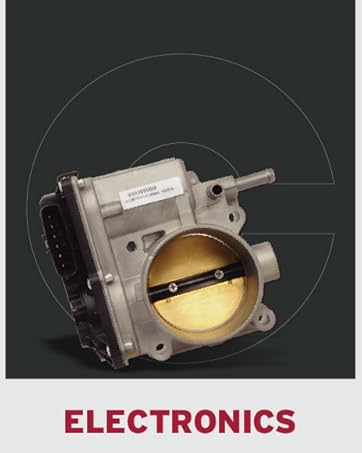
Image: Example of an automotive electronic component, similar to an ECM.
Operating Instructions
Once properly installed and any necessary programming completed, the Cardone 77-7730 Remanufactured General Motors Computer operates automatically as part of your vehicle's engine management system. It continuously monitors various sensors and controls engine functions to optimize performance, fuel efficiency, and emissions.
- Automatic Operation: The module functions without direct user intervention.
- Diagnostic Capabilities: The ECM/PCM stores diagnostic trouble codes (DTCs) if a fault is detected. These codes can be retrieved using an OBD-II scanner (for vehicles 1996 and newer) or specific diagnostic tools for older vehicles.
- Normal Vehicle Operation: Expect your vehicle to operate as designed by the manufacturer, with improved or restored performance if the previous module was faulty.
Maintenance
The Cardone 77-7730 Remanufactured General Motors Computer is a sealed electronic component and requires no routine user maintenance. To ensure its longevity and proper function:
- Keep Connections Secure: Periodically check that all electrical connectors to the module are clean, secure, and free from corrosion.
- Protect from Elements: Ensure the module is protected from excessive moisture, heat, and physical damage.
- Avoid Tampering: Do not attempt to open or modify the module, as this will void any warranty and may cause irreversible damage.
Troubleshooting
If your vehicle experiences issues after installing the Cardone 77-7730, consider the following troubleshooting steps:
| Symptom | Possible Cause | Solution |
|---|---|---|
| Vehicle does not start or runs poorly | Incorrect installation, loose connections, module not programmed, other vehicle issues. |
|
| Check Engine Light (CEL) illuminated | Diagnostic trouble code (DTC) detected, sensor issue, wiring fault. |
|
| Intermittent vehicle performance issues | Loose connections, environmental factors (heat/cold), other vehicle system faults. |
|
If troubleshooting steps do not resolve the issue, it is recommended to seek assistance from a certified automotive technician.
Specifications
| Feature | Detail |
|---|---|
| Brand | Cardone |
| Model Number | 77-7730 |
| Part Number | 77-7730 |
| UPC | 082617059138 |
| Connector Type | Plug-In |
| Mounting Type | Screw Mount |
| Operation Mode | Automatic |
| Wattage | 100 Milliwatts |
| Item Weight | 1.81 Pounds |
Warranty and Support
As a renewed product, the Cardone 77-7730 is typically backed by a specific return or warranty policy. For this product, a 365-day return/replacement policy is offered by Amazon. Please refer to your purchase documentation or contact Amazon customer service for detailed warranty information and support regarding your renewed product.
For technical assistance related to Cardone products, you may visit the official Cardone website or contact their customer support channels. Always provide your product model number (77-7730) and any relevant vehicle information when seeking support.