
Introduction
The Tripp Lite 2-Port VGA/SVGA Video Splitter with Signal Booster (Model B114-002-R) allows for the simultaneous display of a single video source on two separate monitors. Featuring a built-in booster, this device supports high-resolution video signals up to 2048x1536 at 60Hz and can extend the transmission distance up to 210 feet from the source. This manual provides essential information for proper installation, operation, and maintenance of your video splitter.
Package Contents
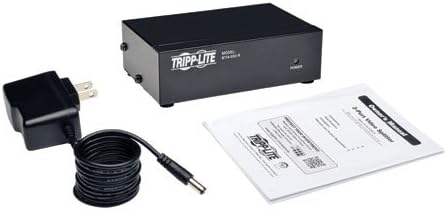
- Tripp Lite 2-Port HD15 VGA/SVGA Video Splitter with Signal Booster
- External Power Adapter
- Owner's Manual
Features
- Simultaneously displays video on 2 VGA/SVGA monitors.
- Built-in booster transmits video signals (up to 1920 x 1080 @ 60Hz) up to 210 ft. from the source.
- Supports bandwidth up to 350MHz.
- Rugged, fully shielded metal housing for durability.
- Expandable by cascading up to 3 levels of splitters.
Setup Instructions
1. Connecting the Splitter
- Ensure all devices (computer, monitors) are powered off.
- Connect the VGA output from your computer or video source to the INPUT port on the Tripp Lite video splitter using a VGA cable. The splitter can be located up to 25 ft. from the connected computer.
- Connect your two VGA monitors to the OUTPUT ports on the splitter using VGA cables. The monitors can be located up to 185 ft. from the splitter.

2. Powering On
- Connect the included external power adapter to the DC9V, 0.5A input on the splitter and then plug it into a standard AC outlet.
- Power on your monitors, then power on your computer or video source.
- Verify that the Power LED on the front of the splitter illuminates, indicating it is receiving power.

Operation
Basic Operation
Once properly connected and powered, the Tripp Lite 2-Port VGA Splitter will automatically duplicate the video signal from your source to both connected monitors. No additional software or drivers are required for basic operation.
Cascading Multiple Splitters
For applications requiring more than two displays, multiple B114-002-R splitters can be cascaded. Connect an output port from the first splitter to the input port of a second splitter. This allows for expansion of the number of connected monitors. Up to 3 levels of splitters can be cascaded together.
Maintenance
The Tripp Lite B114-002-R video splitter requires minimal maintenance. Keep the unit in a clean, dry environment away from direct sunlight and extreme temperatures. Periodically wipe the exterior with a soft, dry cloth. Do not use liquid or aerosol cleaners. Ensure proper ventilation around the unit to prevent overheating.
Troubleshooting
| Issue | Possible Cause | Solution |
|---|---|---|
| No video display on monitors. |
|
|
| Fuzzy, distorted, or weak video signal. |
|
|
| VGA connector does not fit properly. |
|
|
Specifications
| Feature | Specification |
|---|---|
| Model Number | B114-002-R |
| Connector Type | VGA (HD15) |
| Number of Ports | 1 Input, 2 Outputs |
| Bandwidth | 350 MHz |
| Maximum Resolution | 2048x1536 (at 60Hz) |
| Maximum Distance (Source to Splitter) | 25 ft. |
| Maximum Distance (Splitter to Monitor) | 185 ft. |
| Power Input | DC9V, 0.5A (External Power Adapter Included) |
| Housing Material | Metal |
| Item Weight | 1.55 Pounds |
Warranty Information
This Tripp Lite product is covered by a 1-year limited warranty. Please refer to the warranty documentation included with your product for specific terms and conditions. The warranty does not cover misuse of the product.
Technical Support
For technical assistance, troubleshooting, or product information, please visit the official Tripp Lite website or contact their customer support. Have your product model number (B114-002-R) available when seeking support.


