
1. Introduction
The Fan-Tastic Vent Model 2250 is designed to provide efficient ventilation for recreational vehicles (RVs). It features a built-in thermostat, three fan speeds, and a reverse function to either exhaust air out or draw fresh air in. The integrated solid-state rain sensor automatically closes the dome when rain is detected, protecting the interior of your RV.

Figure 1: Fan-Tastic Vent Model 2250 with dome in open position.
2. Safety Information
Please read and understand all safety instructions before installation and operation. Failure to follow these instructions may result in property damage, personal injury, or death.
- Always disconnect power to the unit before performing any installation, maintenance, or troubleshooting.
- Ensure proper wiring and fuse protection are used as specified in the installation guide.
- Do not operate the fan with damaged wiring or components.
- Keep hands and foreign objects clear of the fan blades during operation.
- This product is designed for 12-volt DC systems only.
3. Setup and Installation
Installation of the Fan-Tastic Vent Model 2250 typically involves mounting the unit into a standard 14" x 14" RV roof opening and connecting it to the vehicle's 12-volt electrical system. It is recommended that installation be performed by a qualified technician.
3.1. Pre-Installation Checks
- Verify the roof opening dimensions are 14" x 14".
- Ensure adequate clearance for the dome to open fully.
- Confirm 12-volt DC power is available at the installation site.
3.2. Wiring
Connect the fan's positive (+) wire (typically red) to a fused 12-volt DC positive source and the negative (-) wire (typically black) to a suitable ground. Ensure all connections are secure and insulated.
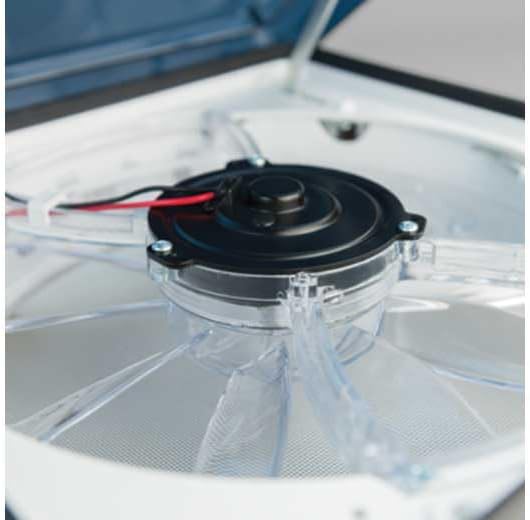
Figure 2: Fan motor and blade assembly.
4. Operating Instructions
The Fan-Tastic Vent Model 2250 offers intuitive controls for optimal ventilation.
4.1. Dome Operation
The dome can be opened manually using the crank handle. For automatic operation with the rain sensor, ensure the dome is fully open.
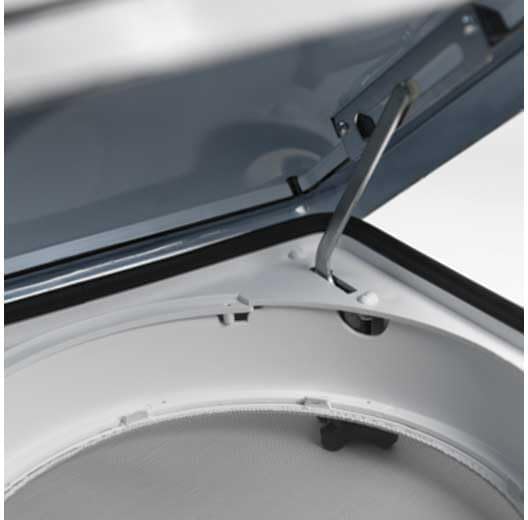
Figure 3: Dome hinge mechanism.
4.2. Thermostat Control
The built-in thermostat allows the fan to operate automatically based on the desired temperature. Rotate the thermostat knob to set your preferred temperature. When the ambient temperature exceeds the set point, the fan will activate.

Figure 4: Thermostat control knob.
4.3. Fan Speed and Direction
The fan features three speeds and a reverse function. Use the control switch to select the desired fan speed (low, medium, high) and direction (intake or exhaust).
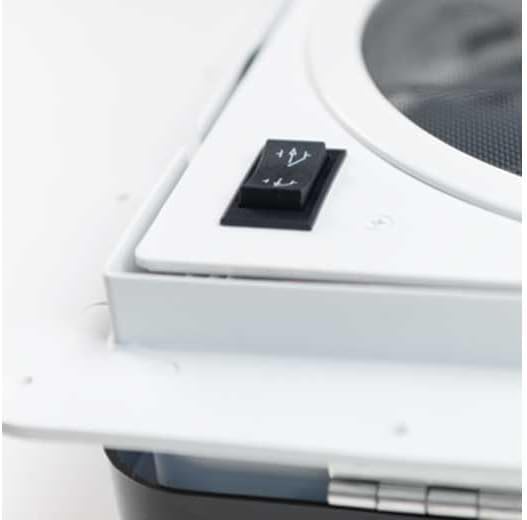
Figure 5: Fan speed and direction switch.
4.4. Rain Sensor
The solid-state rain sensor automatically detects moisture and closes the dome to prevent water entry. Once the sensor dries, the dome will reopen to its previous position, and the fan will resume operation if the thermostat calls for it.
5. Maintenance
Regular maintenance ensures optimal performance and longevity of your Fan-Tastic Vent.
5.1. Cleaning
- Periodically clean the fan blades and motor housing with a soft, damp cloth. Ensure power is disconnected before cleaning.
- Clean the dome exterior with mild soap and water. Avoid abrasive cleaners that may scratch the surface.
- Wipe the rain sensor contacts with a clean, dry cloth to ensure proper function.
5.2. Inspection
- Inspect the dome seals for any signs of wear or damage.
- Check all wiring connections for tightness and corrosion.
- Ensure the fan blades spin freely without obstruction.
6. Troubleshooting
Refer to the following table for common issues and their potential solutions.
| Problem | Possible Cause | Solution |
|---|---|---|
| Fan does not operate. | No power; Blown fuse; Thermostat setting too high; Dome not open. | Check 12V power supply; Replace fuse; Lower thermostat setting; Open dome. |
| Dome does not close automatically in rain. | Rain sensor dirty or faulty. | Clean rain sensor contacts; Inspect sensor for damage. |
| Fan operates continuously. | Thermostat setting too low; Malfunctioning thermostat. | Raise thermostat setting; Contact manufacturer for support if issue persists. |
| Excessive noise during operation. | Obstruction in fan blades; Loose mounting. | Clear any obstructions; Tighten mounting screws. |
7. Specifications
| Feature | Detail |
|---|---|
| Model Number | 2250 (also 802250) |
| Voltage | 12 Volts DC |
| Item Weight | 5 pounds |
| Product Dimensions | 16.5 x 4.5 x 16.5 inches |
| Features | Built-in thermostat, Solid state rain sensor, 3-speed fan, Reverse function |
| Country of Origin | UNITED STATES |
8. Warranty and Support
For warranty information, technical support, or replacement parts, please contact Fan-Tastic Vent directly. Refer to the product packaging or the manufacturer's official website for the most current contact details and warranty terms.
Manufacturer: Fan-Tastic Vent