
Introduction
This manual provides detailed instructions for the proper setup, operation, maintenance, and troubleshooting of your SanDisk Sansa m230 512 MB MP3 Player. Please read this manual thoroughly before using your device to ensure optimal performance and longevity.
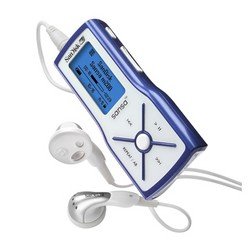
This image displays the SanDisk Sansa m230 MP3 Player, highlighting its compact design and control buttons.
Setup
1. Battery Installation
- Locate the battery compartment cover on the back of the Sansa m230.
- Slide the cover open.
- Insert one AAA battery, ensuring the positive (+) and negative (-) terminals align correctly with the markings inside the compartment.
- Close the battery compartment cover securely.
The device is powered by a single AAA battery, providing up to 19 hours of usage.
2. Connecting to a Computer
- Ensure your computer is powered on.
- Connect the small end of the provided USB cable to the USB port on your Sansa m230.
- Connect the larger end of the USB cable to an available USB port on your computer.
- The Sansa m230 will appear as a removable disk drive on your computer.
3. Loading Music and Files
- Once connected to your computer, open the Sansa m230 drive.
- Drag and drop your MP3 or WMA audio files directly into the player's storage.
- The 512 MB memory can hold approximately 8 hours of MP3 audio or 16 hours of WMA audio.
- The device supports Microsoft PlaysForSure, allowing compatibility with various online music stores and subscription services.
- After transferring files, safely eject the Sansa m230 from your computer before disconnecting the USB cable.
Operating Instructions
1. Basic Controls
- Power On/Off: Press and hold the Play/Pause button.
- Play/Pause: Press the Play/Pause button.
- Next Track: Press the Next Track button.
- Previous Track: Press the Previous Track button.
- Stop: Press the Stop button.
- Volume Control: Use the dedicated volume up/down buttons located on the side of the device.
- Menu: Press the Menu button (usually on top) to access device settings and modes. Use the track buttons for navigation and Play/Pause to select.
2. Playing Music
- Ensure the device is powered on.
- Navigate to the 'Music' menu using the Menu button.
- Browse through your artists, albums, or songs.
- Select a track and press the Play/Pause button to begin playback.
3. FM Radio
The Sansa m230 features an integrated FM radio with 20 presets.
- Navigate to the 'FM Radio' menu.
- Use the track buttons to scan for stations.
- Press the Menu button to access options like saving presets or switching between saved stations.
4. Voice Recorder
The built-in microphone allows for voice recordings.
- Navigate to the 'Voice Recorder' menu.
- Press the Play/Pause button to start recording.
- Press the Stop button to end the recording.
- Recordings are saved and can be played back from the same menu.
Maintenance
1. Cleaning
- Use a soft, dry, lint-free cloth to clean the exterior of the player.
- Do not use liquid cleaners or aerosols directly on the device.
2. Battery Care
- Remove the AAA battery if the device will not be used for an extended period to prevent leakage.
- Always dispose of used batteries responsibly according to local regulations.
3. Software Updates
Periodically check the official SanDisk support website for any available firmware updates for your Sansa m230. Updates can improve performance and add new features.
Troubleshooting
- Device does not power on:
Ensure the AAA battery is correctly inserted and has sufficient charge. Try replacing the battery with a new one. - No sound:
Check that headphones are properly connected. Verify the volume level is not set to zero or muted. Test with different headphones if possible. - Computer does not recognize the player:
Ensure the USB cable is securely connected to both the player and the computer. Try a different USB port or cable. Restart your computer. - Files not playing:
Confirm that the audio files are in a supported format (MP3 or WMA). Ensure the files are not corrupted. - Poor FM radio reception:
Ensure headphones are connected as they often act as the antenna. Try moving to a different location to improve signal.
If issues persist, please refer to the SanDisk support website for further assistance.
Specifications
| Feature | Detail |
|---|---|
| Model Name | Sansa m230 |
| Item Model Number | SDMX3-512-A18 |
| Memory Storage Capacity | 512 MB (approx. 8 hrs MP3 / 16 hrs WMA) |
| Connectivity Technology | USB |
| Power Source | 1 x AAA Battery (up to 19 hours usage) |
| Special Features | Equalizer, FM Radio (20 presets), Voice Recorder |
| Product Dimensions | 3 x 1.5 x 0.75 inches |
| Item Weight | 6.4 ounces |
| Screen Size | 1.44 inches |
| Compatible Devices | Laptop |
| Included Components | Earphone |
Warranty Information
SanDisk products are manufactured to the highest standards and undergo rigorous testing. This product is covered by a limited warranty from the date of purchase. Please refer to the official SanDisk website or your product packaging for specific warranty terms and conditions applicable to your region.
Customer Support
For technical support, product registration, or additional information, please visit the official SanDisk support website:
You may also find answers to frequently asked questions and download the latest drivers or firmware updates on the support portal.