
Introduction
This manual provides essential information for the safe and efficient operation, maintenance, and care of your Lasko 4924 Oscillating High Velocity Fan. Designed for powerful air circulation in various home environments, this fan offers three speeds and optional oscillation for broad coverage. Please read this manual thoroughly before use and retain it for future reference.
Setup
Your Lasko 4924 fan comes fully assembled and ready for immediate use. Simply remove it from the packaging and place it on a stable, flat surface. Ensure the 6-foot power cord can easily reach a suitable electrical outlet without strain or obstruction.
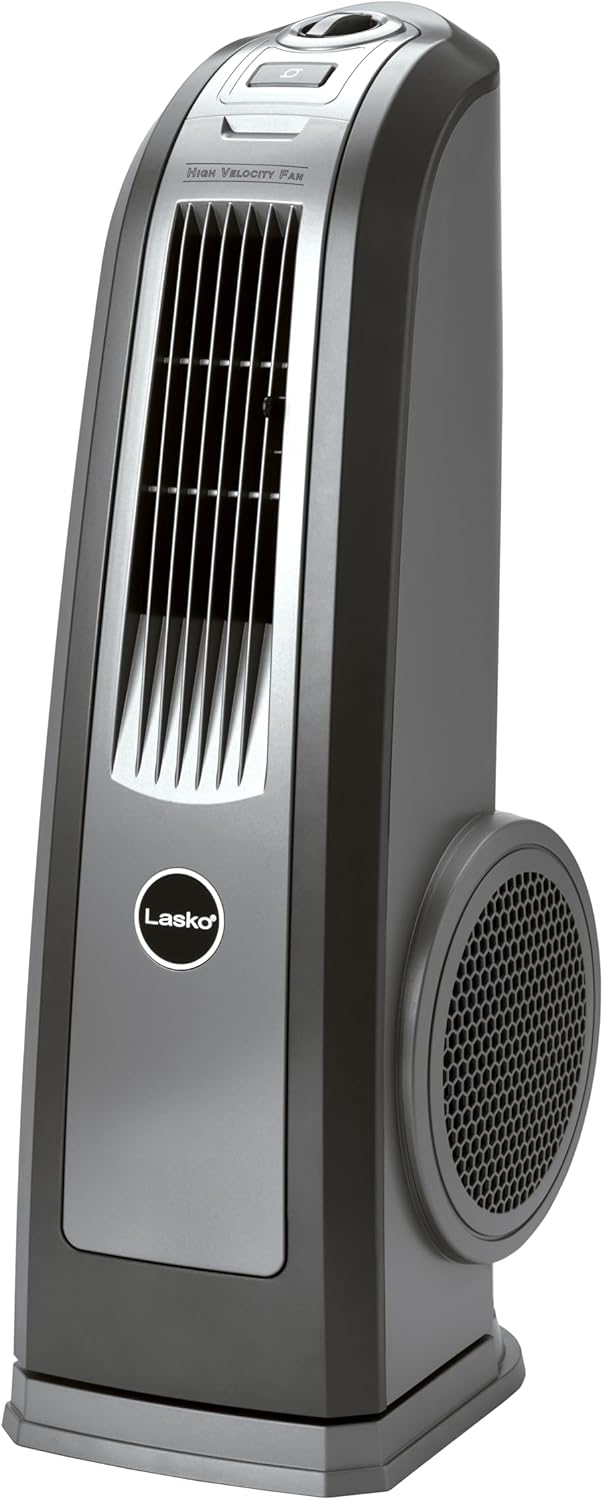
Figure 1: Front view of the Lasko 4924 High Velocity Fan. The fan features a sleek, space-saving tower design with a prominent Lasko logo on the lower front panel.
Operating Instructions
The Lasko 4924 fan is equipped with user-friendly top-mounted controls for easy operation.
Controls Overview
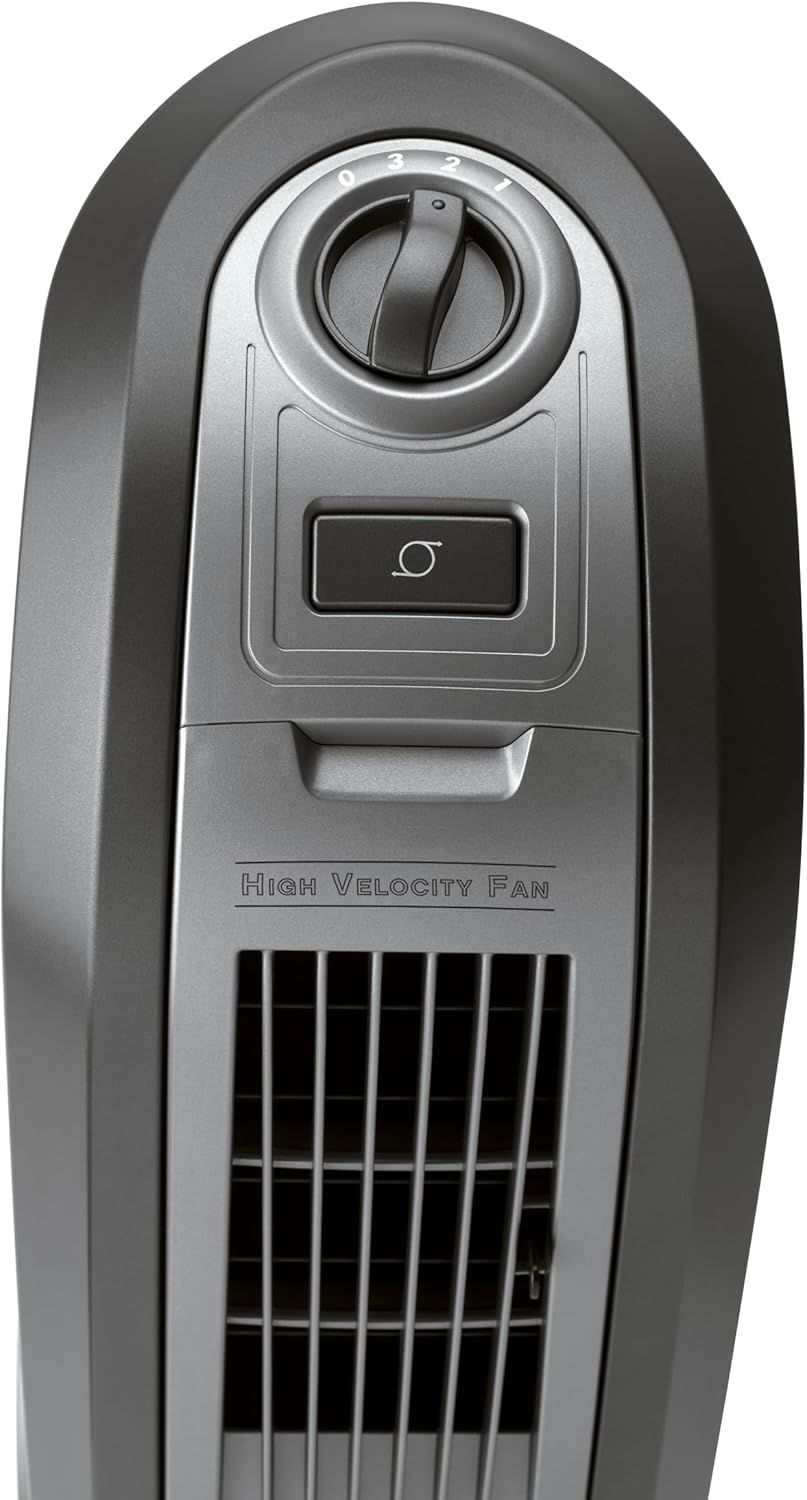
Figure 2: Close-up of the top-mounted controls. The controls include a rotary knob for speed selection and a push-button for oscillation.
- Speed Control Knob: Located at the top, this rotary knob allows you to select from three powerful speeds: Low (1), Medium (2), and High (3). Turn the knob to the desired setting to adjust airflow intensity.
- Oscillation Button: A separate push-button activates or deactivates the oscillation feature, allowing the fan to sweep air from side to side for broader room coverage.
Airflow Direction
The fan features directional louvers that can be manually adjusted to direct airflow precisely where needed. These louvers allow you to direct air upwards or downwards.

Figure 3: A hand demonstrating the adjustment of the directional louvers on the fan's front grille. This allows users to customize the vertical angle of the airflow.
Widespread Oscillation
Engage the oscillation feature for widespread air distribution, effectively cooling a larger space. The fan will smoothly rotate from side to side, ensuring full room coverage.

Figure 4: An illustration showing the Lasko 4924 fan oscillating, with arrows indicating the wide range of motion for comprehensive room cooling.
Portability
The fan includes a convenient easy-grip carry handle, making it simple to move the unit between rooms or to different areas within your home or office.

Figure 5: A close-up of the integrated carry handle located at the top rear of the fan, designed for easy transport.
Maintenance
Regular maintenance ensures optimal performance and longevity of your Lasko fan.
- Cleaning: To maintain efficient airflow, it is recommended to regularly clean the fan blades and interior. For thorough cleaning, the front fascia can be removed. Locate the Lasko emblem on the front; it hides a screw that secures the fascia. Removing this screw allows access to the interior air channel. The squirrel cage fan blades can be cleaned by removing the three screws holding on the side blade protectors. Always unplug the fan before cleaning.
- Safety Fuse Technology: This fan is equipped with Lasko's trusted safety fuse technology, known as THE BLUE Plug. This feature is designed to cut off electric current to the fan if it detects a potentially hazardous electrical fault in the motor or power supply, enhancing user safety.
Troubleshooting
If your fan is not operating as expected, please review the following common issues:
- No Power: Ensure the fan is securely plugged into a working electrical outlet. Check if the outlet is active by plugging in another device. Verify that THE BLUE Plug has not tripped; if it has, reset it according to the instructions on the plug.
- Reduced Airflow: Check for any obstructions in the air intake or exhaust grilles. Dust and debris can accumulate over time, reducing efficiency. Refer to the Maintenance section for cleaning instructions.
- Unusual Noise: Ensure the fan is placed on a stable, level surface. Check for any loose parts or foreign objects that may have entered the fan housing.
For persistent issues or problems not covered here, please contact Lasko customer support or refer to the full user guide.
Specifications
| Feature | Detail |
|---|---|
| Brand | Lasko |
| Model Name | Lasko 4924 High Velocity Blower Fan With Handle |
| Color | Gray |
| Electric Fan Design | Blower |
| Power Source | Corded Electric |
| Style | Blower Fan |
| Product Dimensions | 9"D x 12"W x 30"H |
| Room Type | Bedroom, Living Room |
| Special Feature | Portable |
| Recommended Uses | Cooling |
| Noise Level | 58.9 dB |
| Wattage | 110 watts |
| Number of Blades | 1 |
| Air Flow Capacity | 334 Cubic Feet Per Minute |
| Voltage | 120 |
| Item Weight | 12.5 Pounds |
| Included Components | User Manual, Fan |
| Indoor/Outdoor Usage | Indoor |
| Specification Met | ETL |
| Control Method | Touch |
| Number of Power Levels | 3 |
| Cable Length | 72 Inches |
Warranty and Support
The Lasko 4924 Oscillating High Velocity Fan comes with a 1-year limited warranty.
For detailed warranty information, troubleshooting, or to contact customer support, please refer to the official user guide: