
1. Introduction
The Weiser CLC10010 Tell LC2400 Series Storeroom Leverset is a commercial-grade door hardware solution designed for durability and security. This leverset features Grade 1 steel construction with zinc dichromate coating for corrosion resistance, a freewheeling clutch for enhanced security against forced entry, and independent spring cages for reliable operation. It is UL/ULC listed for 3-hour fire doors, making it suitable for various commercial applications.
This manual provides detailed instructions for the proper installation, operation, and maintenance of your Weiser CLC10010 leverset. Please retain this manual for future reference.
2. Safety Information
WARNING: Failure to follow these instructions may result in property damage or injury.
- Always wear appropriate personal protective equipment (PPE), such as safety glasses and gloves, during installation.
- Ensure all components are securely fastened before use.
- Do not modify the product in any way, as this may compromise its security features and void the warranty.
- Keep small parts away from children to prevent choking hazards.
- If you encounter any difficulties during installation or operation, contact qualified personnel or Weiser customer support.
3. Package Contents
Verify that all the following components are included in your package:
- Handle
- Outside rosette
- Screw posts
- Cylinder collar
- Spindle
- Latch screws
- Face plate
- Rotation stem
- Mounting screws
- Turn piece
- Paper tab
- Inside rosette
- Lever sleeve (if leverset)
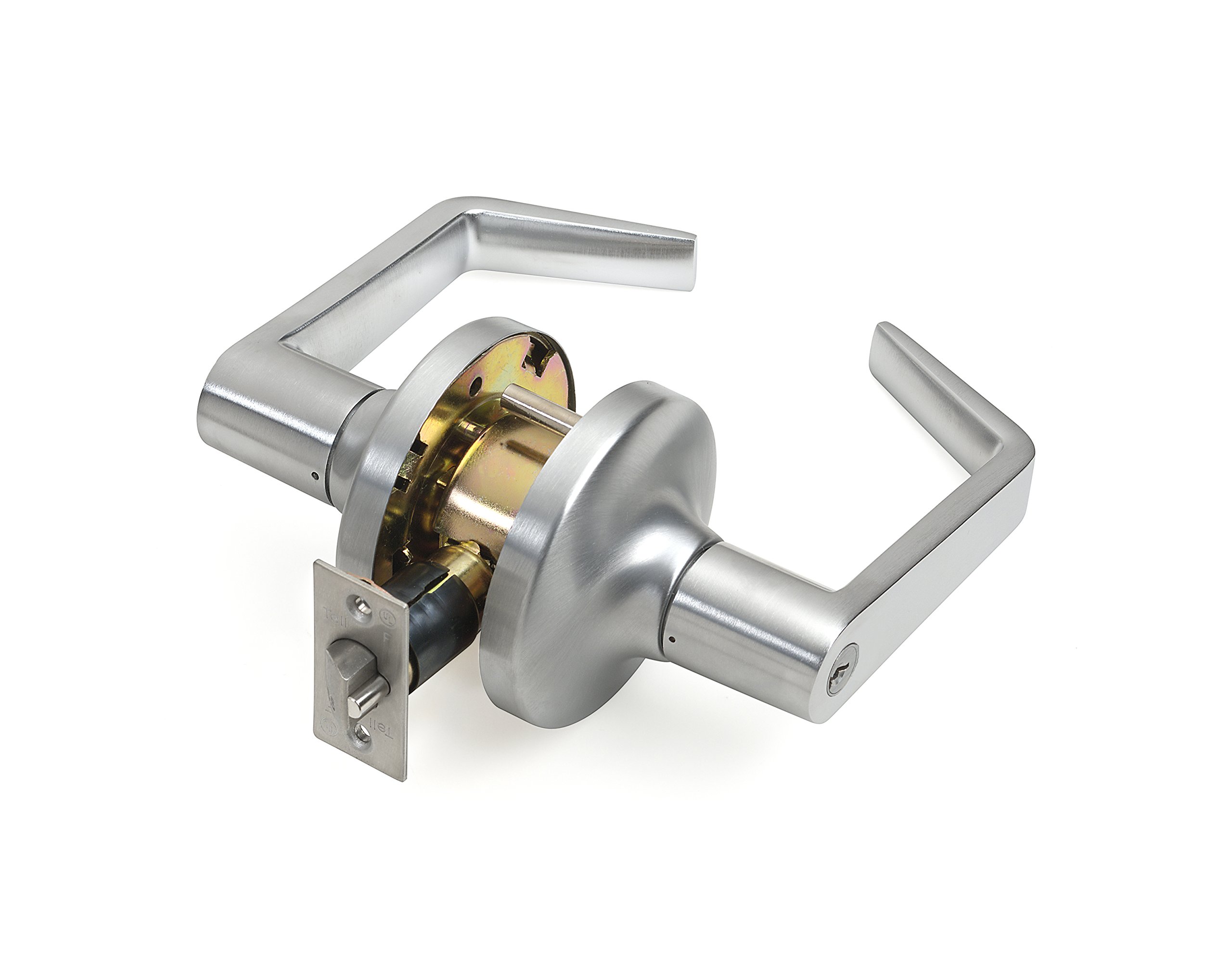
Figure 1: Overview of the Weiser CLC10010 Tell LC2400 Series Storeroom Leverset and its included components. This image displays the main parts required for installation.
4. Setup and Installation
The Weiser CLC10010 leverset is designed for easy installation. Basic tools such as a screwdriver and tape measure are typically required. Ensure your door is properly prepared with standard bore holes before beginning.
4.1 Prepare the Door
- Verify the backset measurement (distance from the door edge to the center of the bore hole).
- Ensure the door thickness is compatible with the leverset.
4.2 Install the Latch
- Insert the latch into the edge bore hole of the door.
- Secure the latch with the provided latch screws. Ensure the latch bolt faces the correct direction for door swing.
4.3 Install the Exterior Lever Assembly
- Place the outside rosette onto the exterior side of the door.
- Insert the exterior lever assembly through the door bore hole, ensuring the spindle engages with the latch mechanism.
4.4 Install the Interior Lever Assembly
- Align the interior rosette and lever assembly with the exterior components.
- Secure both assemblies using the screw posts and mounting screws. Tighten firmly but do not overtighten.
- Attach the turn piece to the interior side, if applicable for your specific storeroom function.
4.5 Test Operation
After installation, test the leverset's function by operating the levers and ensuring the latch retracts smoothly. Verify that the lock mechanism (if applicable) engages and disengages correctly.
5. Operating Instructions
The Weiser CLC10010 Tell LC2400 Series is a storeroom function leverset. This means the exterior lever is always rigid (locked) and requires a key for entry. The interior lever is always free for exit.
5.1 Entry (Exterior Side)
- Insert the correct key into the cylinder on the exterior lever.
- Turn the key to retract the latch bolt.
- Push or pull the door open.
- Remove the key. The exterior lever will return to its rigid, locked state.
5.2 Exit (Interior Side)
- Depress the interior lever.
- Push or pull the door open.
- Release the lever. The latch bolt will extend, and the door will close.
Note: The freewheeling clutch mechanism allows the exterior lever to turn freely without retracting the latch when not unlocked by a key, providing enhanced security against forced entry attempts.
6. Maintenance
Regular maintenance ensures the longevity and proper function of your Weiser leverset.
- Cleaning: Clean the exterior surfaces with a soft, damp cloth. Avoid abrasive cleaners, solvents, or harsh chemicals, as these can damage the finish.
- Lubrication: Periodically apply a small amount of graphite lubricant or a silicone-based spray to the keyway and latch bolt mechanism to ensure smooth operation. Do not use oil-based lubricants, as they can attract dirt and dust.
- Inspection: Regularly inspect all visible components for signs of wear, damage, or loose screws. Tighten any loose screws immediately.
7. Troubleshooting
If you experience issues with your leverset, refer to the following common problems and solutions:
| Problem | Possible Cause | Solution |
|---|---|---|
| Lever is stiff or difficult to turn. | Lack of lubrication, dirt buildup, misaligned components. | Apply graphite lubricant to the keyway and latch. Clean the mechanism. Check for proper alignment during installation. |
| Key is difficult to insert or turn. | Dirt in keyway, worn key, cylinder issue. | Clean keyway with compressed air. Lubricate with graphite. Try a new key if available. If problem persists, contact support. |
| Latch bolt does not retract fully. | Misaligned latch, obstruction, worn spring. | Check latch alignment and ensure no obstructions in the door frame. Inspect for damage. |
| Exterior lever does not lock (storeroom function). | Internal mechanism issue, incorrect installation. | Verify correct installation of the freewheeling clutch mechanism. If problem persists, professional service may be required. |
For issues not listed here, or if solutions do not resolve the problem, please contact Weiser customer support.
8. Specifications
| Feature | Detail |
|---|---|
| Model Number | CL100010 |
| Series | Tell LC2400 Series |
| Function | Storeroom Leverset |
| Material | Chrome, Alloy Steel (Handle), Steel (Chassis) |
| Finish | Brushed |
| Corrosion Resistance | Zinc Dichromate Coated Steel |
| Security Feature | Freewheeling Clutch |
| Fire Rating | UL/ULC listed for 3-hour fire door |
| Product Dimensions | 25.4 x 7.62 x 25.4 cm |
| Item Weight | 1.66 kg |
| Manufacturer | Tell Manufacturing Commercial Doors And Hardware |
9. Warranty and Support
9.1 Warranty Information
This Weiser CLC10010 Tell LC2400 Series Leverset comes with a Limited Lifetime Warranty as stated in the product features, and a 30-day warranty as per the specifications. Please refer to the specific warranty documentation provided with your purchase for full terms and conditions. The warranty covers defects in materials and workmanship under normal use.
9.2 Customer Support
For technical assistance, replacement parts, or warranty claims, please contact Weiser customer support. You can find contact information on the official Weiser website or through your product retailer.
Manufacturer: Tell Manufacturing Commercial Doors And Hardware