
AcuRite 13131
AcuRite Atomic Alarm Clock Model 13131 User Manual
Your guide to setup, operation, and maintenance.
Introduction
Thank you for purchasing the AcuRite Atomic Alarm Clock. This device is designed to provide precise timekeeping, date, day of the week, and indoor temperature readings. It features radio-controlled synchronization with the National Institute of Standards and Technology (NIST) WWVB radio station for automatic time adjustments, including Daylight Saving Time. Please read this manual thoroughly to ensure proper setup and operation.
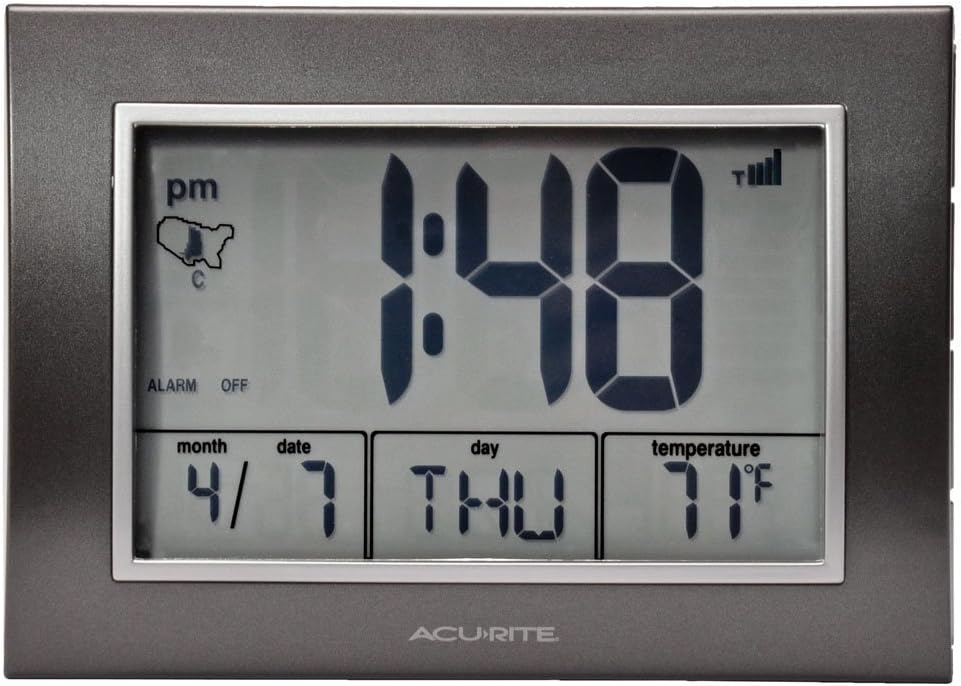
Figure 1: AcuRite Atomic Alarm Clock, front view with display off, showing time, date, day, and temperature.
Setup
1. Battery Installation
- Locate the battery compartment on the back of the unit.
- Remove the battery compartment cover.
- Insert 3 "AA" alkaline batteries (not included) according to the polarity markings (+ and -) inside the compartment.
- Replace the battery compartment cover.
Note: It is recommended to use fresh, high-quality alkaline batteries for optimal performance. Do not mix old and new batteries or different types of batteries.
2. Initial Setup and Atomic Clock Synchronization
Upon battery installation, the clock will automatically begin searching for the WWVB atomic time signal. This process can take several minutes to several hours, depending on your location and environmental conditions. For best reception, place the clock near a window, with the back of the unit facing Colorado (where the WWVB transmitter is located).

Figure 2: AcuRite Atomic Alarm Clock with blue backlight activated.
- The atomic signal strength indicator (located near the time display) will show bars indicating reception quality. More bars mean a stronger signal.
- Once the signal is received, the clock will automatically set the correct time, date, and day of the week.
- If the signal is not acquired within 24 hours, try repositioning the clock.
3. Manual Time and Date Setting (If Atomic Signal is Unavailable)
In areas where the atomic signal cannot be received, you can manually set the time and date.
- Press and hold the SET button (usually on the back or side) for a few seconds until the display flashes.
- Use the UP or DOWN buttons to adjust the flashing value (e.g., hour, minute, year, month, day).
- Press SET again to confirm the setting and move to the next value.
- Repeat until all settings are complete.
Operating Instructions
1. Time Zone Settings
The clock supports time zones for EST, CST, MST, and PST. To adjust the time zone:
- Locate the TIME ZONE button (often labeled TZ) on the back of the unit.
- Press the button repeatedly to cycle through the available time zones until your desired zone is displayed.
2. Setting the Alarm
The clock features a programmable alarm with an audible alert.
- Press the ALARM SET button (or similar) once to display the current alarm time.
- Press and hold the ALARM SET button until the alarm hour flashes.
- Use the UP or DOWN buttons to adjust the hour.
- Press ALARM SET again to confirm the hour and adjust the minutes.
- Use the UP or DOWN buttons to adjust the minutes.
- Press ALARM SET to confirm and exit alarm setting mode.
3. Activating/Deactivating the Alarm
To turn the alarm ON or OFF:
- Press the ALARM ON/OFF button (or similar). An alarm icon will appear on the display when the alarm is active.
4. Snooze Function
When the alarm sounds, press the large SNOOZE/LIGHT bar on top of the clock to temporarily silence the alarm. The alarm will sound again after approximately 8-10 minutes.
5. Backlight
Press the SNOOZE/LIGHT bar to activate the bright blue momentary backlight for easy viewing in low light conditions.
6. Temperature Display
The clock displays indoor temperature. To switch between Fahrenheit (℉) and Celsius (℃):
- Locate the F/C button (or similar) on the back of the unit and press it to toggle between the two units.

Figure 3: Close-up view of the AcuRite Atomic Alarm Clock's LCD display.
Maintenance
1. Cleaning
Clean the unit with a soft, damp cloth. Do not use abrasive cleaners or chemicals that may damage the display or casing.
2. Battery Replacement
When the display dims or the unit stops functioning correctly, replace the batteries. Always replace all batteries at the same time with new ones. Dispose of old batteries responsibly according to local regulations.
Troubleshooting
| Problem | Possible Solution |
|---|---|
| No display or dim display | Check battery polarity. Replace batteries with new ones. |
| Atomic time signal not received | Reposition the clock near a window, facing Colorado. Keep away from electronic devices that may cause interference. Allow up to 24 hours for synchronization. |
| Incorrect time or date | Ensure the correct time zone is selected. If atomic signal is weak, manually set the time and date. Verify Daylight Saving Time setting is correct. |
| Alarm does not sound | Ensure the alarm is activated (alarm icon visible). Check alarm time setting. |
Specifications
- Model Number: 13131
- Display Type: Digital LCD
- Power Source: 3 x AA Alkaline Batteries (not included)
- Product Dimensions: Approximately 7 inches (W) x 5 inches (H) x 2.3 inches (D)
- Weight: Approximately 0.16 ounces (without batteries)
- Temperature Range: Indoor only
- Time Synchronization: WWVB Atomic Clock
- Special Features: Atomic time, programmable alarm, date, day of week, indoor temperature, momentary backlight, Daylight Saving Time (DST) auto-adjustment.

Figure 4: AcuRite Atomic Alarm Clock demonstrating its size.
Warranty Information
This AcuRite product is covered by a one-year limited warranty from the date of purchase. For full warranty details and to register your product, please refer to the official AcuRite website or contact customer support.
Customer Support
For additional assistance, troubleshooting, or to inquire about replacement parts, please visit the AcuRite support website or contact their customer service department. Contact information can typically be found on the AcuRite official website or on the product packaging.
Related documents13131


Ask a question about this manual
Ask about setup, troubleshooting, compatibility, parts, safety, or missing instructions. Manuals+ will review the question and use this page’s manual context to help answer it.