
Denon D-MG33M
DENON D-MG33M CD/MD System Component Instruction Manual
Model: D-MG33M
Introduction
This manual provides detailed instructions for the setup, operation, and maintenance of your DENON D-MG33M CD/MD System Component. Please read this manual thoroughly before using the unit to ensure proper operation and to maximize your listening experience. Keep this manual for future reference.

Figure 1: Front view of the Denon D-MG33M CD/MD System Component. This image shows the main unit with its silver finish and the two accompanying wood-grain speakers, highlighting the compact design.
Key Features
- High-quality audio playback with 14cm fiberglass woofer and MDF cabinet speakers.
- Equipped with playback functions including a tuner, capable of CD-R/RW playback.
- Supports MDLP mode for 2x and 4x long-time stereo recording.
- Features various MD functions such as 2x/4x speed editing and CD-to-MD synchro recording.
- Includes a group management function for easy song search and playback during long-time stereo recording (up to 99 groups).
- Convenient MD PICK REC function for precise recording from the beginning of a song.
- Equipped with Super Dynamic Bass (SDB) circuit for rich bass reproduction even at low listening volumes.
- Analog mini-jack input on the front panel for connecting portable players.
- DENON BUS (System Connector) for system connection with optional cassette deck DRR-M33, enabling integrated control.
- Sophisticated design with a substantial aluminum front panel and aluminum-capped controls.
- Includes an easy-to-understand remote control with a mobile phone-type 10-key layout for text input.
Setup
1. Unpacking and Placement
Carefully remove all components from the packaging. Place the main unit and speakers on a stable, flat surface, ensuring adequate ventilation around the unit. Avoid direct sunlight, heat sources, or areas with high humidity.

Figure 2: The Denon D-MG33M system components, including the central unit, two wooden-finish speakers, and the remote control. This image illustrates the complete system layout.
2. Speaker Connection
Connect the supplied speaker cables to the speaker terminals on the rear of the main unit and the corresponding terminals on each speaker. Ensure correct polarity (+ to + and - to -) for optimal sound quality.
3. Power Connection
Connect the AC power cord to the unit's AC inlet and then to a wall outlet. The unit operates on AC 100V, 50/60Hz.

Figure 3: Rear panel of the Denon D-MG33M main unit. This view displays the model number (D-XW33), serial number, and power requirements (AC 100V, 48W, 50/60Hz), along with various connection ports.
4. Connecting External Devices
- Portable Player: Connect a portable audio player to the "Portable In" stereo mini-jack on the front panel.
- Other Audio Devices (TAPE/AUX): Use RCA cables to connect other audio components (e.g., tape deck, additional audio source) to the TAPE (IN/RCA) or AUX (IN/RCA) terminals on the rear panel.
- Optional Cassette Deck (DRR-M33): For integrated system control, connect the optional Denon cassette deck DRR-M33 using the DENON BUS (System Connector) if available.
Operating Instructions
1. Basic Operation
- Power On/Off: Press the POWER button on the unit or remote control.
- Volume Control: Use the VOLUME knob on the unit or the VOLUME +/- buttons on the remote control.
- Function Selection: Press the FUNCTION button repeatedly to cycle through CD, MD, Tuner, TAPE, AUX, and Portable In modes.
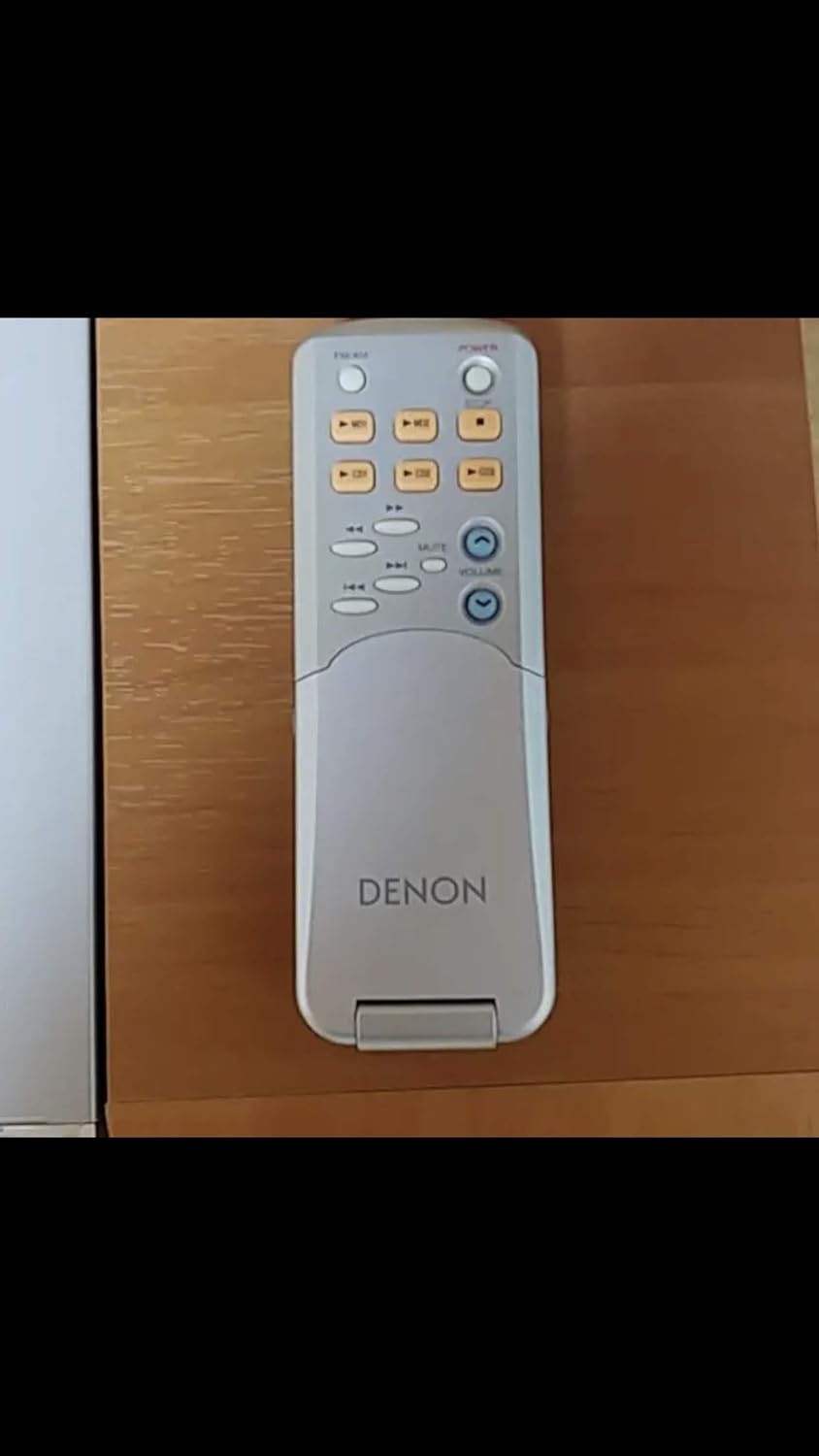
Figure 4: The Denon D-MG33M remote control in its compact, closed state. This image highlights the basic playback and volume controls visible on the remote.
2. CD Playback
- Press the CD button to select CD mode.
- Press the OPEN/CLOSE button to open the CD tray.
- Place a CD (or CD-R/RW) on the tray with the label side up and press OPEN/CLOSE again to close the tray.
- Press PLAY to start playback.
3. MD Playback and Recording
- Press the MD button to select MD mode.
- Insert an MD into the slot.
- Press PLAY to start playback.
- MDLP Mode: To enable 2x or 4x long-time stereo recording, select MDLP mode before recording. Refer to the on-screen display for mode selection.
- CD Synchro Recording:
- ALL TRACK SRS: Records all tracks from a CD sequentially onto an MD.
- 1 TRACK SRS: Records only a selected track from a CD onto an MD.
- MD PICK REC: While listening to a CD or FM, if you hear a song you like, press the ENTER button before the song ends. The unit will record the song precisely from its beginning onto the MD.
- Group Management: Use the group functions to divide recorded songs into up to 99 groups for easier search and playback.

Figure 5: The Denon D-MG33M remote control in its open position, revealing the full keypad. This allows for advanced functions like text input and direct track selection, similar to a mobile phone keypad.
4. Tuner Operation
Press the TUNER button to select FM or AM mode. Use the tuning buttons to find desired stations. Stations can be preset for quick access.
5. Super Dynamic Bass (SDB)
Activate the SDB function to enhance bass reproduction, providing powerful sound even at low listening volumes. Refer to the unit's display or remote control for SDB activation.
Maintenance
- Cleaning: Wipe the unit and speakers with a soft, dry cloth. For stubborn dirt, use a cloth lightly dampened with water and a mild detergent, then wipe dry. Do not use abrasive cleaners, alcohol, benzene, or thinners.
- Disc Care: Handle CDs and MDs by their edges. Keep them clean and free from dust and scratches. Store them in their cases when not in use.
- Ventilation: Ensure that the ventilation openings on the unit are not blocked to prevent overheating.
Troubleshooting
| Problem | Possible Cause | Solution |
|---|---|---|
| No power | Power cord not connected securely. | Check power cord connection to unit and wall outlet. |
| No sound | Volume is too low or muted. Speaker cables not connected correctly. Incorrect function selected. | Increase volume, check mute status. Verify speaker cable connections and polarity. Select the correct input function. |
| Disc not playing | Disc is dirty or scratched. Disc inserted incorrectly. | Clean the disc. Insert the disc with the label side facing up. |
| Remote control not working | Batteries are depleted or inserted incorrectly. Obstruction between remote and unit. | Replace batteries, ensuring correct polarity. Remove any obstructions. |
If the problem persists after trying these solutions, please contact Denon customer support or a qualified service technician.
Specifications
| Feature | Detail |
|---|---|
| Model Number | D-MG33M |
| Color | Wood Grain |
| Practical Maximum Output (Speakers) | 20W + 20W (6Ω, EIAJ) |
| Audio Input Terminals | TAPE (IN/RCA), AUX (IN/RCA), Portable In (IN/Stereo Mini Jack) |
| Power Supply | AC 100V, 50/60Hz |
| Power Consumption | 48W (from back panel image) |
| Package Dimensions | 51 x 35.2 x 34.6 cm |
| Item Weight | 500 g |
| ASIN | B000B9OAWE |
| Date First Available on Amazon.co.jp | September 16, 2005 |
Warranty and Support
For information regarding warranty coverage, service, or technical support, please refer to the warranty card included with your product or visit the official Denon website. Keep your purchase receipt as proof of purchase for warranty claims.
Official Denon Website: www.denon.com
Related documentsD-MG33M


Ask a question about this manual
Ask about setup, troubleshooting, compatibility, parts, safety, or missing instructions. Manuals+ will review the question and use this page’s manual context to help answer it.