
GPX CDPR6205SPK
GPX Personal CD Player with Amplified Speaker System
Model: CDPR6205SPK
Product Overview
The GPX Personal CD Player with Amplified Speaker System (Model CDPR6205SPK) is a portable audio device designed for playing compact discs and listening to FM radio. It features an integrated speaker system for enhanced audio output.
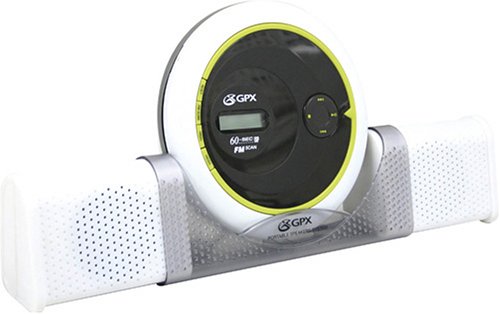
An image showing the GPX Personal CD Player, a white and black circular unit, docked between two white rectangular amplified speakers. The speakers are attached to a clear plastic stand that holds the CD player upright.
Key Features:
- Retractable amplified stereo speakers with integrated CD player stand.
- Stereo line input for connecting external audio devices.
- Volume control for speaker output.
- CD Player with digital FM scan radio.
- 60-second Anti-Skip Protection (ASP) for uninterrupted playback.
- 6-digit LCD display for track information and radio frequency.
- Supports CD and CD-R/RW playback.
- Dynamic Bass Boost System for enhanced low-frequency sound.
- Battery operated: Speakers require 4 AA batteries, CD player requires 2 AA batteries (batteries not included).
Setup Guide
1. Battery Installation
This unit operates on batteries for portability. Ensure you have fresh batteries before use.
- For the CD Player: Locate the battery compartment on the back or bottom of the CD player. Insert 2 AA batteries, observing the correct polarity (+/-) as indicated inside the compartment.
- For the Amplified Speakers: Locate the battery compartment on each speaker unit. Insert 4 AA batteries (2 per speaker), observing the correct polarity (+/-).
- Close all battery compartment covers securely.
2. Assembling the Speaker System
The amplified speakers are designed to integrate with the CD player.
- Gently slide the two speaker units outwards from the central stand.
- Position the personal CD player into the designated slot in the center of the speaker stand. Ensure it is securely seated.
- Connect the audio cable from the CD player's headphone/line-out jack to the stereo line input jack on the speaker system.
3. Powering On
Once batteries are installed and connections are made, the unit is ready for operation.
- Press the POWER button on the CD player to turn it on. The LCD display should illuminate.
- Ensure the volume control on the speaker system is not set to minimum.
Operating Instructions
1. CD Playback
- Open the CD compartment lid by pressing the OPEN button or sliding the latch.
- Carefully place a CD (CD or CD-R/RW) onto the spindle with the label side facing up.
- Close the CD compartment lid firmly until it clicks.
- Press the PLAY/PAUSE button to begin playback. The track number and elapsed time will appear on the LCD display.
- To pause playback, press PLAY/PAUSE again. Press it once more to resume.
- To skip to the next track, press the SKIP FORWARD button (▶▶|).
- To go back to the beginning of the current track, press the SKIP BACKWARD button (|◀◀) once. Press it twice to go to the previous track.
- To stop playback, press the STOP button.
- The 60-second Anti-Skip Protection (ASP) helps prevent audio interruptions during movement.
2. FM Radio Operation
- Ensure the unit is powered on.
- Press the MODE button (if available, or a dedicated FM button) to switch to FM radio mode. The display will show the radio frequency.
- Press the SCAN button to automatically scan and store available FM stations.
- Use the TUNE UP/DOWN buttons (often shared with skip buttons) to manually tune to a specific frequency or select a stored station.
- Extend the telescopic antenna (if present) for better reception.
3. Using the Amplified Speakers
- The speakers are powered independently by batteries. Ensure they are turned on (if they have a separate power switch) and connected to the CD player's line output.
- Adjust the volume using the VOLUME control knob on the speaker system.
- To activate the Dynamic Bass Boost System, locate and press the DBBS button (if available). This will enhance bass frequencies.
- The stereo line input on the speakers allows connection of other audio sources (e.g., smartphone, MP3 player) using a 3.5mm audio cable (not included).
Maintenance and Care
- Cleaning: Use a soft, dry cloth to clean the exterior of the unit. Do not use abrasive cleaners or solvents. For the CD lens, use a specialized CD lens cleaner disc.
- Battery Replacement: Replace all batteries when the sound becomes distorted or the unit stops functioning correctly. Always replace all batteries at the same time with new ones of the same type. Remove batteries if the unit will not be used for an extended period to prevent leakage.
- CD Handling: Always hold CDs by their edges. Avoid touching the playing surface. Store CDs in their cases to prevent scratches and dust accumulation.
- Storage: Store the unit in a cool, dry place away from direct sunlight, heat sources, and excessive dust or humidity.
- Transport: When transporting the unit, ensure the CD compartment is empty and closed.
Troubleshooting
| Problem | Possible Cause | Solution |
|---|---|---|
| Unit does not power on. | Batteries are dead or incorrectly inserted. | Replace batteries with new ones, ensuring correct polarity. |
| No sound from speakers. | Speakers not powered on; volume too low; audio cable disconnected. | Check speaker batteries/power; increase volume; ensure audio cable is securely connected. |
| CD skips or plays intermittently. | CD is dirty or scratched; unit is being moved excessively; ASP is off. | Clean CD; avoid excessive movement; ensure ASP is active (if applicable). |
| Poor FM radio reception. | Antenna not extended; weak signal area. | Fully extend the telescopic antenna; try repositioning the unit. |
| Display shows "NO DISC" or similar. | No CD inserted; CD inserted incorrectly; CD is unreadable. | Insert a CD; ensure CD is placed label-side up; try a different CD. |
Specifications
| Feature | Detail |
|---|---|
| Brand | GPX |
| Model Number | CDPR6205SPK |
| Product Dimensions (LxWxH) | 33.02 x 5.08 x 22.86 cm (13 x 2 x 9 inches) |
| Item Weight | 590 g (1.3 lbs) |
| Supported Disc Types | CD, CD-R/RW |
| Anti-Skip Protection | 60 seconds |
| Radio Tuner | Digital FM Scan Radio |
| Display | 6-digit LCD |
| Power Source (CD Player) | 2 x AA Batteries (not included) |
| Power Source (Speakers) | 4 x AA Batteries (not included) |
| UPC | 047323062056 |
Warranty and Support
Information regarding product warranty and customer support was not available in the provided product data. Please refer to the product packaging or the manufacturer's official website for the most accurate and up-to-date warranty details and support contact information.
For general inquiries or further assistance, you may visit the official GPX website or contact their customer service department.
Ask a question about this manual
Ask about setup, troubleshooting, compatibility, parts, safety, or missing instructions. Manuals+ will review the question and use this page’s manual context to help answer it.