
1. Introduction
The Brady TLS2200 Portable Label Printer is a robust thermal transfer labeling system designed for identifying a wide variety of items, including cables, file folders, and equipment. It offers high-quality printing at 203 dots per inch (dpi) on materials up to 2 inches wide and print lengths up to 54 inches. Featuring an ABC keyboard for ease of use, the TLS2200 supports both continuous tape and die-cut labels, ensuring crisp and durable results that outlast direct thermal printing.
2. What's in the Box
Upon unboxing your Brady TLS2200 Thermal Labeling System, please verify that all the following components are present:

Image: The Brady TLS2200 Thermal Labeling System and its included accessories, securely stored within the hard plastic carrying case.
- Brady TLS2200 handheld label printer
- Hard plastic case
- PC cable
- AC power cord
- Rechargeable battery
- Manual
- R6210 Ribbon
- Battery Pack
- Battery Charger
- Quick Start Guide
- Communications Cable
- Test Label
- One Cleaning Card
3. Setup
Follow these steps to set up your TLS2200 printer for first use:
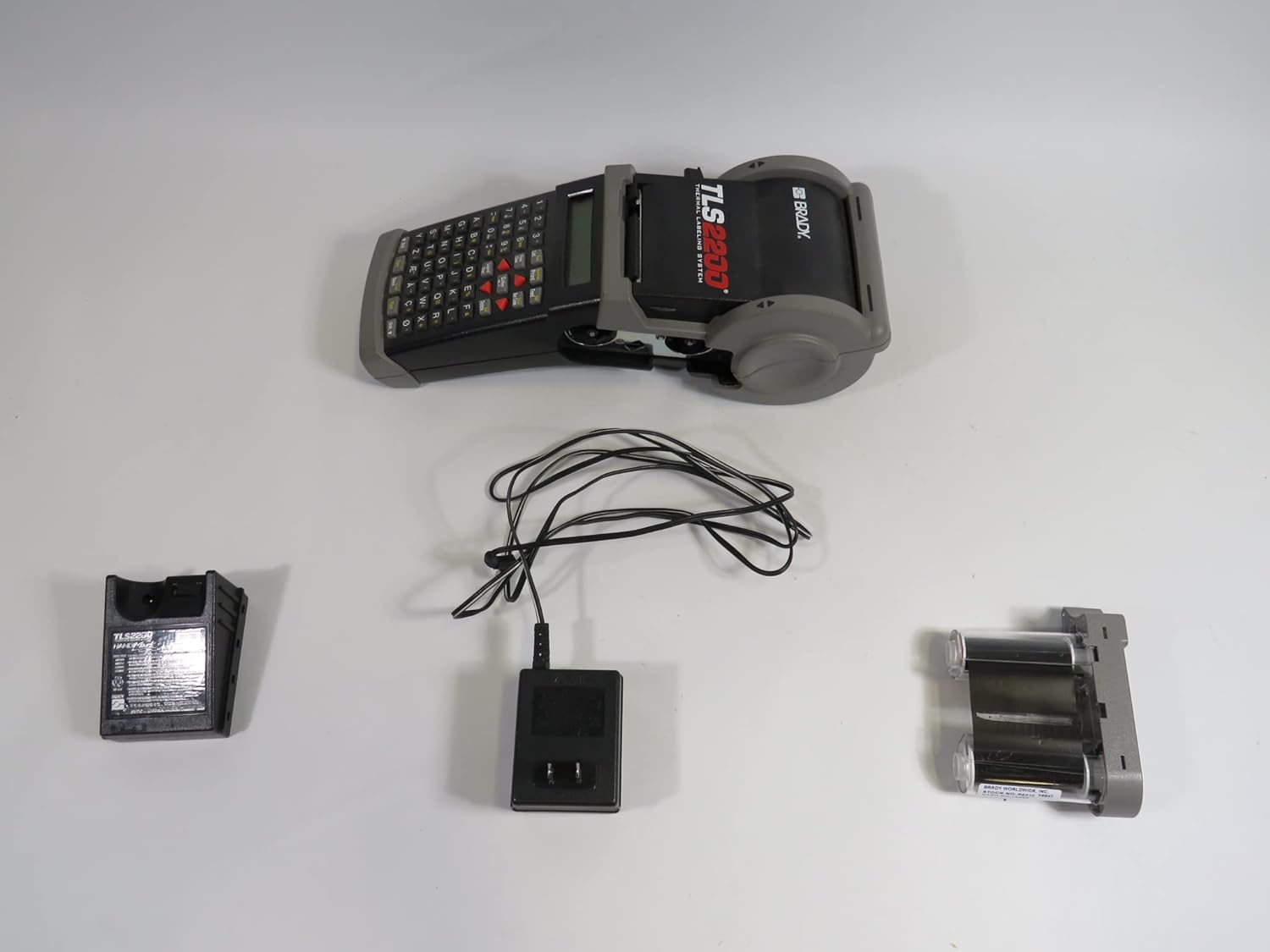
Image: The Brady TLS2200 printer, its rechargeable battery, AC power adapter, and a label ribbon cartridge, ready for setup.
- Charge the Battery: Connect the rechargeable battery to the AC power cord and charger. Allow the battery to fully charge before initial use. The printer can also operate directly from AC power.
- Install Battery: Once charged, insert the rechargeable battery into the designated compartment on the printer.
- Load Label Cartridge: The TLS2200 features a quick-loading cartridge system. Open the printer's media compartment and insert the desired label cartridge. The printer automatically senses the cartridge label type and size. Ensure the ribbon is properly aligned with the label material.
- Power On: Locate the power button (often on the underside or side of the unit) and press it to turn on the printer.
- PC Connection (Optional): If connecting to a computer for advanced label design, use the provided PC cable. Note that older models may use a serial port connection, requiring a serial-to-USB adapter for modern computers.
4. Operating Instructions
The TLS2200 is designed for intuitive operation with its ABC keyboard. Here are the basic steps for creating and printing labels:

Image: The Brady TLS2200 Thermal Labeling System, showcasing its compact design, ABC keyboard, and LCD display for easy label creation.
- Enter Text: Use the ABC keyboard to type the desired legend onto the LCD display. The printer supports TrueType fonts from 4 to 72 point.
- Adjust Text Size/Type: To change the text size or type on the current line, use the SHIFT + UP ARROW or SHIFT + DOWN ARROW keys.
- Print Label: Once your text is entered and formatted, press the PRINT key to generate the label.
- Wire Marker Mode: For wire marking applications, press SHIFT + WIRE KEY to activate the wire marker print mode.
- Printer Settings: To access and modify printer settings, press the FUNC & SETUP keys. This allows adjustment of various parameters to suit your labeling needs.
- Memory Feature: The TLS2200 can store up to 10 label setups, allowing for quick recall of frequently used label formats. It also has a memory capacity of 21,000 characters and 10 label lists.
- Sleep Mode: To conserve battery life, the printer features a sleep mode that can be set to activate after 1, 3, or 5 minutes of non-use.
5. Maintenance
Proper maintenance ensures the longevity and optimal performance of your Brady TLS2200 printer:
- Cleaning: Regularly clean the print head and platen roller using the provided cleaning card or a lint-free cloth moistened with isopropyl alcohol. Ensure the printer is off and disconnected from power before cleaning.
- Battery Care: To maximize battery life, avoid fully discharging the battery frequently. Store the printer and battery in a cool, dry place when not in use for extended periods.
- Label and Ribbon Handling: Always use genuine Brady label cartridges and ribbons. Ensure they are loaded correctly to prevent jams and ensure optimal print quality. Avoid exposing labels to extreme temperatures or direct sunlight.
- Firmware Updates: Periodically check the Brady website for any available firmware updates for your TLS2200 model. Firmware updates can improve performance and resolve known issues.
6. Troubleshooting
If you encounter issues with your TLS2200 printer, consider the following common troubleshooting steps:
- No Power: Ensure the battery is charged and properly installed, or that the AC adapter is securely connected to a working power outlet.
- Poor Print Quality: Check if the label cartridge and ribbon are correctly installed. Clean the print head and platen roller. Ensure you are using compatible Brady labels and ribbons.
- Labels Not Feeding/Jams: Verify that the label cartridge is seated properly. Check for any obstructions in the label path. Ensure the label material is not wrinkled or damaged.
- Printer Not Responding: Try turning the printer off and then on again. If connected to a PC, ensure the cable is secure and the correct drivers are installed.
- Error Messages: Refer to the detailed user manual (PDF link provided in product documentation) for specific error code explanations and resolutions.
For more in-depth troubleshooting or issues not covered here, please consult the official Brady TLS2200 User Manual or contact Brady customer support.
7. Specifications
Below are the key technical specifications for the Brady TLS2200 Thermal Labeling System:

Image: A detailed view of the product information label on the Brady TLS2200, indicating model number, power requirements, and manufacturing details.
| Feature | Specification |
|---|---|
| Model Name | TLS2200 |
| Item Model Number | 18550 |
| Brand | Brady |
| Printing Technology | Thermal Transfer 203 DPI |
| Print Speed | 12 mm/sec |
| Color Capability | Single Color Printing (Monochrome) |
| Max Label Width | 2.000 inches |
| Max Print Width | 1.810 inches |
| Max Label Roll Length | 50 ft / 500 ft (Bulk) |
| Text Sizes | 4 - 72 pt. |
| Connectivity Technology | USB, Ethernet (via PC connection) |
| Power Supply | Rechargeable Battery, AC Power (optional) |
| Weight | 2.75 lbs (1.25 kg) / 7.5 Pounds (shipping) |
| Product Dimensions | 20.08 x 14.17 x 14.17 inches |
| Memory | 21,000 characters, 10 label lists |
| Special Feature | Portable |
8. Warranty and Support
Warranty: The Brady TLS2200 Thermal Labeling System includes a 1-Year Limited Warranty from the manufacturer. Please retain your proof of purchase for warranty claims.
Support: For technical assistance, replacement parts, or further inquiries, please contact Brady customer support directly. You can also visit the official Brady Store for additional product information and resources.


