
1. Introduction
The Clarion N.I.C.E. 430 is an in-car entertainment system designed to provide navigation, audio, and video functionalities. This manual provides essential information for the proper installation, operation, and maintenance of your device.
Please read this manual thoroughly before using the product to ensure safe and optimal performance.
2. Safety Information
Observe the following safety precautions to prevent injury or damage to the device:
- Do not operate the device in a manner that distracts you from driving. Always prioritize road safety.
- Ensure the unit is securely mounted to prevent it from becoming a projectile during sudden stops or collisions.
- Avoid exposing the unit to extreme temperatures, direct sunlight for prolonged periods, or excessive moisture.
- Do not attempt to disassemble or modify the unit. Refer all servicing to qualified personnel.
- Clean the unit with a soft, dry cloth. Do not use abrasive cleaners or solvents.
3. Package Contents
Verify that all items are present in the package:
- Clarion N.I.C.E. 430 Main Unit
- GPS Receiver
- Remote Control (as shown in image)
- Power Cable
- Mounting Bracket (Dashboard Mount)
- User Manual (this document)
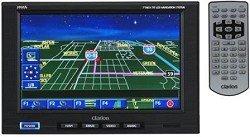
Image: The Clarion N.I.C.E. 430 main unit with its display showing a navigation map, alongside its remote control.
4. Setup
4.1 Mounting the Unit
The Clarion N.I.C.E. 430 is designed for dashboard mounting. Ensure the mounting location does not obstruct the driver's view or interfere with vehicle controls or airbags.
- Clean the dashboard surface where the mount will be placed.
- Attach the mounting bracket to the dashboard using the provided adhesive or screws, ensuring a secure fit.
- Slide the main unit onto the mounting bracket until it clicks into place. Adjust the viewing angle for optimal visibility.
4.2 Power Connection
Connect the power cable to the unit and then to your vehicle's 12V power outlet (cigarette lighter socket) or directly to the vehicle's electrical system as per professional installation guidelines.
4.3 Initial Setup
Upon first power-on, the unit may prompt you to configure basic settings such as language, time zone, and map preferences. Follow the on-screen instructions to complete the initial setup.
5. Operating Instructions
5.1 Touchscreen Navigation
The unit features a capacitive touchscreen for interaction. Tap icons or buttons to select functions, enter data, or navigate menus.
5.2 GPS Navigation
To use the navigation feature:
- Ensure the external GPS receiver is connected and has a clear view of the sky.
- From the main menu, select the 'Navigation' icon.
- Enter your destination using the on-screen keyboard or select from saved locations.
- The unit will calculate a route and provide turn-by-turn voice guidance and visual cues on the map (North America maps are pre-loaded).
5.3 Media Playback (USB)
The unit supports media playback via USB connectivity. Connect a USB storage device containing compatible audio or video files to the designated USB port. Select the 'Media' or 'USB' option from the main menu to browse and play content.
5.4 Remote Control Usage
The included remote control allows for convenient operation of various functions without directly touching the screen. Refer to the remote control's button layout for specific functions.
6. Maintenance
6.1 Cleaning the Unit
To maintain the display and casing, gently wipe with a soft, lint-free cloth. For stubborn marks, slightly dampen the cloth with water. Do not use chemical cleaners, solvents, or abrasive materials, as these can damage the screen or finish.
6.2 Software Updates
Periodically check the Clarion official website for any available software or map updates for your N.I.C.E. 430 unit. Follow the instructions provided with the update package carefully.
7. Troubleshooting
If you encounter issues with your Clarion N.I.C.E. 430, refer to the following common problems and solutions:
| Problem | Possible Cause | Solution |
|---|---|---|
| Unit does not power on. | No power connection or blown fuse. | Check power cable connection. Verify vehicle's 12V outlet is functional. Check vehicle's fuse box for a blown fuse. |
| No GPS signal. | GPS receiver obstructed or not connected. | Ensure GPS receiver has a clear view of the sky. Verify receiver is securely connected to the main unit. Move to an open area. |
| Touchscreen unresponsive. | Temporary software glitch or dirty screen. | Restart the unit by cycling power. Clean the screen thoroughly with a soft cloth. |
| Audio issues (no sound/distorted). | Volume too low, mute enabled, or connection issue. | Adjust volume. Check if mute is active. Verify audio output connections to vehicle's sound system. |
If the problem persists after attempting these solutions, please contact Clarion customer support.
8. Specifications
| Feature | Detail |
|---|---|
| Model | N.I.C.E. 430 |
| Dimensions (Package) | 13.4 x 11.4 x 4.2 inches |
| Item Weight | 5.7 pounds |
| Manufacturer | Clarion |
| Vehicle Service Type | Car |
| Special Feature | Touchscreen Navigation |
| Connectivity Technology | USB |
| Map Type | North America |
| Included Components | GPS Receiver |
| Mounting Type | Dashboard Mount |
| Touch Screen Type | Capacitive |
| Display Type | Touch Screen |
| Human Interface Input | Touchscreen |
9. Warranty and Support
Warranty information for your Clarion N.I.C.E. 430 is typically provided with your purchase documentation. Please refer to the warranty card or contact your retailer for details regarding coverage and terms.
For technical support, product registration, or further inquiries, please visit the official Clarion website or contact their customer service department. Contact information can usually be found on the manufacturer's website or in the product packaging.
Note: No official product videos from the seller were available for embedding in this manual.