
Sigma 508101
Sigma 70-300mm f/4-5.6 DG APO Macro Telephoto Zoom Lens
Model: 508101 | Brand: Sigma
1. Introduction
This manual provides comprehensive instructions for the proper use, maintenance, and troubleshooting of your Sigma 70-300mm f/4-5.6 DG APO Macro Telephoto Zoom Lens. This high-performance lens is optimized for digital SLR cameras, offering a versatile telephoto zoom range with integrated tele-macro functionality.
Designed with two Special Low Dispersion (SLD) glass elements, the lens effectively minimizes chromatic aberrations. Its multi-layer coating reduces flare and ghosting, common issues in digital photography, ensuring optimal color balance throughout the zoom range. The macro feature allows for close-up photography at specific focal lengths, making it suitable for a wide array of photographic applications including portraits, sports, and nature.
2. What's in the Box
Upon unpacking, please ensure all the following items are present:
- Sigma 70-300mm f/4-5.6 DG APO Macro Telephoto Zoom Lens
- Lens Hood
- Front Lens Cap
- Rear Lens Cap
- Pouch
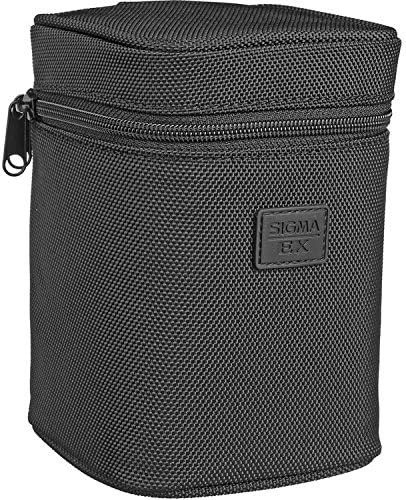
Image: The included black Sigma lens pouch, designed for protective storage and transport of the lens.
3. Parts Identification
Familiarize yourself with the various parts of your lens:

Image: Front view of the Sigma 70-300mm lens, highlighting its various rings and switches.
- Front Element: The outermost glass element of the lens.
- Filter Thread: Located around the front element, used for attaching filters.
- Focus Ring: Used for manual focusing.
- Zoom Ring: Used to adjust the focal length (70mm to 300mm).
- Focus Mode Switch (AF/MF): Toggles between Autofocus and Manual Focus.
- Macro Switch: Engages the macro mode at specific focal lengths.
- Lens Mount: The rear part of the lens that attaches to the camera body.
4. Setup
4.1 Attaching the Lens
- Ensure both the camera and lens are clean and free of dust.
- Remove the rear lens cap from the lens and the body cap from your camera.
- Align the mounting index (usually a white or red dot) on the lens with the corresponding index on your camera body.
- Insert the lens into the camera mount and rotate it clockwise (for Canon EF mount) until it clicks into place. Do not force the lens.
4.2 Detaching the Lens
- Turn off your camera.
- Press and hold the lens release button on your camera body.
- While holding the button, rotate the lens counter-clockwise until it detaches from the camera body.
- Immediately attach the rear lens cap to the lens and the body cap to your camera to protect the sensor and lens elements from dust.
5. Operating the Lens
5.1 Focusing (Autofocus and Manual Focus)
This lens supports both autofocus (AF) and manual focus (MF).
- To switch between modes, use the AF/MF switch located on the side of the lens barrel.
- In Autofocus (AF) mode, the camera will automatically focus when the shutter button is half-pressed. Note that the autofocus motor on this lens can be audible during operation.
- In Manual Focus (MF) mode, rotate the focus ring on the lens barrel to achieve sharp focus. Ensure the camera's focus mode is also set to MF if applicable.
- Important: Avoid rotating the focus ring manually when the lens is set to AF mode, as this can damage the internal focusing mechanism.
5.2 Zooming
To adjust the focal length, rotate the zoom ring on the lens barrel. The lens covers a range from 70mm (wide telephoto) to 300mm (super telephoto).
5.3 Macro Function
The lens features a dedicated macro mode for close-up photography:
- The macro function can only be engaged when the focal length is set between 200mm and 300mm.
- To activate, slide the Macro switch on the lens barrel.
- In macro mode, the minimum focusing distance is reduced to approximately 37.4 inches (95 cm), allowing for a maximum magnification ratio of 1:2 at 300mm.
- To exit macro mode, slide the switch back to the normal position. You may need to adjust the focus or zoom slightly to disengage the macro lock.
6. Maintenance
6.1 Cleaning the Lens
- Lens Elements: Use a lens blower brush to remove dust. For smudges or fingerprints, use a clean microfiber lens cloth with a small amount of lens cleaning solution. Wipe gently in a circular motion from the center outwards.
- Lens Body: Wipe with a soft, dry cloth. For stubborn dirt, a slightly damp cloth can be used, followed by a dry cloth.
- Do not use: Solvents, alcohol, or abrasive cleaners, as these can damage the lens coatings or plastic parts.
6.2 Storage
- Always attach the front and rear lens caps when the lens is not in use.
- Store the lens in a cool, dry place, away from direct sunlight and extreme temperatures.
- If storing for extended periods, consider using a dehumidifying agent to prevent mold growth, especially in humid environments.
- Store the lens in its included pouch for added protection.
7. Troubleshooting
This section addresses common issues you might encounter with your lens.
| Problem | Possible Cause | Solution |
|---|---|---|
| Lens not focusing (Autofocus) | Lens set to MF; insufficient light; subject too close; camera settings. | Switch lens to AF; ensure adequate lighting; check minimum focusing distance; verify camera AF settings. |
| Images are blurry | Incorrect focus; camera shake; dirty lens; slow shutter speed. | Re-focus; use a tripod or faster shutter speed; clean lens elements; increase ISO or aperture. |
| Lens not attaching to camera | Misalignment; obstruction. | Ensure alignment marks match; check for debris on mount; do not force. |
| Macro mode not engaging | Focal length outside 200-300mm range. | Adjust zoom to 200mm or higher before engaging macro switch. |
For issues not listed here, or if problems persist, please refer to your camera's instruction manual or contact Sigma customer support.
8. Specifications
Detailed technical specifications for the Sigma 70-300mm f/4-5.6 DG APO Macro Telephoto Zoom Lens:
| Feature | Detail |
|---|---|
| Model Number | 508101 |
| Focal Length | 70-300mm |
| Maximum Aperture | f/4-5.6 |
| Lens Type | Telephoto Zoom with Macro Function |
| Compatible Mountings | Canon EF |
| Minimum Focusing Distance (Normal) | 59.1 inches (150 cm) |
| Minimum Focusing Distance (Macro) | 37.4 inches (95 cm) at 200-300mm |
| Maximum Magnification Ratio | 1:2 (at 300mm in Macro mode) |
| Lens Construction | 14 elements in 10 groups (includes SLD glass elements) |
| Filter Size | 58mm (typical for this model) |
| Product Dimensions | 4.8 x 3.03 x 3.03 inches (12.2 x 7.7 x 7.7 cm) |
| Item Weight | 1.21 pounds (0.55 kg) |
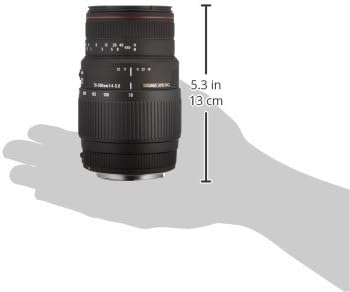
Image: Side view of the Sigma 70-300mm lens, illustrating its approximate length of 5.3 inches (13 cm).
9. Warranty and Support
For information regarding the product warranty, please refer to the warranty card included with your purchase or visit the official Sigma website. Warranty terms and conditions may vary by region.
If you require technical assistance, have questions about your lens, or need to arrange for service, please contact Sigma customer support. Contact details can typically be found on the Sigma website or in the documentation provided with your lens.
Legal Disclaimer: Returns are accepted within 3 days of receipt, as per the product's important information.
Ask a question about this manual
Ask about setup, troubleshooting, compatibility, parts, safety, or missing instructions. Manuals+ will review the question and use this page’s manual context to help answer it.