
Introduction
The Radial ProDI is a high-quality, passive mono direct box designed for use with various instruments such as acoustic guitars, bass guitars, electric pianos, and synthesizers. It features a custom transformer engineered to deliver optimal performance and effectively eliminate noise issues. The ProDI is built for reliability and ease of use, allowing users to simply plug in their mono instrument to eliminate ground loops and achieve a rich, full sound. For stereo applications, Radial also offers the ProD2 stereo version.
Key Features
- Passive Mono Direct Box: Designed for high-quality signal conversion without requiring external power.
- Custom Transformer: Ensures optimal audio performance and effective noise elimination.
- Rugged I-beam Construction: Built to withstand demanding live and studio environments, ensuring durability.
- Input Pad: -15dB pad for handling high-level signals from active instruments or line-level sources.
- Ground Lift: Switchable ground lift to eliminate hum and buzz caused by ground loops.
- Thru Output: Allows the input signal to be passed directly to an amplifier or other stage equipment.
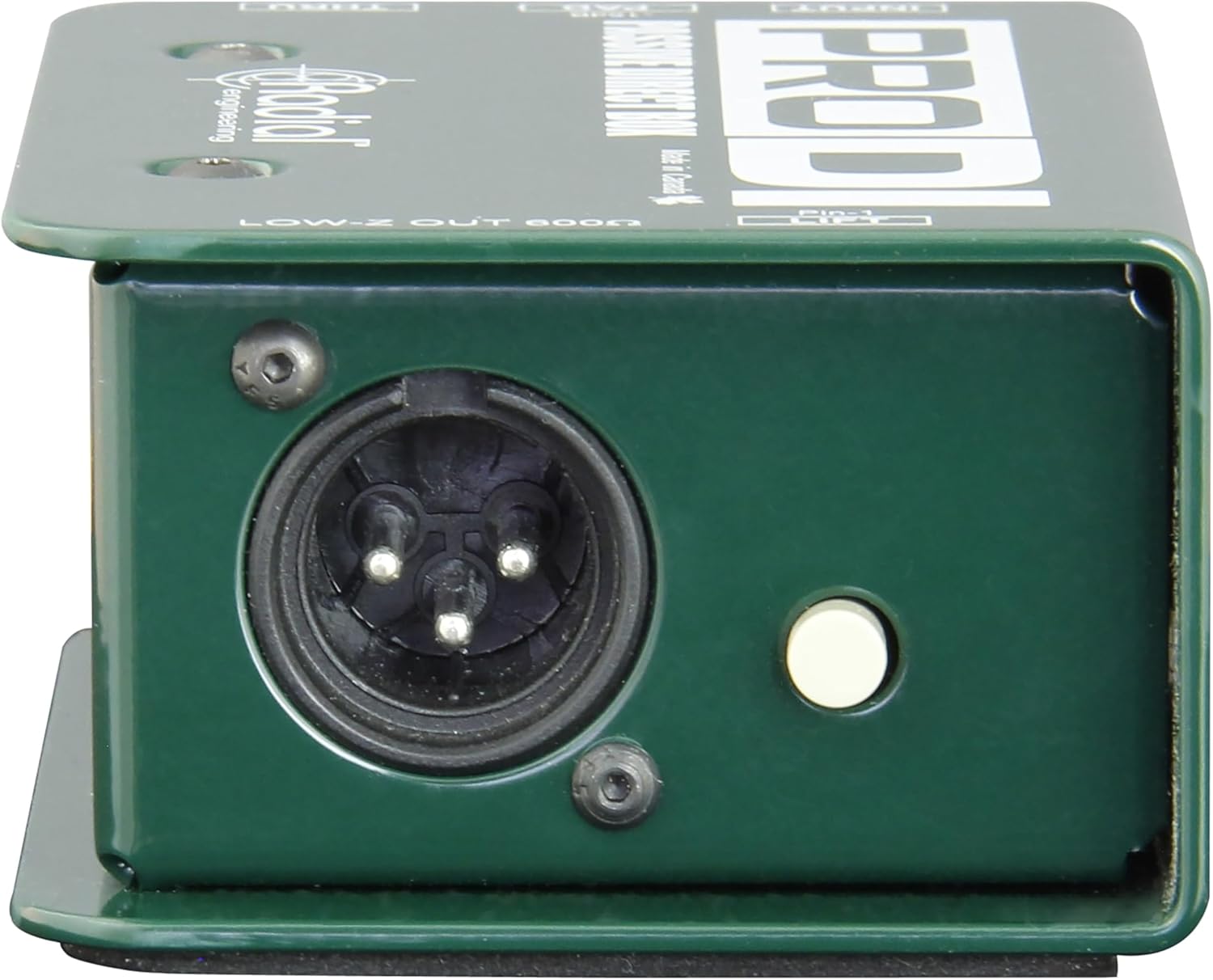
- XLR Output: Provides a balanced, low-impedance output for connection to a mixer or audio interface.
Setup
Proper setup of your Radial Pro DI ensures optimal performance and signal integrity. Follow these steps for typical connections:
- Connect Your Instrument: Plug your instrument (e.g., acoustic guitar, bass, keyboard) into the INPUT jack (1/4" TS) on the Radial Pro DI.
- Connect to Amplifier (Optional): If you wish to send your instrument's signal to an on-stage amplifier, connect a 1/4" TS cable from the THRU jack on the Radial Pro DI to your amplifier's input.
- Connect to Mixer/Audio Interface: Connect an XLR cable from the LOW-Z OUT 600Ω (XLR male) jack on the Radial Pro DI to a microphone input on your mixing console or audio interface.

Operating Instructions
The Radial Pro DI features simple controls for effective signal management:
- Input Pad (-15dB):
- Use the PAD switch when connecting high-output instruments or line-level sources to prevent signal clipping at the input stage. Engaging the pad reduces the input signal by 15dB.
- For instruments with passive pickups or lower output, ensure the pad is disengaged for a stronger signal. - Ground Lift:
- The LIFT switch (Pin-1 Lift) is used to disconnect the ground connection between the Pro DI and the connected mixer/audio interface.
- If you experience hum or buzz in your audio signal, try engaging the ground lift switch. This can often resolve ground loop issues. If the hum persists, disengage the switch.

Maintenance
The Radial Pro DI is built for durability and requires minimal maintenance. To ensure its longevity and optimal performance:
- Cleaning: Use a soft, dry cloth to clean the exterior of the unit. Avoid using abrasive cleaners or solvents, as these can damage the finish.
- Storage: Store the direct box in a cool, dry place away from extreme temperatures and humidity when not in use.
- Cable Management: Always use high-quality cables and ensure they are not excessively bent or strained, which can damage the connectors or internal wiring.
- Inspection: Periodically inspect the jacks and switches for any signs of wear or damage.
Troubleshooting
If you encounter issues with your Radial Pro DI, refer to the following common troubleshooting tips:
- No Signal:
- Check all cable connections to ensure they are secure and correctly inserted.
- Verify that your instrument is functioning correctly.
- Ensure the PAD switch is not engaged if your instrument has a low output. - Hum or Buzz:
- Engage the LIFT (Ground Lift) switch. This is the most common solution for ground loop hum.
- Try connecting the Pro DI to a different power outlet or circuit if possible.
- Ensure all audio cables are in good condition and properly shielded. - Distorted Signal:
- If the signal is distorted, engage the PAD switch to reduce the input level, especially with high-output instruments.
- Check the input gain settings on your mixer or audio interface to ensure they are not set too high.
Specifications
| Feature | Specification |
|---|---|
| Brand | Radial Engineering |
| Model Number | R8001100 |
| Audio Output Mode | Mono |
| Connectivity Technology | XLR |
| Enclosure Material | Stainless Steel |
| Additional Features | Durable |
| Item Weight | 540 Grams |
| Warranty Type | Limited |
Warranty & Support
The Radial Pro DI Passive Direct Box comes with a 2-Year Warranty from Radial Engineering. For warranty claims, technical support, or service inquiries, please contact Radial Engineering directly through their official website or authorized service centers. Keep your purchase receipt as proof of purchase for warranty validation.
Manufacturer: Radial Engineering


