
AcuRite 00799A2
AcuRite 00799 Digital Outdoor Window Thermometer User Manual
Model: 00799A2
Introduction
The AcuRite 00799 Digital Outdoor Window Thermometer provides accurate outdoor temperature readings at a glance. Designed for easy installation on any window surface, this weather-resistant device features a clear digital display for convenient monitoring of outdoor conditions.
Key Features:
- Digital window thermometer for outdoor temperature reading.
- Weather-proof metallic mount with rubber weather seal over on/off switch.
- Digital temperature displayed in 3/4-inch-high numerals.
- Displays readings from -4 to 158 degrees Fahrenheit.
- Repositionable suction cup mount.
What's Included:
- AcuRite 00799 Digital Outdoor Window Thermometer
- Instruction Manual (this document)
Setup
Follow these steps for initial setup and mounting of your thermometer.
1. Battery Installation
The thermometer comes with a pre-installed L1154 cell battery. To activate or replace the battery:
- Locate the battery compartment on the back of the unit.
- Use a small Phillips screwdriver to open the battery compartment.
- Remove any plastic pull tabs if present.
- Insert a new L1154 cell battery, ensuring correct polarity (+/-).
- Securely close the battery compartment.
2. Mounting the Thermometer
The thermometer is designed for outdoor window mounting using its integrated suction cup. For optimal performance and longevity, consider the following:
- Location: Choose a window pane that is out of direct sunlight. Direct sunlight can affect temperature accuracy and the longevity of the unit.
- Surface Preparation: Ensure the window surface is clean and free of dust, dirt, or grease.
- Application: Moisten the suction cup slightly before pressing it firmly onto the clean window pane. This helps create a strong, lasting bond.

Image: The AcuRite 00799 Digital Outdoor Window Thermometer mounted on the exterior of a window, displaying the temperature. The image shows the thermometer's clear digital display and its suction cup attachment, with a green outdoor landscape visible through the window.
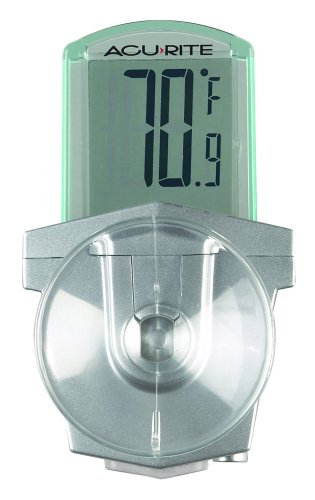
Image: A close-up front view of the AcuRite 00799 Digital Outdoor Window Thermometer. The digital display shows "70.9°F", and the translucent green frame around the LCD is visible, along with the grey metallic mount and clear suction cup.
Operating Instructions
Once mounted, the AcuRite 00799 thermometer is designed for simple operation.
- Power On/Off: The thermometer features an on/off switch located on its base, protected by a weather-proof rubber seal. Flip the switch to turn the unit on or off.
- Temperature Display: The digital display will show the current outdoor temperature in 3/4-inch-high numerals. Readings are provided in Fahrenheit, ranging from -4°F to +158°F, to the tenth of a degree for precision.
- Note on Celsius: This model does not support Celsius readings. Temperatures are displayed exclusively in Fahrenheit.
- Visibility: The translucent pale green LCD frame borders the screen, offering some illumination. For optimal visibility, especially in low light conditions, ensure there is sufficient ambient light behind the thermometer. The screen is not backlit.

Image: The AcuRite 00799 Digital Outdoor Window Thermometer as seen from inside a room, mounted on the window. The digital display shows "70.2°F", and the outdoor environment is visible through the window, suggesting its function as an outdoor thermometer.

Image: The AcuRite 00799 Digital Outdoor Window Thermometer positioned inside a refrigerator, attached to a clear shelf. The display shows "38.2°F", demonstrating its versatility for indoor temperature monitoring in specific applications.
Maintenance
Proper maintenance ensures the longevity and accuracy of your thermometer.
- Battery Replacement: When the display becomes dim or unreadable, it's time to replace the battery. Follow the "Battery Installation" steps in the Setup section. Use an L1154 cell battery.
- Cleaning: Clean the thermometer's display and body with a soft, damp cloth. Avoid abrasive cleaners or solvents that could damage the plastic or electronic components.
- Suction Cup Care: If the suction cup loses its grip, clean both the suction cup and the window surface thoroughly. A slight moistening of the suction cup before reapplication can help restore its adhesion.
Troubleshooting
| Problem | Solution |
|---|---|
| Display is dim or blank. | The battery may be low or depleted. Replace the L1154 cell battery following the instructions in the Maintenance section. Ensure the on/off switch is in the "on" position. |
| Thermometer falls off the window. | Ensure the window surface and the suction cup are clean and free of debris. Moisten the suction cup slightly before firmly pressing it onto the clean window pane. Avoid mounting on uneven or textured surfaces. |
| Temperature reading seems inaccurate. | Ensure the thermometer is not in direct sunlight, which can cause elevated readings. Verify the battery is not low. If the issue persists, try repositioning the thermometer. |
| Cannot read temperature at night or in low light. | This thermometer's screen is not backlit. It relies on ambient light passing through the window to illuminate the display. For better visibility in low light, consider painting or covering the backside of the thermometer white to reflect more light, or ensure there is an external light source. |
| Temperature is not in Celsius. | This model (AcuRite 00799) displays temperatures exclusively in Fahrenheit. It does not have a setting to switch to Celsius. |
Specifications
| Feature | Detail |
|---|---|
| Model Number | 00799A2 |
| Product Dimensions | 2 x 1 x 3 inches; 1.6 ounces |
| Temperature Range | -4°F to +158°F |
| Display Type | LCD |
| Power Source | 1 x L1154 Cell Battery (pre-installed) |
| Color | White |
| Outer Material | Rubber |
| Manufacturer | AcuRite |
Warranty and Support
For warranty information, technical support, or to purchase replacement parts, please contact AcuRite Customer Support.
You can also visit the official AcuRite store for more information and products:
Related documents00799A2


Ask a question about this manual
Ask about setup, troubleshooting, compatibility, parts, safety, or missing instructions. Manuals+ will review the question and use this page’s manual context to help answer it.