
Maxpower 330100B
Contents
Maxpower 330100 16-Inch Universal Power Rake/Dethatcher Lawn Mower Blade Instruction Manual
Model: 330100B | Brand: Maxpower
1. Product Overview
The Maxpower 330100B is a 16-inch universal power rake/dethatcher blade designed for lawn mowers. It is engineered to effectively remove thatch and promote healthier lawn growth. This blade is manufactured from premium grade high carbon American steel, heat-treated at extreme temperatures to meet Rockwell hardness standards for safety and reliability, ensuring durability and optimal performance.

Figure 1: Maxpower 16-Inch Universal Power Rake/Dethatcher Blade with all components.
Key Features:
- Includes one (1) 16-inch universal power rake/dethatcher blade.
- Measures 16 inches in length and 2-1/4 inches in width.
- Features a 1-inch center hole diameter.
- Comes with a cover washer and six (6) reducing washers in sizes: 3/8 in., 7/16 in., 9/16 in., 1/2 in., 5/8 in., and 3/16 in.
- Manufactured to meet or exceed all OEM specifications.
- Proudly made in the USA.
2. Safety Information
Always prioritize safety when handling or installing lawn mower blades. Failure to follow safety instructions can result in serious injury.
- Disconnect Spark Plug: Before performing any maintenance or installation, always disconnect the spark plug wire from the spark plug to prevent accidental engine starting.
- Wear Protective Gear: Always wear heavy-duty gloves and eye protection when handling the blade, as it has sharp edges.
- Secure the Blade: Use a blade removal tool or a block of wood to secure the blade from turning while loosening or tightening the mounting bolt.
- Inspect for Damage: Before each use, inspect the blade for any signs of damage, cracks, or excessive wear. Replace damaged blades immediately.
- Proper Installation: Ensure the blade is installed correctly and securely according to the instructions to prevent it from coming loose during operation.
- Clear Work Area: Keep the work area clear of debris and other people, especially children and pets, during installation and operation.
3. Setup and Installation
This universal dethatcher blade is designed to fit most 16-inch lawn mowers. It includes various reducing washers to accommodate different center hole sizes.
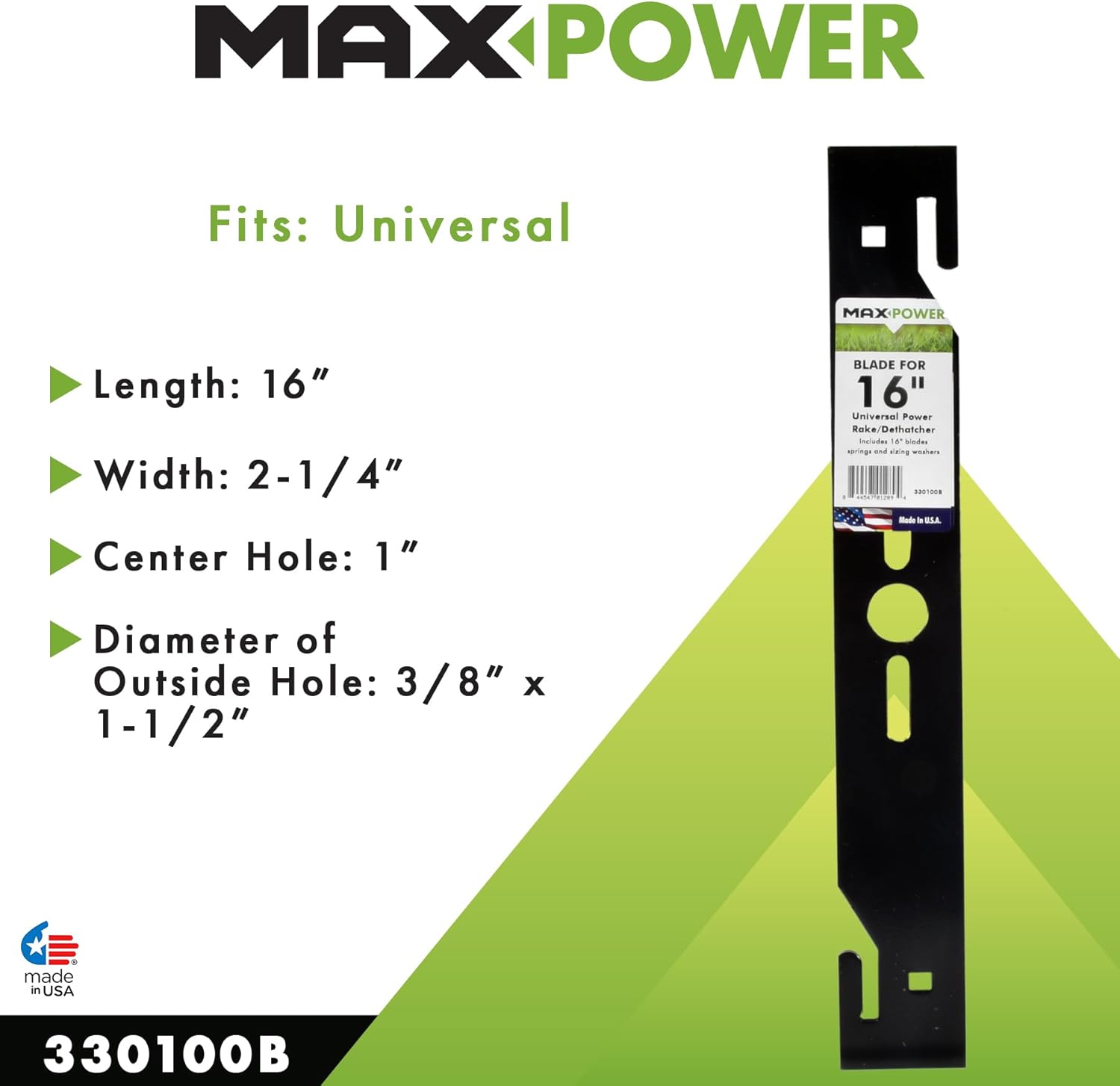
Figure 2: Blade Dimensions for proper fitment.
Installation Steps:
- Prepare Mower: Ensure the lawn mower engine is off and the spark plug wire is disconnected. Tilt the mower onto its side with the carburetor facing up to prevent fuel leakage.
- Remove Old Blade: Secure the existing blade with a blade removal tool or a block of wood. Loosen and remove the blade mounting bolt(s) and carefully remove the old blade and any washers.
- Select Correct Washers: Identify the correct reducing washer(s) from the included set (3/8 in., 7/16 in., 9/16 in., 1/2 in., 5/8 in., and 3/16 in.) that fit your mower's drive shaft. The blade has a 1-inch center hole, and the reducing washers adapt this to smaller shaft sizes.
- Install Springs: Attach the dethatching springs to the blade. The loops in the springs where the mounting bolts install may require slight compression with pliers to align with the bolts and allow the nuts to be started. Ensure the springs are installed so they are trailing the blade part when the blade is installed on the mower (i.e., they should drag behind the cutting edge in the direction of rotation).
- Mount New Blade: Place the selected reducing washer(s) and the cover washer onto the drive shaft, followed by the Maxpower dethatcher blade. Ensure the blade is oriented correctly for dethatching (springs trailing).
- Secure Blade: Reinstall the blade mounting bolt(s) and tighten them securely. Refer to your mower's manual for specific torque specifications.
- Reconnect Spark Plug: Once the blade is securely installed, reconnect the spark plug wire.
Note: Some mower models may require minor modifications to the blade's slots to ensure proper engagement with the mower's tabs. A dremel or grinding stone can be used for this purpose if necessary.
4. Operating Instructions
The Maxpower dethatcher blade is designed to remove thatch and debris from your lawn, promoting healthier grass growth. Follow these guidelines for effective operation:
- Adjust Blade Height: Set your mower's blade height so that the tips of the dethatching springs are just about at ground level. On concrete, they should lightly touch.
- Mowing Speed: Push the mower at a moderately quick speed. The dethatcher is designed to pull up thatch and dead material as you move.
- Continuous Motion: Avoid stopping the mower in one spot while the blade is engaged, as this can cause the springs to tear up a circular area of your lawn. If you need to stop, tilt the mower up slightly to lift the springs off the ground.
- Post-Dethatching Cleanup: The dethatcher blade does not have an angle designed for bagging. After dethatching, you will need to rake up the loosened thatch and debris. For easier cleanup, consider re-installing your regular high-lift mower blade and using the bagging attachment to collect the material.
- Lawn Appearance: Immediately after dethatching, your lawn may appear thin or "terrible" due to the removal of thatch and some grass. This is normal. Overseeding after dethatching can help fill in bare spots and promote a lush, healthy lawn.
Note: Dethatching can expose bare soil, making it susceptible to weeds. Consider applying a broadleaf killer a few weeks after reseeding if necessary.
5. Maintenance
Proper maintenance of your Maxpower dethatcher blade will ensure its longevity and continued performance.
- Cleaning: After each use, clean any accumulated grass clippings and debris from the blade and springs. This prevents rust and maintains balance.
- Inspection: Regularly inspect the blade for wear, damage, or bent springs. While made from durable steel, impacts with hard objects can cause damage. Replace the blade if it shows signs of significant wear or damage.
- Storage: Store the blade in a dry place to prevent rust. If storing for an extended period, a light coating of oil can provide additional protection.
- Sharpening: The Maxpower blade is precision sharpened for optimal performance. While the dethatching function relies on the springs, maintaining a sharp blade edge for any incidental cutting is beneficial. If sharpening, ensure the blade remains balanced.
6. Troubleshooting
Here are some common issues and their potential solutions:
| Problem | Possible Cause | Solution |
|---|---|---|
| Blade does not fit mower shaft correctly. | Incorrect reducing washer used, or mower tabs do not align with blade slots. | Ensure the correct reducing washer is used. If tabs don't align, minor modification to blade slots with a dremel may be needed. |
| Difficulty installing springs/bolts. | Spring loops are stiff or bolts are slightly short. | Use pliers to compress the spring loops slightly while starting the nuts onto the bolts. |
| Lawn is being torn up in spots. | Mower stopped with dethatcher engaged on the ground. | Always tilt the mower up to lift the springs off the ground before stopping. |
| Thatch not being collected. | Dethatcher blade is not designed for bagging. | After dethatching, re-install a standard or high-lift blade and use the bagging attachment for cleanup. |
7. Specifications
| Attribute | Detail |
|---|---|
| Brand | Maxpower |
| Model Number | 330100B |
| Blade Length | 16 inches (40.6 cm) |
| Blade Width | 2-1/4 inches |
| Center Hole Diameter | 1 inch |
| Included Reducing Washers | 3/8 in., 7/16 in., 9/16 in., 1/2 in., 5/8 in., 3/16 in. |
| Material | Alloy Steel |
| Color | Black |
| Item Weight | 1.95 pounds (approx. 0.88 kg) |
| Product Dimensions | 4"D x 16"W x 1.9"H (approximate packaging/overall) |
| UPC | 844547012894 |

Figure 3: Understanding OEM numbers for replacement parts.
8. Warranty and Support
For specific warranty information regarding your Maxpower 330100B blade, please refer to the documentation included with your purchase or contact Maxpower directly. Maxpower blades are manufactured to meet or exceed OEM specifications, reflecting their commitment to quality.
For additional product information or support, you may visit the official Maxpower store:
Documents and downloads
Ask a question about this manual
Ask about setup, troubleshooting, compatibility, parts, safety, or missing instructions. Manuals+ will review the question and use this page’s manual context to help answer it.