
Introduction
This manual provides essential information for the proper handling, assembly, and care of your Bandai Gundam Seed Destiny MSiA GAT-04 Windam action figure. Please read these instructions carefully before use to ensure optimal enjoyment and longevity of your collectible.
Safety Information
- Choking Hazard: This product contains small parts and is not suitable for children under 3 years of age.
- Adult Supervision: Adult supervision is recommended during assembly and play, especially for younger users.
- Handle with Care: Avoid excessive force when posing or attaching accessories to prevent damage to joints or parts.
- Storage: Store the figure away from direct sunlight, high temperatures, and humidity to prevent material degradation.
Package Contents
Verify that all components are present in the package:
- GAT-04 Windam Mobile Suit Action Figure (1 unit)
- Beam Rifle (1 unit)
- Shield (1 unit)
- Beam Saber (1 unit)
Setup and Assembly
The GAT-04 Windam action figure comes pre-assembled. Minor assembly involves attaching its accessories.
- Attaching the Beam Rifle: Gently insert the handle of the beam rifle into the figure's right hand. Ensure a snug fit without forcing.
- Attaching the Shield: The shield can be attached to the figure's left forearm. Locate the peg on the shield and align it with the corresponding hole on the forearm. Press gently until it clicks into place.
- Attaching the Beam Saber: The beam saber can be held in either hand. Insert the handle into the desired hand.
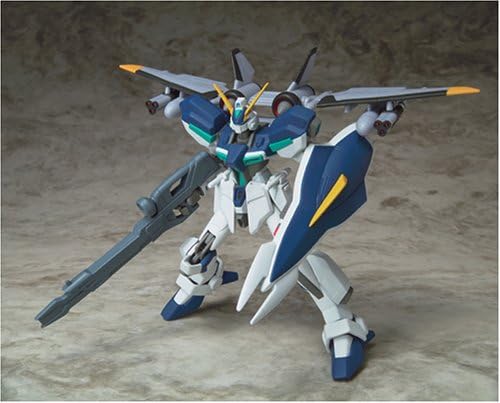
Figure shown holding the beam rifle. Ensure accessories are securely attached.
Operating and Posing
The GAT-04 Windam action figure features multiple points of articulation for dynamic posing.
- Joint Movement: Carefully manipulate the joints at the neck, shoulders, elbows, wrists, waist, hips, knees, and ankles to achieve desired poses.
- Accessory Posing: The beam rifle, shield, and beam saber can be positioned to complement various action stances.
- Stability: For complex or dynamic poses, ensure the figure's balance to prevent it from falling. Consider using a display stand (sold separately) for enhanced stability.

Figure displayed with all included accessories, showcasing articulation.
Maintenance
Proper maintenance will help preserve the condition of your action figure.
- Cleaning: Use a soft, dry cloth to gently wipe away dust. For stubborn dirt, lightly dampen the cloth with water and wipe carefully, then dry immediately. Avoid harsh chemicals or abrasive cleaners.
- Joint Care: If joints become stiff, gently work them back and forth. If they become loose, a small amount of clear nail polish or a similar product can be applied to the joint peg and allowed to dry to increase friction.
- Storage: When not on display, store the figure in its original packaging or a protective container to prevent dust accumulation and damage.
Troubleshooting
Common issues and their solutions:
- Loose Accessories: If an accessory does not stay in the figure's hand or attachment point, ensure it is fully inserted. If the connection is still loose, a small piece of tissue paper can be used to create a tighter fit.
- Stiff Joints: Gently rotate or bend the joint repeatedly to loosen it. Do not apply excessive force.
- Figure Falls Over: Ensure the figure's feet are flat on the surface and its center of gravity is balanced. Adjust leg and body positions for better stability.
Specifications
| Product Type | Action Figure |
| Model Name | GAT-04 Windam |
| Model Number | 508480 |
| Brand | Bandai (TAMASHII NATIONS) |
| Material | Plastic |
| Item Weight | 4.54 g |
| Item Dimensions (L x W x H) | 9.37 x 6.54 x 1.97 inches |
| Assembly Required | No (for main figure) |
| Batteries Required | No |
Warranty and Support
For information regarding warranty, returns, or product support, please refer to the retailer's policy or contact Bandai customer service directly. Keep your proof of purchase for any warranty claims.
Note: Specific warranty terms may vary by region and retailer.