
Shoprider 889B-4
Shoprider Sprinter XL4 Personal Travel Scooter User Manual
Model: 889B-4
Introduction
This manual provides essential information for the safe and efficient operation, maintenance, and troubleshooting of your Shoprider Sprinter XL4 Personal Travel Scooter. Please read this manual thoroughly before using your scooter to ensure proper understanding of its features and functions.
The Sprinter XL4 is a robust four-wheel personal travel scooter designed for comfort and maneuverability. It features a 350 lb. weight capacity, a deluxe captain seat, a front chrome bumper, and 12-inch wheels for enhanced safety and ride quality.

Figure 1: Front-side view of the Shoprider Sprinter XL4 Personal Travel Scooter, showcasing its robust design and front basket.
Setup
Unpacking and Initial Inspection
Carefully remove all components from the packaging. Inspect the scooter for any signs of damage that may have occurred during shipping. If any damage is found, contact your dealer immediately.
Assembly
- Handlebar/Tiller Assembly: Securely attach the tiller to the main frame. Ensure all locking mechanisms are engaged.
- Seat Installation: Place the deluxe captain seat onto the seat post. Ensure it clicks into place and is stable. The seat can slide and swivel for optimal positioning.
- Battery Installation: Ensure the battery pack is correctly installed and connected according to the diagrams in the full manual.
- Initial Charge: Before first use, fully charge the scooter's battery for at least 8-12 hours. Refer to the charging section for detailed instructions.

Figure 2: Side view of the scooter, illustrating the adjustable deluxe captain seat and overall frame.
Operating Instructions
Controls Overview
The control panel on the tiller provides access to all operational functions.
- Key Switch: Turns the scooter on/off.
- Speed Control Dial: Adjusts the maximum speed of the scooter (Min to Max).
- Battery Indicator: Displays the current battery charge level.
- Forward/Reverse Lever: Controls the direction of travel.
- Headlight Switch: Activates the front headlight.
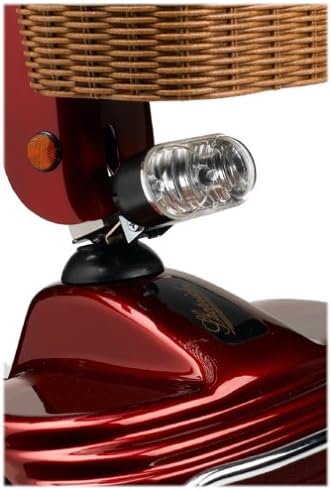
Figure 3: Detail of the control panel, showing the speed adjustment dial and battery charge indicator.
Driving Your Scooter
- Power On: Insert the key and turn it to the "ON" position.
- Adjust Speed: Set the speed control dial to a comfortable and safe speed for your environment. Start with a lower setting.
- Engage Drive: Gently press the forward or reverse lever to begin moving. Release the lever to engage the electromagnetic brake and stop the scooter.
- Steering: Use the tiller to steer the scooter.
- Headlight Use: Turn on the front headlight package when operating in low-light conditions.

Figure 4: Close-up view of the integrated front headlight, part of the headlight package.
Maintenance
Regular maintenance ensures the longevity and optimal performance of your Sprinter XL4 scooter.
- Battery Care:
- Charge the battery fully after each day of use, even if only used for a short period.
- Avoid completely draining the battery.
- If storing the scooter for an extended period, charge the battery at least once a month.
- Tire Pressure: Check tire pressure regularly. Proper inflation of the 12-inch wheels is crucial for ride comfort and battery range. Refer to the tire sidewall for recommended PSI.
- Cleaning: Clean the scooter with a damp cloth. Do not use abrasive cleaners or spray water directly onto electrical components.
- Inspections: Periodically check all nuts, bolts, and connections for tightness. Ensure the chrome bumper is secure.
Troubleshooting
This section addresses common issues you might encounter. For problems not listed here, contact your authorized Shoprider dealer.
| Problem | Possible Cause | Solution |
|---|---|---|
| Scooter does not power on. | Key not fully inserted or turned; battery low or disconnected; circuit breaker tripped. | Ensure key is fully inserted and turned. Check battery charge and connections. Reset circuit breaker (if applicable). |
| Scooter moves slowly or has reduced range. | Low battery charge; under-inflated tires; excessive load. | Fully charge battery. Check and inflate tires to recommended PSI. Reduce load if exceeding weight capacity. |
| Motor stops unexpectedly. | Overload protection activated; loose connection. | Turn scooter off, wait a few minutes, then restart. Check all visible connections. |
Specifications
Key specifications for the Shoprider Sprinter XL4 (Model 889B-4):
- Model Name: Sprinter
- Item Model Number: 889B-4
- Brand: Shoprider
- Weight Capacity: 350 lb.
- Product Dimensions: 52 x 23 x 42 inches
- Product Weight: 227 Pounds
- Wheel Size: 12 inches (pneumatic tires)
- Color: Burgundy
- Material: Stainless Steel (frame components)
- Features: Front chrome bumper, Slide and swivel deluxe captain seat, Front headlight package.
Warranty and Support
For detailed warranty information regarding your Shoprider Sprinter XL4 Personal Travel Scooter, please refer to the warranty card included with your purchase or contact your authorized Shoprider dealer. Warranty terms and conditions may vary.
If you require technical assistance, parts, or service, please contact your local Shoprider dealer or the manufacturer's customer support. Ensure you have your model number (889B-4) and serial number ready when contacting support.
Ask a question about this manual
Ask about setup, troubleshooting, compatibility, parts, safety, or missing instructions. Manuals+ will review the question and use this page’s manual context to help answer it.