
1. Introduction
The jWIN JX-MP256FM is a portable digital audio player designed for active lifestyles. It integrates 256MB of internal flash memory, an FM radio tuner, and a voice recording function. Its compact form factor and included detachable armband make it a suitable companion for various physical activities, allowing users to enjoy music or record audio on the go.
2. Product Features
- 256 MB Built-in Flash Memory: Provides storage for digital audio files and recorded voice memos.
- USB 2.0 Full Speed Interface: Enables fast data transfer between the player and a computer.
- Audio File Format Support: Compatible with MP3, WMA (including DRM-protected files), and ADPCM audio formats.
- Digital Voice Recording: Features a built-in microphone for convenient voice recording.
- FM Tuner: Integrated FM radio with memory for up to 20 preset stations.
- Compact and Sporty Design: Engineered for portability and active use.
- Blue-Color Backlit LCD Screen: Provides clear visibility of track information, radio frequency, and device status.
- Detachable Armband: Allows for secure and comfortable wear during activities.
3. Package Contents
Verify that all items are present in the package:
- jWIN JX-MP256FM MP3/Voice Digital Audio Player
- Detachable Armband
- USB Connection Cable
- User Manual (this document)
4. Setup
4.1. Initial Power and Charging
Before first use, ensure the player is adequately charged. Connect the player to a computer's USB port using the provided USB cable. The device's LCD screen may indicate charging status. A full charge is recommended for optimal battery performance.
4.2. Connecting to a Computer and Transferring Files
- Connect the jWIN JX-MP256FM to an available USB 2.0 port on your computer using the USB cable.
- The player will be recognized as a removable storage device (e.g., a USB drive).
- Open the player's drive folder on your computer.
- Drag and drop your desired MP3, WMA, or ADPCM audio files into the player's music folder.
- Once file transfer is complete, safely eject the device from your computer before disconnecting the USB cable.
4.3. Attaching the Armband
Thread the detachable armband through the designated slots on the back of the MP3 player. Secure the armband around your arm, adjusting for a comfortable and snug fit during physical activity.
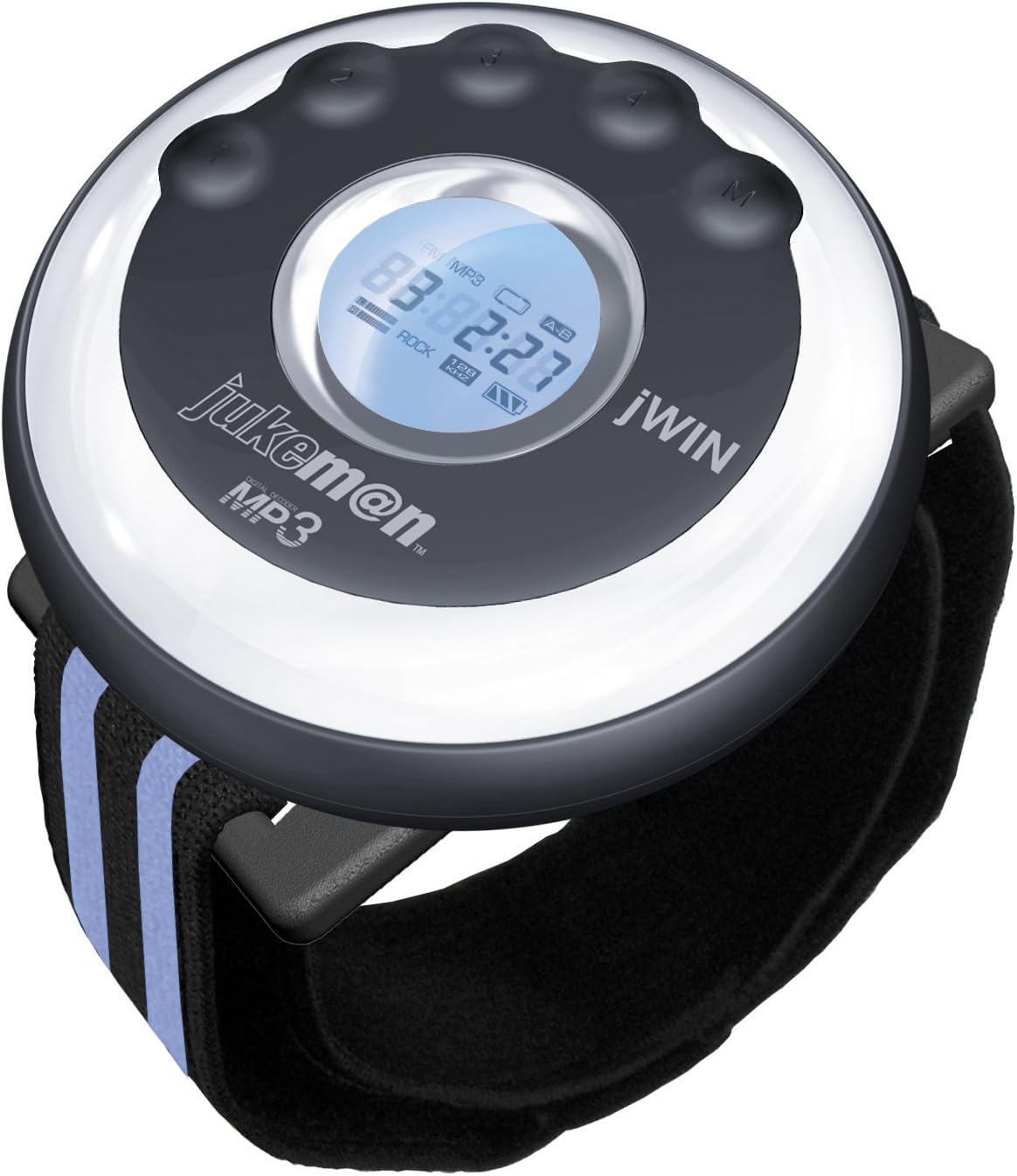
Image of the jWIN JX-MP256FM Sports MP3 Player, showing its circular design, blue backlit LCD screen, control buttons, and the attached black armband with blue stripes.
5. Operating Instructions
5.1. Power On/Off
- To Power On: Press and hold the Power/Play/Pause button until the LCD screen illuminates.
- To Power Off: Press and hold the Power/Play/Pause button until the LCD screen turns off.
5.2. Basic Navigation and Volume Control
- Use the Volume Up (+) and Volume Down (-) buttons to adjust the audio output level.
- The Next Track (>>) and Previous Track (<<) buttons are used to skip between songs or navigate menus.
- The Mode (M) button cycles through different functions (MP3, FM Radio, Voice Recorder).
5.3. MP3 Playback
- Ensure the player is in MP3 mode (indicated on the LCD screen). If not, press the Mode (M) button until MP3 mode is selected.
- Press the Play/Pause button to start playback.
- Press Play/Pause again to pause playback.
- Use Next Track (>>) or Previous Track (<<) to navigate through your music files.
5.4. FM Radio Operation
- Press the Mode (M) button until FM Radio mode is selected. The LCD will display the current frequency.
- Automatic Scan: Press and hold the Play/Pause button to initiate an automatic scan for available FM stations. The player will save up to 20 stations.
- Manual Tuning: Use the Next Track (>>) or Previous Track (<<) buttons to manually tune to desired frequencies.
- Selecting Presets: After an automatic scan, use the Next Track (>>) or Previous Track (<<) buttons to cycle through saved preset stations.
5.5. Voice Recording
- Press the Mode (M) button until Voice Recorder mode is selected.
- Press the Play/Pause button to start recording. The LCD will show a recording indicator.
- To stop recording, press the Play/Pause button again. The recording will be saved automatically.
- To play back recordings, navigate to the recording files using the Next Track (>>) or Previous Track (<<) buttons and press Play/Pause.
6. Maintenance
- Cleaning: Use a soft, dry cloth to clean the exterior of the player. Avoid using liquid cleaners or abrasive materials.
- Storage: Store the player in a cool, dry place away from direct sunlight and extreme temperatures.
- Battery Care: To maintain battery longevity, avoid fully discharging the player frequently. Recharge the device regularly, even if not in constant use.
- Water Exposure: This device is not waterproof. Avoid exposure to moisture, rain, or submersion in water.
7. Troubleshooting
| Problem | Solution |
|---|---|
| Player does not power on. | Ensure the battery is charged. Connect the player to a USB power source and allow it to charge for at least 30 minutes before attempting to power on again. |
| No sound during playback. | Check the volume level and ensure it is not set to minimum. Verify that headphones are properly connected. Test with different headphones if available. |
| Cannot transfer files to the player. | Ensure the USB cable is securely connected to both the player and the computer. Try a different USB port or cable. Verify that the player is recognized as a removable drive by your computer. |
| FM radio reception is poor. | Move to an area with better signal reception. The headphone cable often acts as an antenna; ensure it is fully plugged in. |
| Voice recordings are unclear. | Ensure the microphone is not obstructed. Record in a quiet environment and speak clearly towards the device. |
8. Specifications
| Feature | Detail |
|---|---|
| Model Number | JXMP256FM |
| Internal Memory | 256 MB Flash |
| Interface | USB 2.0 Full Speed |
| Supported Audio Formats | MP3, WMA (with DRM), ADPCM |
| FM Tuner | Yes, with 20 preset stations |
| Voice Recorder | Yes, built-in microphone |
| Display | Blue-color backlit LCD |
| Item Weight | 10.4 ounces (approx. 295 grams) |
| Package Dimensions | 8.7 x 7.2 x 3 inches (approx. 22.1 x 18.3 x 7.6 cm) |
9. Warranty and Support
For warranty information or technical support, please refer to the documentation included with your purchase or contact jWIN customer service. Specific warranty terms and conditions may vary by region and retailer.
For further assistance, please visit the official jWIN website or consult your retailer.