
Kenmore 238-69239
Kenmore 16-Speed White Push-Button Stand Mixer User Manual
Model: 238-69239
1. Introduction and Important Safeguards
Thank you for choosing the Kenmore 16-Speed White Push-Button Stand Mixer. This manual provides essential information for the safe and efficient operation of your new appliance. Please read all instructions carefully before use and retain this manual for future reference.
Important Safety Instructions
- Always unplug the mixer from the outlet when not in use, before putting on or taking off parts, and before cleaning.
- Avoid contact with moving parts. Keep hands, hair, clothing, as well as spatulas and other utensils away from beaters during operation to reduce the risk of injury to persons and/or damage to the mixer.
- Do not operate any appliance with a damaged cord or plug, or after the appliance malfunctions or has been dropped or damaged in any manner.
- The use of attachments not recommended or sold by the manufacturer may cause fire, electric shock, or injury.
- Do not use outdoors.
- Do not let cord hang over edge of table or counter.
- Do not let cord contact hot surfaces, including the stove.
- Do not immerse the motor base in water or other liquids.
2. Parts and Components
Familiarize yourself with the various parts of your Kenmore Stand Mixer:
- Mixer Head: Contains the motor and attachment ports.
- Stand Base: Provides stability and houses the rotating bowl platform.
- Mixing Bowls: Includes one large and one small stainless steel bowl.
- Beaters: Standard attachments for general mixing tasks.
- Dough Hooks: Used for kneading dough.
- Whisk: Ideal for whipping eggs, cream, and light batters.
- Speed Control Panel: Features a 16-speed indicator and push-buttons for operation.
- Tilt Release Button: Allows the mixer head to tilt back for easy attachment and bowl removal.
- Power Cord: For connecting to an electrical outlet.

Figure 2.1: Kenmore stand mixer with whisk and dough hooks in a large stainless steel bowl, viewed from an angle showing the power cord.
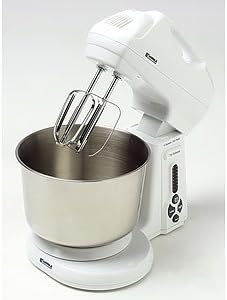
Figure 2.2: Kenmore stand mixer with beaters attached, positioned over a stainless steel mixing bowl on its base.

Figure 2.3: Two stainless steel mixing bowls (one large, one small) and a pair of dough hooks, detached from the mixer.

Figure 2.4: Close-up view of the control panel on the Kenmore stand mixer, showing the 16-speed indicator and push-buttons.
3. Setup and Assembly
- Unpack: Carefully remove all components from the packaging. Retain packaging for storage or future transport.
- Placement: Place the mixer on a clean, dry, and stable surface. Ensure there is enough space around the mixer for operation and ventilation.
- Attach Bowl: Place the desired stainless steel mixing bowl onto the rotating platform on the stand base. Twist gently to secure it if applicable.
- Tilt Mixer Head: Press the 'Tilt Release' button located on the side of the mixer head and gently tilt the head back until it locks into the upright position.
- Insert Attachment: Select the appropriate attachment (beaters, dough hooks, or whisk) for your task. Insert the attachment into the port on the underside of the mixer head. Push and twist slightly until it clicks securely into place.
- Lower Mixer Head: Press the 'Tilt Release' button again and gently lower the mixer head until it locks into the operating position. Ensure the attachment is positioned correctly within the bowl.
- Connect Power: Plug the power cord into a standard electrical outlet.
4. Operating Instructions
Your Kenmore Stand Mixer features 16 speeds for versatile mixing. Always ensure the mixer head is locked down and the attachment is securely in place before starting.
Speed Control and Buttons
- ON/OFF Button: Press to turn the mixer on or off.
- Start/Stop Button: Initiates or pauses mixing at the selected speed.
- Low Button: Decreases the mixing speed.
- High Button: Increases the mixing speed.
- Speed Indicator: The vertical display shows the current speed setting from 1 to 16.
General Mixing Guidelines
- Starting: Always begin mixing at a low speed to prevent ingredients from splashing out of the bowl. Gradually increase speed as needed.
- Adding Ingredients: For best results, add ingredients gradually while the mixer is operating at a low speed.
- Scraping Bowl: Periodically stop the mixer and use a spatula to scrape down the sides of the bowl to ensure all ingredients are thoroughly incorporated.
- Beaters: Best for creaming butter and sugar, mixing cake batters, and combining ingredients.
- Dough Hooks: Use for kneading yeast doughs for bread, pizza, or pasta. Start at a low speed and increase as the dough forms.
- Whisk: Ideal for whipping egg whites, cream, and light meringues. Use higher speeds for maximum aeration.
- Stopping: Press the 'Start/Stop' or 'ON/OFF' button to stop the mixer. Unplug when finished.
5. Cleaning and Maintenance
Proper cleaning and maintenance will extend the life of your Kenmore Stand Mixer.
Cleaning
- Unplug: Always unplug the mixer before cleaning.
- Remove Attachments and Bowl: Detach the mixing bowl and chosen attachment.
- Wash Attachments and Bowls: The stainless steel mixing bowls, beaters, dough hooks, and whisk are dishwasher safe. Alternatively, wash them in warm, soapy water, rinse thoroughly, and dry immediately.
- Clean Mixer Body: Wipe the exterior of the mixer head and stand base with a damp cloth. For stubborn spots, use a mild detergent. Do NOT immerse the motor base in water or any other liquid.
- Dry Thoroughly: Ensure all parts are completely dry before reassembling or storing.
Storage
Store the mixer and its accessories in a clean, dry place. Ensure the power cord is neatly wrapped and not kinked.
6. Troubleshooting
If you encounter issues with your mixer, refer to the following common problems and solutions:
| Problem | Possible Cause | Solution |
|---|---|---|
| Mixer does not turn on. | Not plugged in; power outlet not working; thermal overload. | Ensure power cord is securely plugged into a working outlet. Check circuit breaker. If motor overheated, unplug and let cool for 30 minutes before restarting. |
| Attachments not mixing ingredients properly. | Bowl not secured; ingredients stuck to sides; incorrect attachment for task. | Ensure bowl is properly seated and locked. Stop mixer and scrape down sides of bowl with a spatula. Verify you are using the correct attachment for the consistency of ingredients. |
| Mixer head vibrates excessively or makes unusual noise. | Attachment not properly inserted; mixer overloaded. | Ensure attachment is fully inserted and locked. Reduce the amount of ingredients if overloading is suspected. |
| Bowl is unstable during mixing. | Bowl not properly secured to the base. | Ensure the bowl is twisted and locked firmly onto the rotating platform. |
If the problem persists after trying these solutions, please contact Kenmore customer service for assistance.
7. Specifications
| Feature | Detail |
|---|---|
| Model Number | 238-69239 |
| Brand | Kenmore |
| Color | White |
| Blade Material | Stainless Steel |
| Special Feature | Adjustable Speed Control |
| Controls Type | Push-Button (with 16-speed indicator) |
| Dishwasher Safe Parts | Yes (Bowls and Attachments) |
| Number of Speeds | 16 |
8. Warranty and Customer Support
For information regarding warranty coverage, service, or to purchase replacement parts, please refer to the warranty card included with your product or visit the official Kenmore website. You may also contact Kenmore customer service directly for assistance.
Kenmore Official Website: www.kenmore.com
Please have your model number (238-69239) and purchase date ready when contacting support.
Ask a question about this manual
Ask about setup, troubleshooting, compatibility, parts, safety, or missing instructions. Manuals+ will review the question and use this page’s manual context to help answer it.