1. Introduction
Thank you for purchasing the Sony NW-E507 Network Walkman. This digital music player offers 1 GB of storage, an integrated FM tuner, and a long-lasting rechargeable battery, providing a portable audio experience. This manual provides essential information for setting up, operating, and maintaining your device.
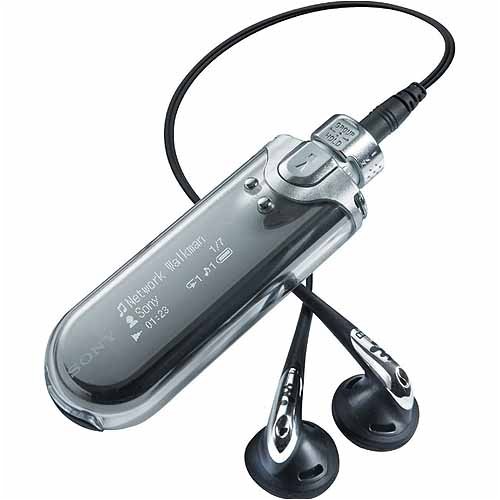
Figure 1: Sony NW-E507 Network Walkman. This image displays the compact, silver-colored digital music player with its screen and control buttons visible on the front face.
2. Safety Information
Please read all safety instructions carefully before using the device to ensure safe and proper operation.
- Do not expose the device to extreme temperatures, direct sunlight, or high humidity.
- Avoid operating controls with wet hands, as moisture can affect the device's performance and appearance.
- Keep the device away from strong magnetic fields or static electricity, which can cause malfunctions.
- Do not attempt to disassemble or modify the device. Refer all servicing to qualified personnel.
- Use only the specified charging cable and accessories.
- Listen at moderate volume levels to prevent hearing damage.
3. Package Contents
Verify that all items are present in the package:
- Sony NW-E507 Network Walkman
- USB Cable
- Earphones
- Charging Cable
- Instruction Manual (this document)
4. Setup
4.1 Charging the Battery
The NW-E507 features a built-in rechargeable battery. Before initial use, fully charge the device.
- Connect the supplied USB cable to the charging port on your Network Walkman.
- Connect the other end of the USB cable to a powered USB port on your computer or a compatible USB AC adapter (not included).
- The charging indicator will illuminate. A full charge typically takes several hours. A quick 3-minute charge can provide up to 3 hours of playback.
- Disconnect the cable once charging is complete.
Note: The battery charges via the USB port when connected to a computer. This connection is also used for data transfer.
4.2 Installing Software and Transferring Music
To transfer music files to your NW-E507, you must use the proprietary Sony SonicStage or MP3 Manager software. These applications are typically provided on a CD with the device or available for download from the Sony support website.
- Install the SonicStage or MP3 Manager software on your computer.
- Connect your NW-E507 to your computer using the USB cable.
- Launch the installed software.
- Follow the on-screen instructions within the software to import music from your computer's library and transfer it to your Network Walkman.
Important: The NW-E507 supports ATRAC3, ATRAC3plus, and MP3 file formats. It also supports WMA and WAV files. For optimal playback, ensure MP3 files have a minimum of 32 bits and a 44100 sample rate. The software may convert files to a compatible format during transfer.
5. Operation
5.1 Basic Controls and Navigation
The NW-E507 features a one-handed Jog Dial for easy navigation through menus and tracks.
- Power On/Off: Press and hold the PLAY/STOP button.
- Volume Control: Use the volume buttons located on the side of the device.
- Jog Dial: Rotate to scroll through lists and menus. Press to select an item.
- PLAY/STOP: Starts or pauses playback.
- SKIP/SEARCH: Use to skip tracks or fast forward/rewind within a track.
- MODE/MENU: Accesses the main menu or changes playback modes.
5.2 Playing Music
- Ensure your earphones are connected to the headphone jack.
- Power on the device.
- Navigate to the "Music" or "Album" menu using the Jog Dial.
- Select the desired album, artist, or track.
- Press the PLAY/STOP button to begin playback.
Tip: The device can resume playback from where it was last stopped, even after powering off.
5.3 Using the FM Tuner
The NW-E507 includes a built-in FM tuner, allowing you to listen to radio broadcasts.
- From the main menu, select "FM Tuner".
- Use the Jog Dial to scan for stations or select a preset.
- You can preset up to 30 stations for quick access. Refer to the on-screen menu for saving presets.
Note: Earphones act as the antenna for the FM tuner, so they must be connected for optimal reception.
6. Maintenance
6.1 Cleaning the Device
To maintain the appearance and functionality of your Network Walkman:
- Wipe the exterior with a soft, dry cloth.
- Do not use abrasive cleaners, solvents, or alcohol, as these can damage the finish.
- Keep the display screen clean and free from dust.
6.2 Battery Care
To maximize battery life and performance:
- Avoid fully discharging the battery frequently.
- Charge the device regularly, even if not in use for extended periods.
- Store the device in a cool, dry place when not in use.
7. Troubleshooting
If you encounter issues with your NW-E507, refer to the following common solutions:
| Problem | Possible Cause / Solution |
|---|---|
| Device does not power on. | Battery may be depleted. Connect to a power source and charge. |
| No sound from earphones. | Check earphone connection. Ensure volume is not set to minimum. Try different earphones. |
| Cannot transfer music files. | Ensure Sony SonicStage or MP3 Manager software is correctly installed and running. Verify USB connection. Check file format compatibility (ATRAC3, MP3, WMA, WAV) and MP3 bit rate/sample rate requirements. |
| FM radio reception is poor. | Ensure earphones are properly connected, as they function as the antenna. Move to an area with better signal. |
| Display is difficult to read in bright light. | The OLED display may wash out in direct sunlight. Move to a shaded area for better visibility. |
| Device is unresponsive. | Try resetting the device (refer to the full manual for specific reset instructions, if available, or hold power button for extended period). |
8. Specifications
| Model Name | NW-E507 |
| Memory Storage Capacity | 1 GB |
| Supported Media Types | ATRAC3, ATRAC3plus, MP3, WMA, WAV |
| Connectivity Technology | USB |
| Special Features | Built-in FM Tuner, One-Handed Jog Dial Operation |
| Battery Life (Approx.) | Up to 50 hours (playback) |
| Quick Charge | 3 minutes charge for up to 3 hours playback |
| Screen Size | 1.77 inches |
| Color | Silver |
| Product Dimensions | 2.1 x 7.2 x 11.2 inches |
| Item Weight | 9.3 ounces |
| Manufacturer | Sony |
9. Warranty and Support
Sony products are manufactured to high-quality standards and are backed by a limited warranty. For specific warranty terms and conditions, please refer to the warranty card included with your product or visit the official Sony support website.
For technical support, software updates, or additional assistance, please visit the Sony support website or contact Sony customer service. Keep your proof of purchase for warranty claims.
Online Support: www.sony.com/electronics/support


