1. Introduction
This manual provides essential instructions for the safe and efficient operation of your Makita DC1804T Battery Charger. This universal voltage charger is designed to charge Makita 7.2V to 18V Nickel-Cadmium (NiCd) and Nickel-Metal Hydride (NiMH) batteries, including both stick and pod styles.
Please read this manual thoroughly before using the charger to ensure proper usage and to prevent damage to the charger or batteries.
2. Important Safety Instructions
WARNING: Read all safety warnings and all instructions. Failure to follow the warnings and instructions may result in electric shock, fire, and/or serious injury.
- SAVE THESE INSTRUCTIONS. This manual contains important safety and operating instructions for battery charger model DC1804T.
- Before using battery charger, read all instructions and cautionary markings on battery charger, battery, and product using battery.
- Do not charge other types of batteries. This charger is designed exclusively for Makita 7.2V-18V NiCd and NiMH batteries.
- Do not expose the charger to rain or wet conditions. Water entering the charger will increase the risk of electric shock.
- Do not operate the charger if it has received a sharp blow, been dropped, or otherwise damaged. Take it to a qualified service person.
- Do not attempt to use a step-up transformer, an engine generator, or DC receptacle.
- Do not charge battery in a location where the temperature is below 10°C (50°F) or above 40°C (104°F).
- Do not charge battery when it is wet or dirty.
- Unplug the charger from the power source when not in use.
- California Proposition 65 Warning: This product may contain chemicals known to the State of California to cause cancer and birth defects or other reproductive harm.
3. Package Contents
Your Makita DC1804T Battery Charger package should include the following items:
- Makita DC1804T Battery Charger Unit
- Instruction Guide (this document)
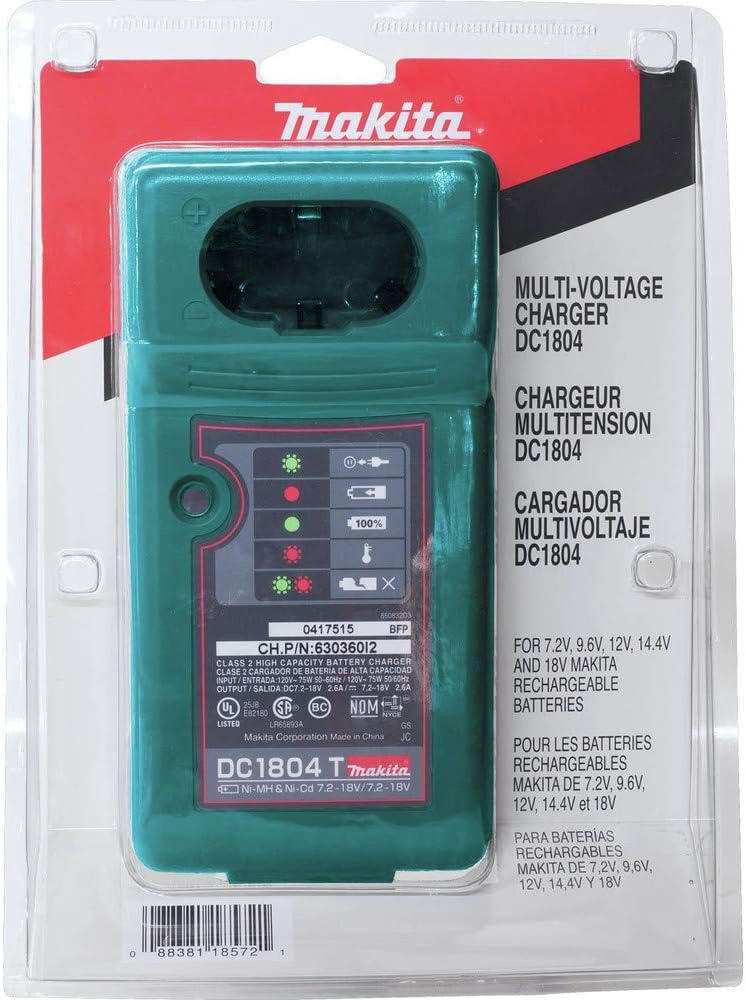
Figure 1: Makita DC1804T Battery Charger in its original retail packaging.

Figure 2: Rear view of the charger packaging, highlighting the included instruction guide.
4. Setup
Follow these steps to set up your Makita DC1804T Battery Charger:
- Choose a Location: Place the charger on a flat, stable surface in a well-ventilated area, away from direct sunlight, moisture, and extreme temperatures.
- Connect to Power: Plug the charger's power cord into a standard 120V AC electrical outlet. The charger's power indicator LED (often blinking green) should illuminate, indicating it is ready for use.
- Insert Battery: Align the battery with the charging slot on the charger. Slide the battery firmly into the slot until it clicks into place. Ensure a secure connection.

Figure 3: The Makita DC1804T charger with a battery inserted, ready for or undergoing charging.
5. Operating Instructions
Once a battery is properly inserted, the charger will automatically begin the charging process. The LED indicator lights provide status updates:
- Blinking Green: Charger is powered on and ready to charge, or waiting for a battery.
- Solid Red: Battery is currently charging.
- Solid Green: Battery is fully charged.
- Blinking Red: Indicates high battery temperature. Charging will pause until the battery cools down to a safe temperature.
- Blinking Green-Red: Indicates a broken or faulty battery that cannot be charged.
Charging times vary depending on the battery's voltage, capacity, and current charge level. The charger is designed for quick charging.
Once charging is complete (solid green light), remove the battery by sliding it out of the charging slot. Unplug the charger when not in use.
6. Maintenance
Proper maintenance ensures the longevity and optimal performance of your charger:
- Cleaning: Regularly wipe the charger's exterior with a soft, dry cloth. Do not use harsh chemicals or abrasive cleaners. Keep the charging terminals clean and free of debris.
- Storage: Store the charger in a dry, indoor location, away from extreme temperatures and direct sunlight.
- Inspection: Periodically inspect the power cord for any signs of damage. If the cord is damaged, have it replaced by a qualified service technician.
7. Troubleshooting
If you encounter issues with your charger, refer to the following common problems and solutions:
- Charger Not Powering On (No LED):
- Ensure the power cord is securely plugged into both the charger and a working electrical outlet.
- Check the circuit breaker or fuse for the outlet.
- Battery Not Charging (Blinking Green LED, no Red):
- Ensure the battery is fully seated in the charging slot.
- Verify the battery is a compatible Makita 7.2V-18V NiCd or NiMH type.
- Blinking Red LED (High Temperature):
- The battery or charger is too hot. Remove the battery and allow both to cool down in a well-ventilated area before attempting to charge again.
- Blinking Green-Red LED (Battery Broken):
- The battery is likely faulty or damaged and cannot be charged. It may need to be replaced.
If the problem persists after attempting these solutions, please contact Makita customer support.
8. Specifications
| Feature | Specification |
|---|---|
| Model Number | DC1804T |
| Part Number | 630360J2 |
| Compatible Battery Types | NiCd (Nickel-Cadmium), NiMH (Nickel-Metal Hydride) |
| Compatible Battery Voltages | 7.2V to 18V |
| Input Voltage | 120V AC (Standard US Outlet) |
| Output Voltage | 18 Volts (DC) |
| Item Weight | 9.1 ounces (approx. 0.57 lbs) |
| Product Dimensions | 7.75 x 3.5 x 9.5 inches |
| Manufacturer | Makita |
| Country of Manufacture | China |
9. Warranty Information
The Makita DC1804T Battery Charger comes with a 1 Year Parts & Labor warranty from the date of purchase. This warranty covers defects in materials and workmanship under normal use. Please retain your proof of purchase for warranty claims.
For detailed warranty terms and conditions, please refer to the official Makita warranty statement or contact Makita customer support.
10. Customer Support
For further assistance, technical support, or warranty inquiries, please contact Makita customer service. You can find contact information on the official Makita website or through your product retailer.
Visit the Makita Store for more products and information.


