
1. Introduction
The TRENDnet TU-S9 USB to Serial 9-Pin Converter Cable provides a solution for connecting RS-232 serial devices to a computer's USB port. This adapter enables compatibility between modern computers lacking serial ports and legacy serial peripherals such as modems, network switches, and other RS-232 compatible equipment.
The TU-S9 supports USB 1.1 and is compatible with USB 2.0 and USB 3.0 ports. It features an integrated flexible cable for convenient installation.
2. Package Contents
- TU-S9 USB to Serial 9-Pin Converter Cable
- Quick Installation Guide
- CD-ROM (Drivers and User's Guide)
3. Setup and Installation
Follow these steps to install the TRENDnet TU-S9 converter cable:
- Install Drivers: Before connecting the TU-S9 cable, insert the provided CD-ROM into your computer's optical drive. Follow the on-screen instructions to install the necessary drivers. If your computer does not have an optical drive, drivers can typically be downloaded from the official TRENDnet support website.
- Connect to Computer: Plug the USB Type-A connector of the TU-S9 cable into an available USB port on your desktop or laptop computer.
- Connect to Serial Device: Connect the 9-pin RS-232 serial connector of the TU-S9 cable to the serial port of your RS-232 compatible device (e.g., modem, printer, network switch). Ensure a secure connection.
 Image: Connection diagram illustrating the TU-S9 connecting a laptop to a modem.
 Image: The TRENDnet TU-S9 cable, displaying both the USB-A and DB9 serial connectors.
4. Operating Instructions
Once the drivers are installed and the cable is connected, your operating system should recognize the new serial port. You can then use software applications that require a serial connection to communicate with your RS-232 device.
- Verify Port Assignment: Check your computer's Device Manager (Windows) or System Information (Mac) to identify the COM port number assigned to the TU-S9.
- Configure Software: In your serial communication software (e.g., HyperTerminal, PuTTY, RealTerm), select the assigned COM port and configure the serial communication parameters (baud rate, data bits, parity, stop bits, flow control) to match those of your connected RS-232 device.
- Data Transfer: Initiate data transfer or communication through your chosen software. The TU-S9 facilitates bi-directional data transfers between your computer and the serial device.
 Image: Internal cable structure for reliable data transfers.
5. Compatibility
Operating System Compatibility:
- Windows: 11, 10, 8.1, 8, 7
- Mac OS: 10.11, 10.10, 10.9, 10.8, 10.7, 10.6
 Image: Operating System Compatibility details.
RS-232 Port Compatibility:
The TU-S9 is designed for use with female RS-232 ports that either lack retention nuts or feature male retention screws. It is not compatible with ports that have integrated retention nuts.
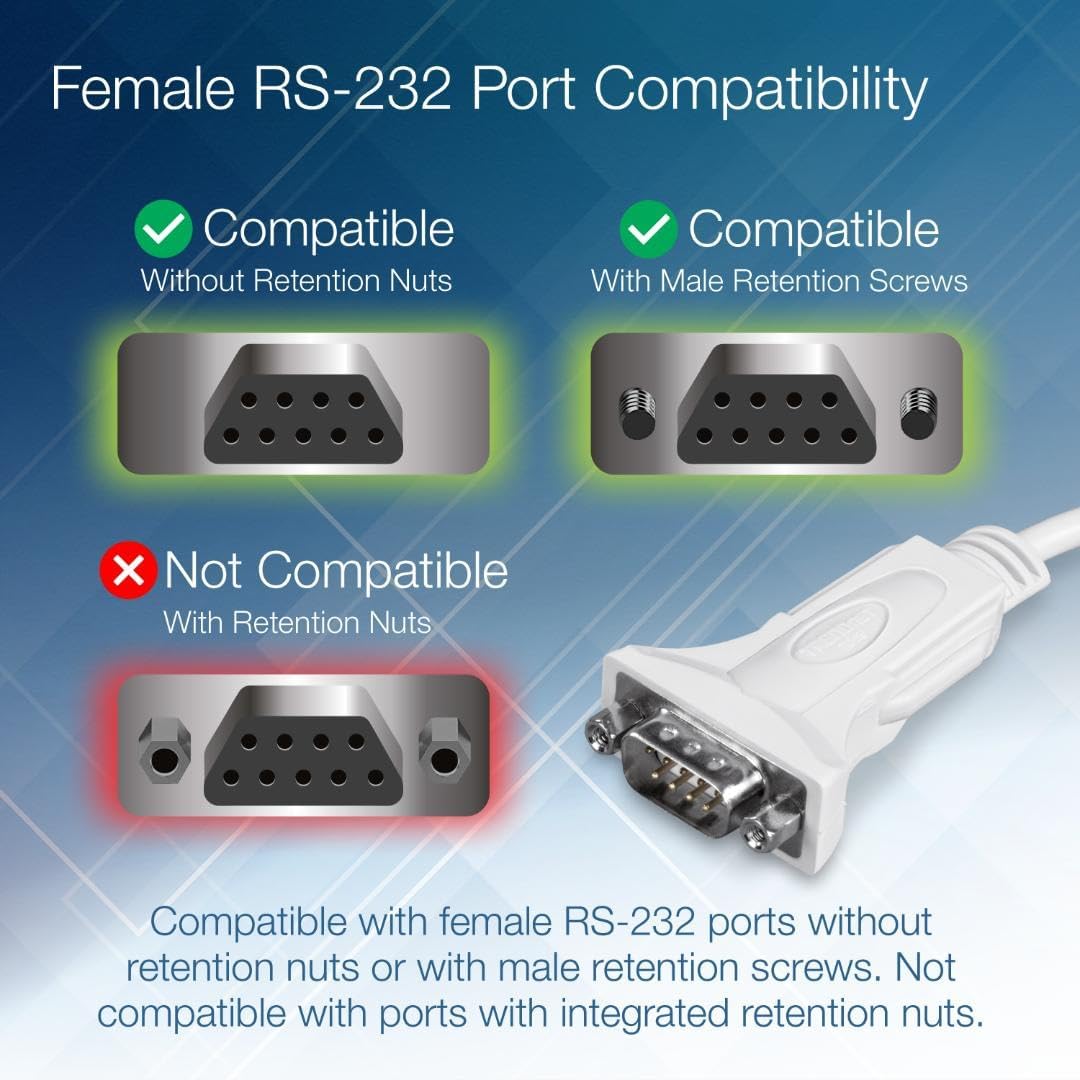 Image: RS-232 Port Compatibility guide.
6. Specifications
| Feature | Detail |
|---|---|
| Model Number | TU-S9 |
| Product Dimensions (L x W x H) | 2.56 x 1.38 x 0.39 inches (converter unit) |
| Item Weight | 1.41 ounces |
| Cable Length | 64 cm (25 in.) total, 540mm (21 in.) flexible USB cable |
| Connector Type | USB Type A, RS-232 (9-Pin) |
| USB Standard | USB 1.1 (compatible with USB 2.0 and 3.0 ports) |
| Specific Uses | Serial Devices (modems, printers, network switches, PLC controllers, POS systems) |
| Color | White |
| NDAA Compliant | Yes |
 Image: Rear view of the TU-S9 converter.
7. Troubleshooting
- Device Not Recognized:
- Ensure drivers are correctly installed from the provided CD-ROM or TRENDnet's website.
- Try connecting the TU-S9 to a different USB port on your computer.
- Restart your computer after driver installation.
- Communication Errors:
- Verify that the COM port selected in your software matches the one assigned to the TU-S9 in Device Manager.
- Confirm that the serial communication parameters (baud rate, data bits, parity, stop bits, flow control) in your software match those of the connected RS-232 device.
- Ensure the RS-232 device is powered on and functioning correctly.
- Check the physical connection between the TU-S9 and the RS-232 device for looseness.
- Driver Installation Issues:
- If using an older operating system, ensure you have the correct drivers for your specific OS version.
- Temporarily disable antivirus software during driver installation if encountering conflicts.
8. Maintenance
The TRENDnet TU-S9 USB to Serial Converter Cable requires minimal maintenance. To ensure optimal performance and longevity:
- Keep the cable and connectors clean and free from dust and debris.
- Avoid bending the cable sharply or placing heavy objects on it to prevent internal damage.
- Store the cable in a cool, dry place when not in use.
- Do not expose the device to extreme temperatures or humidity.
9. Warranty and Technical Support
The TRENDnet TU-S9 USB to Serial 9-Pin Converter Cable is backed by a 2-year TRENDnet Manufacturer Protection.
For technical assistance, TRENDnet provides reliable tech support. Our team of advisors, support, and technical experts are available during normal business hours to assist with any product-related inquiries.
For the most current support information, including driver downloads and contact details, please visit the official TRENDnet website.


