1. Product Overview
The ONKYO INTEC205 T-405FX(S) is a high-performance FM Stereo/AM Tuner designed to deliver clear and accurate radio reception. It features advanced functionalities such as the Accuclock system for precise timekeeping and versatile program timers for recording and playback scheduling. The unit is built with a durable aluminum front panel, ensuring both aesthetic appeal and longevity.
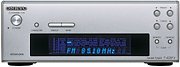
Figure 1: Front view of the ONKYO INTEC205 T-405FX(S) FM Stereo/AM Tuner. This image shows the silver-colored unit with its display and control buttons.
Key Features:
- Accuclock Function: Automatically corrects time using standard radio waves (40kHz and 60kHz), ensuring precise timekeeping for all functions.
- 4-Mode Program Timer: Allows scheduling of up to four recording or playback events with day-of-week specifications.
- Sleep Timer: Conveniently set an automatic power-off timer for up to 90 minutes.
- Auto Preset Memory: Automatically registers up to 20 FM stations and 10 AM stations for quick access.
- Wideband FM Compatibility: Supports FM frequencies from 76.00 MHz to 108.00 MHz.
- Durable Construction: Features an elegant aluminum front panel.
2. Setup
Follow these steps to properly set up your ONKYO INTEC205 T-405FX(S) tuner.
2.1 Connecting Antennas
- FM Antenna: Connect the supplied FM indoor antenna or an external FM antenna to the FM antenna input terminal on the rear panel. For optimal reception, extend the antenna fully and position it away from other electronic devices.
- AM Antenna: Connect the supplied AM loop antenna to the AM antenna input terminals on the rear panel. Rotate the loop antenna for the best AM reception.
2.2 Connecting to an Amplifier/Receiver
Use an audio cable (RCA type) to connect the audio output terminals of the T-405FX(S) to an available audio input (e.g., 'TUNER' or 'AUX') on your amplifier or receiver.
2.3 Power Connection
Plug the power cord into an AC outlet. Ensure the voltage matches the unit's requirements.
2.4 Initial Accuclock Setup
Upon initial power-on, the Accuclock function will automatically attempt to receive standard radio wave time signals (40kHz/60kHz) to set the correct time. This process may take a few minutes. Ensure the unit is placed in a location with good radio signal reception.
3. Operating Instructions
3.1 Basic Tuning
- Power On: Press the Power button to turn on the tuner.
- Select Band: Press the FM or AM button to select the desired radio band.
- Manual Tuning: Use the Tuning Up/Down buttons to manually adjust the frequency.
- Auto Tuning/Preset: Press the Auto Preset button to automatically scan and store available stations. The tuner can store up to 20 FM and 10 AM stations. Use the Preset Up/Down buttons to cycle through stored stations.
3.2 Using the Accuclock Function
The Accuclock function automatically synchronizes the tuner's clock with standard time signals. This ensures that all time-based functions, such as the program timer and sleep timer, operate with precise accuracy. No manual adjustment is typically required after initial setup, provided the unit receives a clear signal.
3.3 Program Timer Setup
The T-405FX(S) features a 4-mode program timer for automated recording or playback. This function is particularly useful when combined with compatible ONKYO components like the A-905FX amplifier and MD-105FX MiniDisc recorder.
- Access Timer Settings: Refer to your main system's instruction manual (e.g., A-905FX) for specific steps to access and configure the program timer.
- Set Program Mode: Choose between recording or playback modes for each of the four available programs.
- Set Start/End Times: Specify the desired start and end times for each program.
- Select Day(s) of Week: Configure the program to run on a specific day, or on multiple consecutive days.
- Activate Timer: Ensure the timer function is activated once all settings are confirmed.
3.4 Sleep Timer Function
The sleep timer allows the unit to automatically power off after a set duration, up to 90 minutes. This feature is typically controlled via a connected ONKYO amplifier (e.g., A-905FX).
- Activate Sleep Timer: Press the Sleep button (if available on the tuner or remote) or access the sleep timer function through your connected amplifier.
- Set Duration: Adjust the timer to the desired duration (e.g., 30, 60, 90 minutes). The unit will power off automatically once the set time expires.
4. Specifications
| Model | T-405FX(S) |
| Tuner Type | AM, FM |
| FM Frequency Range | 76.00 MHz – 108.00 MHz (Wideband compatible) |
| Radio Clock Compatibility | 40 kHz, 60 kHz standard radio waves |
| Program Timer Modes | 4 modes (Recording/Playback, with day-of-week specification) |
| Sleep Timer | Up to 90 minutes |
| Preset Memory | 20 FM stations, 10 AM stations |
| Display | 8-character input display |
| Front Panel Material | Aluminum |
| Dimensions (W x H x D) | Approximately 50 x 19 x 15 cm |
| Weight | Approximately 2.7 kg |
| Internet Services (if applicable) | Pandora (Requires compatible connected devices) |


