
1. Product Overview
The Shure WA610 Hard Carrying Case is a durable, molded plastic case designed to provide secure and protective storage for your valuable audio equipment. It features customizable foam cutouts to precisely fit various components of wireless microphone systems and other delicate instruments.
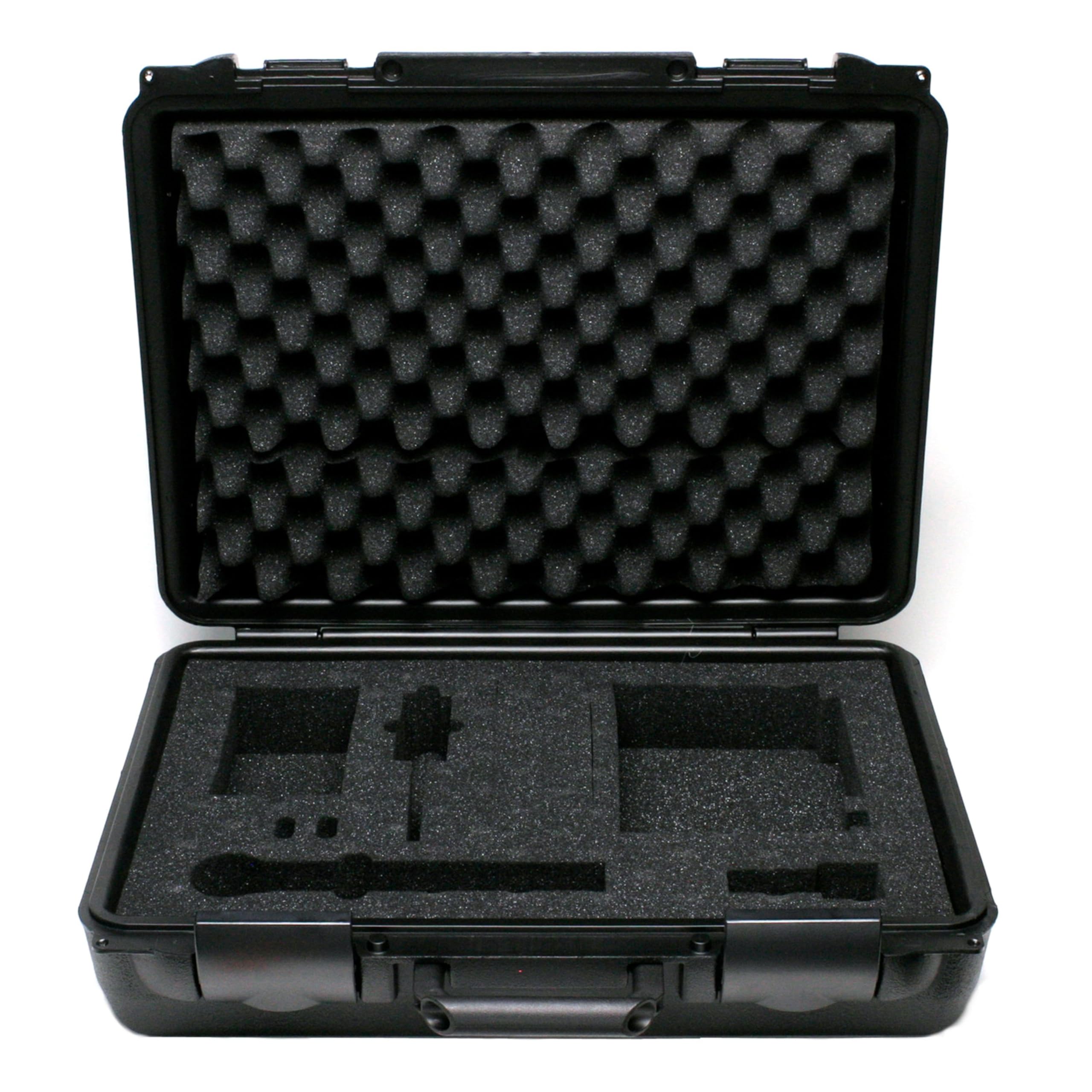
Image: Closed view of the Shure WA610 Hard Carrying Case, showing its black molded plastic exterior and sturdy handle.
2. Key Features and Compatibility
- Molded Plastic Construction: Provides robust protection against impacts and external elements.
- Customizable Foam Interior: Features pre-scored foam inserts that can be easily removed to create custom compartments for your gear. This ensures a snug fit and prevents movement during transport.
- Secure Latches: Designed to keep the case firmly closed, protecting contents from accidental opening.
- Ergonomic Handle: A comfortable handle for easy portability.
Compatibility:
The WA610 case is compatible with various Shure wireless systems, including:
- ULX Wireless Microphone Systems
- SLX Wireless Microphone Systems
- UC Wireless Systems
- PGX Systems
- PG4 Systems
- PSM300 Systems
- QLXD Systems
It is designed to accommodate components such as bodypack transmitters, handheld microphones, receivers, power supplies, antennas, and lavalier microphones.
3. Setup: Customizing the Foam Interior
The WA610 case features a pick-and-pluck foam interior, allowing you to create custom compartments tailored to your specific equipment. This ensures maximum protection and prevents items from shifting during transport.
- Plan Your Layout: Arrange your equipment inside the case to determine the optimal placement for each item. Ensure there is adequate spacing between items and from the case walls.
- Trace Outlines: Gently press each item into the foam to leave an impression, or use a marker to trace the outline of your equipment.
- Remove Foam Sections: The foam is pre-scored into small cubes. Carefully pluck out the foam cubes along your traced outlines to create the desired shape and depth for each compartment. Start with smaller sections and expand as needed to achieve a snug fit.
- Test Fit: Place your equipment into the newly created compartments to ensure a secure and protective fit. Adjust by removing more foam if necessary.
Video: Demonstration of customizing foam inserts in a hard shell carrying case to fit various equipment like cameras and lenses. This process allows for tailored protection of delicate items.
Video: Visual guide on how to create custom compartments within a carrying case using an egg-crate foam insert. This method helps in securely organizing and protecting diverse items.
4. Operating the Case
Once your foam interior is customized, using the case is straightforward:
- Place Equipment: Carefully place each item into its designated foam compartment. Ensure all items are seated snugly and do not protrude above the foam level.
- Close the Lid: Gently close the lid of the case, ensuring no items are obstructing the closure. The lid's egg-crate foam will press down on your equipment, providing additional cushioning and preventing vertical movement.
- Secure Latches: Fasten both latches firmly to ensure the case remains securely closed during transport.
- Optional Locking: The case may feature points for padlocks (not included) for added security.
5. Maintenance and Care
- Cleaning the Exterior: Wipe the exterior of the case with a damp cloth and mild soap as needed. Avoid harsh chemicals that may damage the plastic.
- Cleaning the Foam: The foam inserts can be gently vacuumed to remove dust and debris. For spills, spot clean with a damp cloth and mild detergent, allowing to air dry completely before reinserting into the case.
- Inspect Latches: Periodically check the latches for any signs of wear or damage. Ensure they operate smoothly and securely.
- Storage: Store the case in a cool, dry place away from direct sunlight when not in use.
6. Troubleshooting
- Case Does Not Close Properly:
- Ensure no equipment is protruding from the foam compartments or obstructing the lid.
- Check if any foreign objects are caught in the latches or hinges.
- Equipment Shifts Inside:
- The foam cutouts may be too large. Consider adding small foam pieces (from the plucked material) to fill gaps, or re-customize the layout for a tighter fit.
- Ensure the lid's egg-crate foam is making proper contact with all items when closed.
7. Specifications
| Feature | Detail |
|---|---|
| Model | WA610 |
| Brand | Shure |
| Material | Molded Plastic (Exterior), Foam (Interior) |
| Color | Black |
| Dimensions (L x W x H) | 20" x 5.5" x 16.25" (50.8 cm x 13.97 cm x 41.27 cm) |
| Item Weight | 6.5 Pounds (2.95 kg) |
| UPC | 042406089067 |
8. Warranty Information
The Shure WA610 Hard Carrying Case comes with a 2-year manufacturer's warranty. This warranty covers defects in materials and workmanship under normal use. Please retain your proof of purchase for warranty claims. For detailed terms and conditions, refer to the official Shure warranty policy or contact Shure customer support.
9. Customer Support
For further assistance, technical support, or warranty inquiries regarding your Shure WA610 Hard Carrying Case, please visit the official Shure website or contact their customer service department.
You can find more information and products from Shure at their Amazon Brand Store.
Video: Official Shure brand video showcasing their commitment to sound quality and extraordinary products. This video provides a general overview of the brand's philosophy and product range.