1. Introduction
This manual provides essential information for the proper installation, operation, and maintenance of the Honeywell L4006E1067 Boiler Control Aqua Stat. This device is designed to regulate boiler temperature, ensuring efficient and safe operation of heating systems. Please read this manual thoroughly before proceeding with installation or operation.
2. Safety Information
WARNING: Improper installation, adjustment, alteration, service, or maintenance can cause property damage, injury, or death. Read and understand these instructions completely before installing or servicing this product.
- Always disconnect power to the boiler system before installing or servicing the Aqua Stat to prevent electrical shock.
- Installation must be performed by a qualified technician in accordance with all local codes and ordinances.
- Ensure all wiring connections are secure and properly insulated.
- Do not operate the boiler system if any part of the Aqua Stat is damaged.
3. Product Overview
The Honeywell L4006E1067 is a direct mount Aqua Stat boiler control designed for precise temperature regulation. It features an adjustable differential and a manual reset function, making it suitable for various boiler applications.
Key Features:
- Boiler Control Aquastat
- Adjustable Temperature Range: 130°F - 270°F
- Manual Reset Function
- Direct Mount Design
- Copper Bulb Sensor
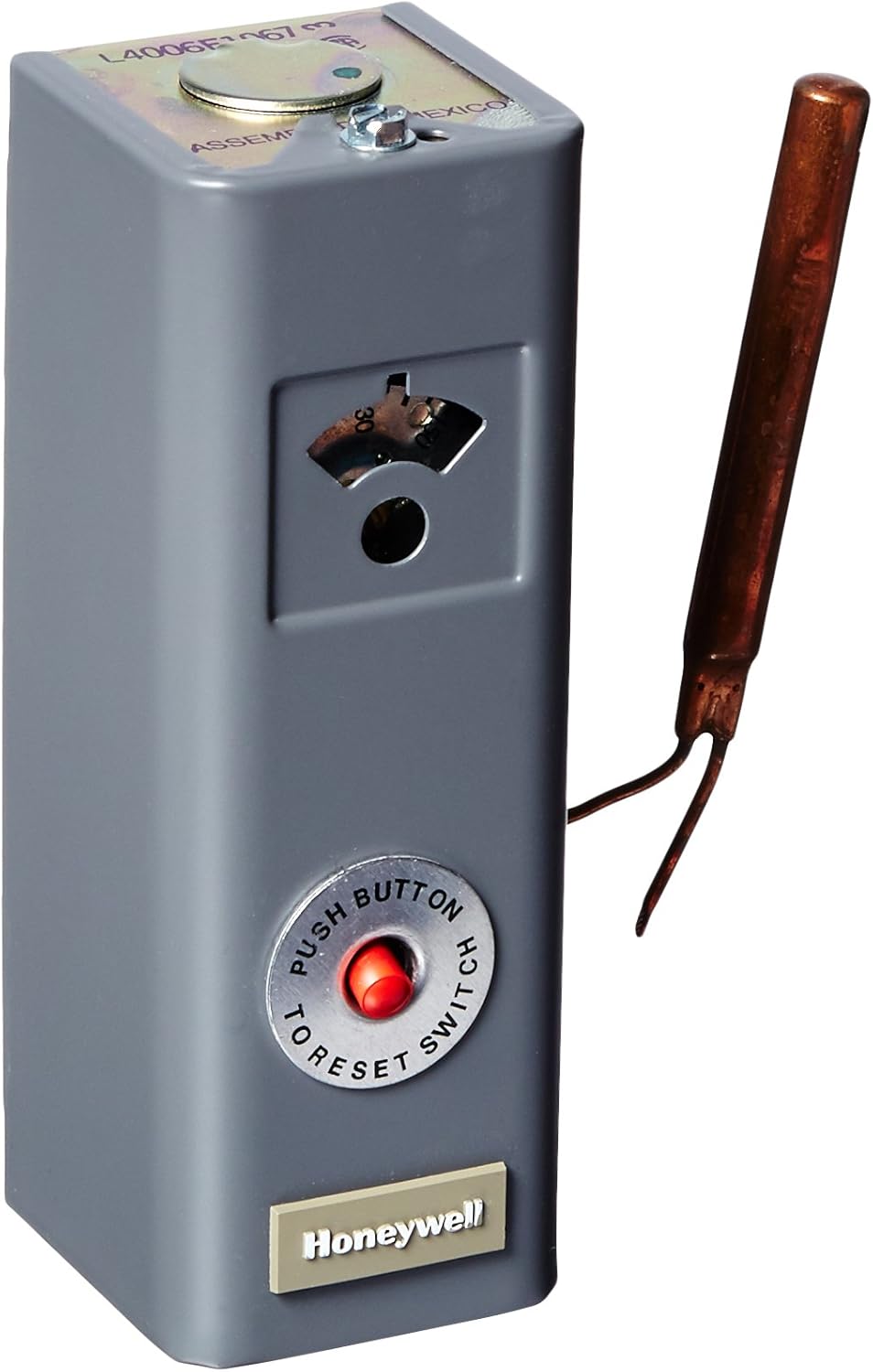
Figure 1: Front view of the Honeywell L4006E1067 Boiler Control Aqua Stat. This image shows the gray housing, the temperature adjustment dial visible through a small window, and the prominent red 'PUSH BUTTON TO RESET SWITCH' button. A copper bulb sensor extends from the side.

Figure 2: Rear view of the Honeywell L4006E1067 Boiler Control Aqua Stat. This image displays the metallic back panel with mounting screw holes and the connection point for the copper bulb sensor, which is visible extending from the unit.
4. Setup and Installation
IMPORTANT: Installation should only be performed by a qualified heating technician. Refer to the boiler manufacturer's instructions and all applicable local and national electrical codes.
- Power Disconnection: Turn off all power to the boiler system at the main circuit breaker before beginning installation. Verify power is off using a voltage meter.
- Mounting: The L4006E1067 is a direct mount Aqua Stat. Mount the control securely to the boiler in the designated location, ensuring the copper bulb sensor is properly inserted into the boiler's immersion well.
- Wiring: Connect the Aqua Stat to the boiler's electrical system according to the wiring diagram provided by the boiler manufacturer and the specific wiring instructions for the L4006E1067 (typically found inside the control's cover). Ensure all connections are tight and correct.
- Sensor Placement: Confirm the copper bulb sensor is fully immersed in the boiler water for accurate temperature sensing.
- Secure Cover: Replace and secure the control cover after wiring is complete.
- Power Restoration: Restore power to the boiler system.
5. Operating Instructions
Once installed and powered, the Honeywell L4006E1067 will automatically monitor and control the boiler temperature.
- Temperature Setting: Adjust the desired boiler water temperature using the dial located behind the small window on the front of the unit. The adjustable range is typically 130°F to 270°F. Consult your boiler manufacturer's recommendations for optimal operating temperatures.
- Adjustable Differential: The Aqua Stat features an adjustable differential, which determines the temperature difference between when the boiler turns on and off. This setting is usually adjusted internally by a qualified technician to optimize boiler cycling and efficiency.
- Manual Reset: If the boiler temperature exceeds a safe limit, the Aqua Stat's manual reset function will trip, shutting down the boiler. To reset, allow the boiler to cool down, then press the red 'PUSH BUTTON TO RESET SWITCH' button on the front of the unit. If the control trips frequently, consult a qualified technician to diagnose the underlying issue.
6. Maintenance
The Honeywell L4006E1067 is designed for reliable operation with minimal maintenance. However, periodic checks are recommended as part of your overall boiler system maintenance.
- Annual Inspection: Have a qualified technician inspect the Aqua Stat and its connections annually as part of routine boiler maintenance.
- Sensor Check: Ensure the copper bulb sensor remains securely in its immersion well and is free from corrosion or damage.
- Cleanliness: Keep the exterior of the Aqua Stat clean and free from dust and debris. Do not use abrasive cleaners.
7. Troubleshooting
If you experience issues with your boiler system that you suspect are related to the Aqua Stat, refer to the following common troubleshooting steps. For complex issues, contact a qualified technician.
| Problem | Possible Cause | Solution |
|---|---|---|
| Boiler not heating | Aqua Stat tripped (manual reset button out) | Allow boiler to cool, then press the red reset button. If it trips again, consult a technician. |
| Boiler runs continuously | Aqua Stat sensor issue or control malfunction | Verify sensor is properly immersed. Contact a qualified technician for diagnosis and repair/replacement. |
| Inaccurate temperature readings | Sensor not fully immersed or damaged | Ensure sensor is correctly installed. Inspect for damage. Replace if necessary (by a technician). |
| No power to Aqua Stat | Blown fuse or tripped circuit breaker | Check boiler's electrical supply and circuit breaker. Consult a technician if problem persists. |
8. Specifications
The following specifications apply to the Honeywell L4006E1067 Boiler Control Aqua Stat:
| Specification | Value |
|---|---|
| Model Number | L4006E1067 |
| Brand | Honeywell |
| Display Type | Digital |
| Operating Temperature | 130°F - 270°F |
| Material | Copper Bulb (Sensor) |
| Color | Grey |
| Item Weight | 1 Pound |
| Product Dimensions | 1 x 2 x 3 inches (Unit) / 31.75"L x 13.46"W x 5.84"H (Package) |
| UPC | 085267048903 |
| Included Components | Honeywell L4006E1067 |
9. Warranty Information
Specific warranty details for the Honeywell L4006E1067 Boiler Control Aqua Stat are typically provided at the point of purchase or included with the product packaging. For comprehensive warranty terms and conditions, please refer to the documentation supplied by Honeywell or contact your seller directly.
10. Support
For technical assistance, replacement parts, or further information regarding the Honeywell L4006E1067, please contact Honeywell customer support or the authorized distributor from whom the product was purchased. When contacting support, please have your product model number (L4006E1067) and any relevant purchase information readily available.
You may also visit the official Honeywell website for additional resources and contact options: www.honeywell.com