
1. Introduction
The iriver N10 is a compact, pendant-style digital audio player designed for portable music enjoyment. This manual provides essential information for setting up, operating, maintaining, and troubleshooting your device.
2. Package Contents
Please check that all items are present in your product package:
- iriver N10 256MB Flash Memory Player
- Stereo Earphones
- USB Connection Cable
- Quick Start Guide (if included)
3. Product Overview
Familiarize yourself with the physical components and controls of your iriver N10 player.
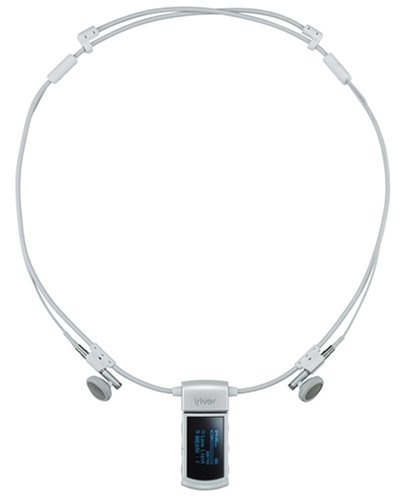
Figure 1: Front view of the iriver N10 256MB Flash Memory Player. This image displays the compact, pendant-style design of the device, featuring a small black and white display screen and control buttons typically located on the front or sides for navigation and playback.
Key Features:
- Display: 0.96-inch black and white screen for track information and menu navigation.
- Controls: Dedicated buttons for power, volume, play/pause, skip, and menu access.
- Connectivity: USB port for data transfer and charging.
- Microphone: Built-in microphone for voice recording functionality.
4. Setup
4.1 Charging the Battery
Before initial use, fully charge the player's built-in battery. Connect the iriver N10 to a computer's USB port or a compatible USB wall adapter using the provided USB cable. A full charge typically takes approximately 1.5 hours.
4.2 Connecting to a Computer
To transfer music files, connect the player to your computer using the USB cable. The device is compatible with Windows and Mac operating systems. Once connected, the player will appear as a removable storage device.
4.3 Transferring Music Files
Drag and drop your MP3, WMA, or ASF audio files directly into the player's storage folder. Ensure files are in a supported format for playback.
5. Operating the Player
5.1 Power On/Off
- To Power On: Press and hold the Power button until the screen illuminates.
- To Power Off: Press and hold the Power button until the device shuts down.
5.2 Basic Playback
- Play/Pause: Press the Play/Pause button to start or temporarily stop playback.
- Volume Control: Use the Volume Up (+) and Volume Down (-) buttons to adjust the audio level.
- Skip Tracks: Use the Forward (▶▶) and Backward (◀◀) buttons to navigate between tracks.
The player offers approximately 11 hours of continuous playback on a full charge.
5.3 Menu Navigation
Use the navigation buttons to browse through menus on the black and white display. Select options by pressing the Play/Pause button.
5.4 Voice Recording
The built-in microphone allows for voice recording. Access the recording function through the device's menu. Recorded files are saved in a designated folder on the player.
6. Maintenance
- Cleaning: Use a soft, dry cloth to clean the player's exterior. Avoid liquid cleaners or abrasive materials.
- Storage: Store the player in a cool, dry place away from direct sunlight and extreme temperatures.
- Battery Care: To prolong battery life, avoid fully discharging the battery frequently. Charge the device regularly, even if not in use for extended periods.
- Data Backup: Regularly back up important voice recordings or other data to your computer.
7. Troubleshooting
Player Does Not Turn On:
- Ensure the battery is charged. Connect the player to a power source for at least 30 minutes.
- Perform a soft reset by pressing and holding the Power button for 10-15 seconds.
No Sound During Playback:
- Check the volume level and ensure it is not muted.
- Verify that the earphones are securely connected.
- Test with a different pair of earphones to rule out a faulty set.
- Ensure the audio files are not corrupted and are in a supported format (MP3, WMA, ASF).
Player Not Recognized by Computer:
- Ensure the USB cable is properly connected to both the player and the computer.
- Try a different USB port on your computer.
- Restart your computer and reconnect the player.
- Ensure your operating system (Windows/Mac) is up to date.
8. Specifications
- Model: N10 256MB
- Storage Capacity: 256 MB Flash Memory
- Supported Audio Formats: MP3, WMA, ASF
- Display: 0.96-inch Black and White LCD
- Battery Type: Built-in rechargeable battery
- Charging Time: Approximately 1.5 hours
- Continuous Playback Time: Up to 11 hours
- Connectivity: USB
- Operating System Compatibility: Windows, Mac
- Voice Recording: Built-in Microphone
- Dimensions: 1.32 x 2.72 x 4.98 cm (0.52 x 1.07 x 1.96 inches)
- Weight: 22.68 g (0.8 oz)
9. Warranty and Support
For warranty information and technical support, please refer to the documentation provided at the time of purchase or visit the official iriver website. Keep your proof of purchase for warranty claims.