Product Overview
The Excel Blades 7/16 inch Pounce Wheel is a precision tool designed for various crafting and industrial applications. It features a durable aluminum handle and an interchangeable hardened steel serrated tracing wheel head. This tool is ideal for creating perforated lines on a wide range of materials.
Key features include:
- Precision Tracing Wheel: Made with a hardened, serrated steel wheel, perfect for embossing, perforating, and tracing. Ideal for sewing, quilting, paper crafting, scrapbooking, modeling, and sculpting. The 7/16-inch wheel features 14 perforations per inch.
- Lightweight Ergonomic Design: The light yet durable 0.31 x 5-inch aluminum handle and knurled grip deliver superior comfort and control during periods of heavy use, effortlessly transferring patterns, markings, and designs without damaging materials.
- Versatile Multi-Purpose Tool: These all-purpose American-made pouncing wheels yield fine, smooth lines on paper, cardboard, foam, fabric, wood, clay, polymer clay, leather, soft metals, fondant, gum paste, and more.
- Adjustable Head: Features a steel serrated wheel with an adjustable head, allowing for precise straight-line work when locked or versatile, intricate patterns, circles, and curves when loosened.
- Proudly Made in the USA: Manufactured using US-sourced materials.

This image shows the overall design of the Excel Blades Pounce Wheel, featuring its metallic handle and the serrated wheel at the end. A "Made in USA" tag is visible, emphasizing its domestic manufacturing.
Setup
The Excel Blades Pounce Wheel is designed for immediate use with minimal setup required. Upon receiving your tool, please follow these steps:
- Unboxing: Carefully remove the pounce wheel from its packaging.
- Inspection: Inspect the tool for any visible damage or manufacturing defects. Ensure the serrated wheel is securely attached and rotates freely.
- Familiarization: Hold the tool to familiarize yourself with its ergonomic aluminum handle and knurled grip.

This image provides a detailed breakdown of the pounce wheel's components, pointing out the aluminum handle, the knurled grip for enhanced control, and the 7/16-inch steel wheel which creates 14 perforations per inch. It also reiterates that the product is Made in the USA.
Operating Instructions
The Excel Blades Pounce Wheel is versatile and can be used for various applications. Always ensure you are working on a suitable surface that can withstand light pressure and marking, such as a cutting mat or a protective board.
General Usage:
- Prepare Your Material: Place the material you wish to mark (e.g., paper, fabric, leather) flat on a stable, protected surface.
- Position the Tool: Hold the pounce wheel firmly by its knurled grip. Position the serrated wheel at the starting point of your desired line or pattern.
- Apply Pressure: Apply gentle, consistent downward pressure as you roll the wheel along the material. The amount of pressure may vary depending on the material's thickness and desired perforation depth.
- Maintain Control: For straight lines, use a ruler or straight edge as a guide. For curves or intricate designs, guide the wheel freehand.
Specific Applications:
- Tracing Patterns: Ideal for transferring patterns from paper to other materials like fabric or wood. The perforations create a dotted line that can be easily followed or filled.
- Perforating Paper: Create tear-off sections on tickets, coupons, or craft projects. Ensure a firm, flat surface underneath for clean perforations.
- Marking Fabric for Sewing/Quilting: Use to mark seam lines or quilting patterns. The small perforations are less intrusive than pen marks and can be easily removed or sewn over.
- Embossing: On softer materials like thin metal foil, fondant, or clay, the wheel can create a raised, textured line.
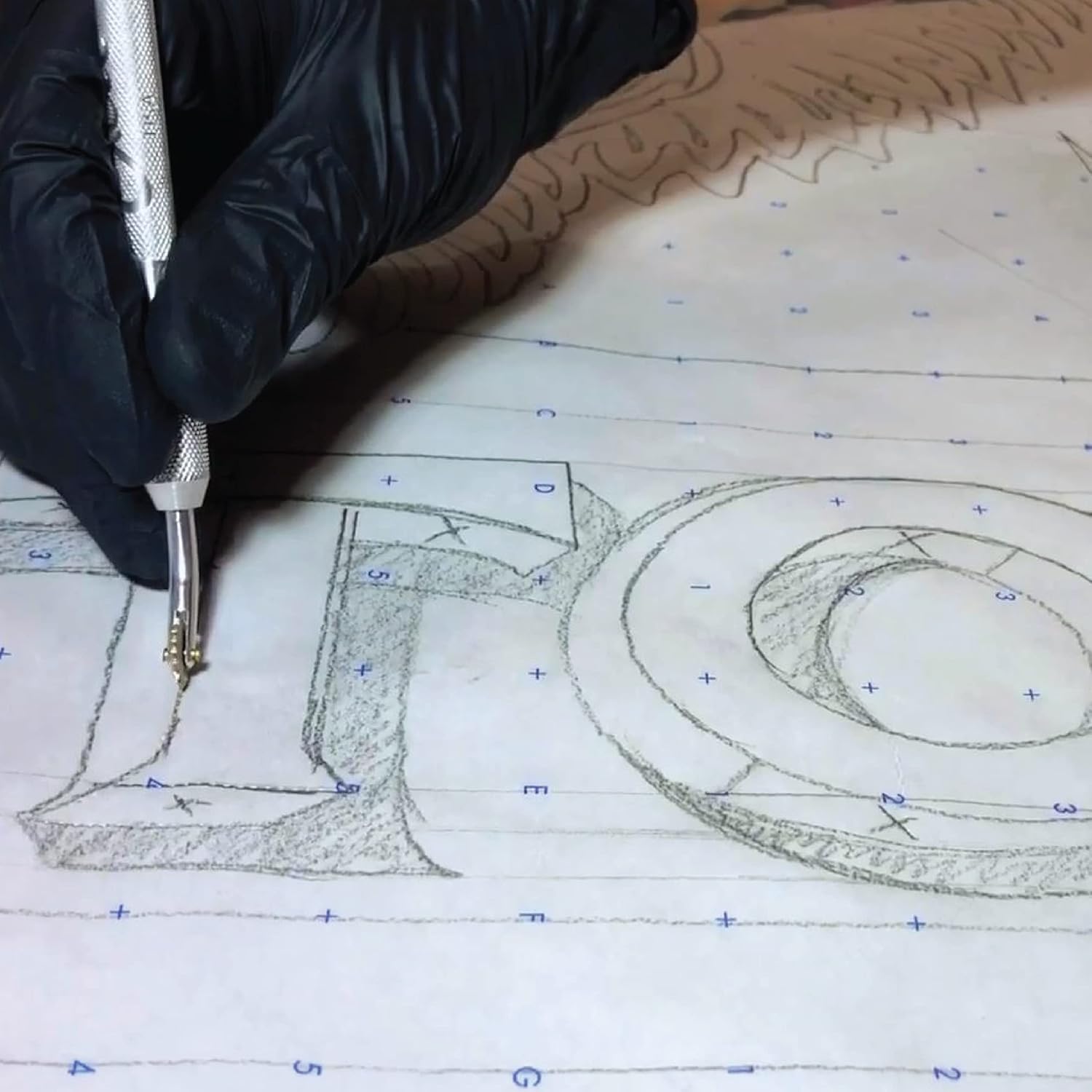
This image illustrates the pounce wheel being used to create a perforated line on a pink sheet of paper, placed on a green cutting mat. The user's hand is guiding the tool, showing the typical application for tracing or marking.

This close-up image focuses on the serrated wheel as it creates a series of small perforations on a piece of black fabric, demonstrating its effectiveness for textile marking in sewing or quilting projects.
Maintenance
Proper maintenance will ensure the longevity and optimal performance of your Excel Blades Pounce Wheel.
- Cleaning: After each use, especially when working with materials that leave residue (e.g., clay, gum paste), wipe the serrated wheel and handle with a clean, dry cloth. For stubborn residue, a slightly damp cloth can be used, followed by immediate drying to prevent rust.
- Storage: Store the pounce wheel in a dry environment to prevent corrosion. Keep it away from excessive moisture or humidity.
- Wheel Inspection: Periodically check the serrated wheel for any signs of wear or damage. While the wheel head is designed to be interchangeable, replacement parts are typically not required under normal use.
Troubleshooting
If you encounter issues with your Excel Blades Pounce Wheel, consider the following common problems and solutions:
| Problem | Possible Cause | Solution |
|---|---|---|
| Wheel does not rotate smoothly or wobbles. | Residue buildup around the axle; loose pivot screw; manufacturing alignment issue. | Clean the wheel and axle area thoroughly. If the wheel is loose, gently inspect the pivot point. While the screws are not designed for user adjustment, if a manufacturing defect is suspected, refer to the warranty information for support. |
| Marks are inconsistent or too faint. | Insufficient pressure; material too thick/hard; worn wheel teeth. | Increase pressure slightly. Ensure the material is suitable for the tool. Check the wheel teeth for wear; if significantly dull, consider replacement if available or contact support. |
| Tool feels uncomfortable or slips. | Improper grip; oily residue on handle. | Ensure you are holding the tool by the knurled grip. Clean the handle with a dry cloth to remove any oils or moisture. |
Specifications
| Feature | Detail |
|---|---|
| Model Number | 30607 |
| Size | 7/16 Inch |
| Wheel Size | 11.02 Millimeters |
| Item Weight | 0.64 ounces (0.04 Pounds) |
| Item Diameter (Handle Length) | 5 Inches |
| UPC | 802344162938, 885106967750, 098171306076 |
| Manufacturer | Excel |
| Number of Pieces | 1 |
| Origin | Made in US |
Warranty Information
Excel Blades offers a 30-day, hassle-free warranty for the Pounce Wheel. This warranty covers manufacturing defects and issues arising from normal use within the specified period. Please note that the warranty does not include blades, referring to the serrated wheel in this context, as it is considered a wear-and-tear component.
For warranty claims or inquiries, please retain your proof of purchase and contact Excel Blades customer support.
Customer Support
For further assistance, product inquiries, or to explore other Excel Blades products, please visit the official Excel Blades Store: