
jWIN JL-CD809
Jwin JL-CD809 Projection CD Player with AM/FM Stereo Radio & Dual Alarm Clock User Manual
Introduction
Thank you for purchasing the Jwin JL-CD809 Projection CD Player with AM/FM Stereo Radio and Dual Alarm Clock. This manual provides essential information for the proper setup, operation, and maintenance of your device. Please read these instructions thoroughly before use and retain them for future reference.
Important Safety Information
- Power Source: Use only the specified AC adapter. Ensure the voltage matches your local power supply.
- Water and Moisture: Do not expose this appliance to rain, moisture, dripping, or splashing. Do not place objects filled with liquids, such as vases, on the apparatus.
- Ventilation: Ensure adequate ventilation. Do not block ventilation openings.
- Heat: Do not place the unit near heat sources such as radiators, heat registers, stoves, or other apparatus (including amplifiers) that produce heat.
- Cleaning: Unplug the unit from the wall outlet before cleaning. Use a soft, dry cloth only.
- Servicing: Do not attempt to service this product yourself. Refer all servicing to qualified service personnel.
- Batteries: Dispose of used batteries according to local regulations. Do not expose batteries to excessive heat.
Package Contents
Please check that all items listed below are included in your package:
- Jwin JL-CD809 Projection CD Player Unit
- AC Power Adapter
- User Manual (this document)
Product Overview
Familiarize yourself with the various parts and controls of your Jwin JL-CD809 unit.
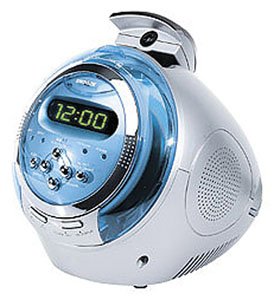
Image: Front-right view of the Jwin JL-CD809 unit. This image displays the main body of the device, featuring a transparent blue CD compartment cover, a digital display showing '12:00', and several control buttons below the display. A speaker grille is visible on the right side, and the time projection lens is located on top of the unit.
Front Panel Controls
- Digital Display: Shows time, alarm settings, CD track number, and radio frequency.
- CD Compartment: Front-loading slot for compact discs.
- Function/Mode Button: Switches between CD, AM, FM, and AUX modes.
- Play/Pause Button: Starts or pauses CD playback.
- Stop Button: Stops CD playback.
- Skip/Tune Buttons (◀◀ / ▶▶): Skips tracks on CD or tunes radio frequency.
- Volume Control: Adjusts audio output level.
- Time Set Button: Used to set the current time.
- Alarm 1/2 Set Buttons: Used to set Alarm 1 and Alarm 2.
- Snooze/Sleep Button: Temporarily silences the alarm or activates sleep timer.
Top Panel
- Projection Lens: Projects the time onto a surface.
- Projection Focus/Angle Adjustment: Dials or levers to adjust the clarity and direction of the projected time.
Side/Rear Panel
- Speaker: Audio output.
- Headphone Jack (3.5mm): For private listening.
- DC IN Jack: For connecting the AC power adapter.
- Battery Compartment: For backup battery (1 x 9V battery, not included).
Setup
1. Power Connection
- Insert the small plug of the AC power adapter into the DC IN jack located on the rear of the unit.
- Plug the AC power adapter into a standard wall outlet.
2. Battery Installation (for Clock Backup)
A 9V battery (not included) can be installed to maintain clock and alarm settings during a power outage.
- Open the battery compartment cover on the bottom or rear of the unit.
- Insert one 9V battery, observing the correct polarity (+ and -).
- Close the battery compartment cover securely.
3. Setting the Current Time
- With the unit powered on, press and hold the TIME SET button. The hour digits on the display will begin to flash.
- Press the ◀◀ or ▶▶ buttons to adjust the hour. Pay attention to AM/PM indicators if present.
- Press the TIME SET button again. The minute digits will flash.
- Press the ◀◀ or ▶▶ buttons to adjust the minutes.
- Press the TIME SET button one more time to confirm and exit time setting mode.
Operating Instructions
1. Basic Operation
- Power On/Off: Press the POWER button (often combined with the MODE button) to turn the unit on or off.
- Volume Adjustment: Rotate the VOLUME knob or press VOL +/- buttons to increase or decrease the sound level.
2. CD Player Operation
- Press the MODE/FUNCTION button until 'CD' mode is selected.
- Open the CD compartment cover and carefully insert a CD with the label side facing up. Close the cover securely.
- Press the PLAY/PAUSE (▶/██) button to begin playback. The track number will appear on the display.
- To pause playback, press PLAY/PAUSE once. Press again to resume.
- To stop playback, press the STOP (█) button.
- To skip to the next track, press the ▶▶ button. To go back to the beginning of the current track or previous track, press the ◀◀ button.
3. AM/FM Radio Operation
- Press the MODE/FUNCTION button until 'AM' or 'FM' mode is selected.
- Manual Tuning: Press the ◀◀ or ▶▶ buttons repeatedly to fine-tune the radio frequency.
- Automatic Scan: Press and hold the ◀◀ or ▶▶ buttons for a few seconds to automatically scan for the next available station.
- Antenna Adjustment: For FM, extend the telescopic antenna for better reception. For AM, rotate the unit for optimal reception.
4. Alarm Clock Settings (Dual Alarm)
The unit features two independent alarms (Alarm 1 and Alarm 2).
- Setting Alarm Time:
a. Press and hold the ALARM 1 SET (or ALARM 2 SET) button. The alarm hour digits will flash.
b. Use the ◀◀ or ▶▶ buttons to adjust the alarm hour.
c. Press the ALARM 1 SET (or ALARM 2 SET) button again. The alarm minute digits will flash.
d. Use the ◀◀ or ▶▶ buttons to adjust the alarm minutes.
e. Press the ALARM 1 SET (or ALARM 2 SET) button one more time to confirm the alarm time. - Setting Alarm Mode (Wake to CD/Radio/Buzzer):
a. After setting the alarm time, press the ALARM 1 SET (or ALARM 2 SET) button repeatedly to cycle through the alarm modes (e.g., Buzzer, Radio, CD). The selected mode will be indicated on the display.
b. If selecting Radio or CD, ensure a station is tuned or a CD is loaded. - Activating/Deactivating Alarm: Press the ALARM 1 ON/OFF (or ALARM 2 ON/OFF) button to toggle the alarm on or off. An alarm icon will appear on the display when active.
- Snooze Function: When the alarm sounds, press the SNOOZE button to temporarily silence it for a few minutes (typically 9 minutes). The alarm will sound again after the snooze period.
- Stopping the Alarm: To turn off the alarm completely until the next day, press the POWER button or the corresponding ALARM ON/OFF button.
5. Time Projection Function
- Activating Projection: Locate the PROJECTION ON/OFF button or switch, usually near the projection lens. Activate it to project the current time onto a wall or ceiling.
- Adjusting Focus: Rotate the FOCUS dial on the projection lens until the projected time is clear and sharp.
- Adjusting Angle: Pivot the projection lens assembly to change the angle and position of the projected time.
6. Headphone Use
To listen privately, plug a 3.5mm stereo headphone into the HEADPHONE JACK. The main speaker will be muted automatically.
Maintenance
- Cleaning the Unit: Disconnect the power adapter before cleaning. Use a soft, dry, lint-free cloth to wipe the exterior surfaces. Do not use abrasive cleaners, waxes, or solvents.
- CD Lens Care: Avoid touching the CD lens. If the lens becomes dirty, use a commercially available CD lens cleaner.
- Storage: If the unit will not be used for an extended period, disconnect the power adapter and remove the backup battery. Store the unit in a cool, dry place.
Troubleshooting
Review the following common issues and their solutions before contacting customer support.
| Problem | Possible Cause | Solution |
|---|---|---|
| Unit does not power on. | Power adapter not connected or faulty. | Ensure the AC adapter is securely plugged into the unit and a working wall outlet. |
| No sound from speaker. | Volume too low; headphones connected; unit in mute mode. | Increase volume. Disconnect headphones. Check if unit is muted. |
| CD does not play or skips. | CD inserted incorrectly; CD is dirty or scratched; CD compartment not closed; unit in wrong mode. | Ensure CD is inserted label-side up. Clean or replace CD. Close CD compartment. Select 'CD' mode. |
| Poor radio reception. | Antenna not extended/positioned correctly; weak signal. | Extend FM antenna fully. Rotate the unit for AM reception. Try moving the unit to a different location. |
| Alarm does not sound. | Alarm not activated; alarm volume too low; incorrect alarm time/mode set. | Ensure alarm is 'ON' (icon visible). Check alarm volume. Verify alarm time and mode (CD/Radio/Buzzer). |
| Projected time is blurry. | Projection focus not adjusted. | Adjust the focus dial on the projection lens until the image is clear. |
Specifications
| Model Name: | JL-CD809 |
| Brand: | jWIN |
| Product Type: | Projection CD Player with AM/FM Stereo Radio & Dual Alarm Clock |
| Dimensions (LxWxH): | 16.84 x 21.92 x 17.48 cm (approximately) |
| Item Weight: | 1.72 kg (approximately) |
| Power Source: | AC Power Adapter (included) |
| Battery Backup: | 1 x 9V battery (not included) |
| Audio Output: | Built-in Speaker, 3.5mm Headphone Jack |
| Special Features: | Time Projection, Dual Alarm, High Precision Front Loading Compact Disc Player, AM/FM Stereo Radio |
Warranty and Support
For warranty information, please refer to the warranty card included with your product or contact your retailer. For technical support or service inquiries, please contact Jwin customer service through their official website or the contact details provided in your purchase documentation.
Ask a question about this manual
Ask about setup, troubleshooting, compatibility, parts, safety, or missing instructions. Manuals+ will review the question and use this page’s manual context to help answer it.